
How to enable and disable the child lock on an LG washing machine
 It's common knowledge that child locks on LG washing machines are quite common. It's hard to find an LG model that doesn't have this useful feature. However, there are some homeowners who don't know how to enable or disable the child lock. We've published this article for these people. We hope you find it helpful.
How does blocking work?
If you decide to try installing a child lock on your LG washing machine, you should first understand how it works. As its name suggests, the child lock locks the machine's control panel during a wash cycle by pressing a combination of keys. After starting the desired wash program, you press these keys. Now you don't have to worry about a small child approaching the washing machine and randomly pressing buttons or turning the program selector knob. The control panel will no longer function.
When the washing program is finished, the user can remove the lock and safely turn off the machine. The manufacturer, when advertising this feature, emphasizes the fact that a child cannot damage the machine or interrupt the wash cycle, but in our opinion, this is misleading. The child lock disables the following control panel elements:
- program switching knobs;
- stop/start buttons;
- "spin" and "temperature" buttons;
- buttons "intensive", "no creases", "pre-wash", "super rinse".
In general, all elements are blocked except the on/off button. This is a problem because a child might be fascinated by this particular button. By pressing it, they'll turn off the washing machine right in the middle of a cycle. If that happens, what's the point of the lock function? We'll address this question to the manufacturer and move on.
Installing and removing the lock
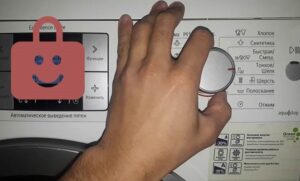
Anyone can set and then remove the child lock. To do this, press two buttons on the control panel simultaneously after starting the wash cycle. What are these buttons? You can look at the control panel of your LG washing machine right now and find two buttons: "Super Rinse" and "Pre-Rinse." They are usually accompanied by a smiling padlock. These buttons may be located in different places on different LG washing machine models.
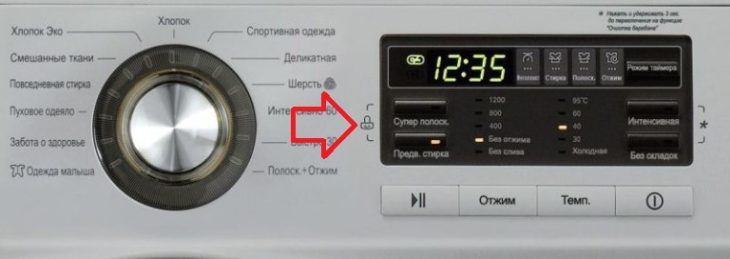
You can see these buttons under the display of your LG washing machine. They will be arranged vertically, with the "Super Rinse" button at the top and the "Pre-Rinse" button below.
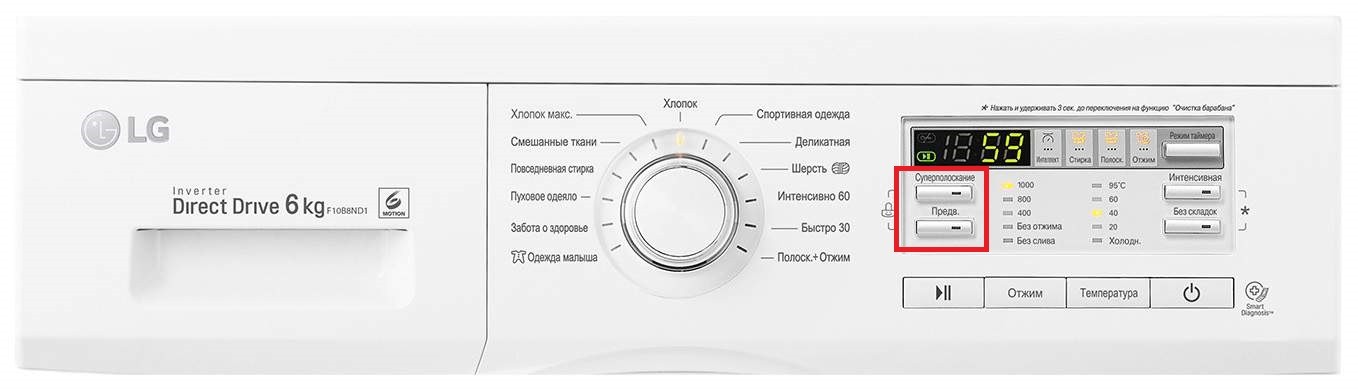
You can also see these buttons below the display, but they will be positioned horizontally, sandwiched between the "Start/Pause" and "Spin" buttons.
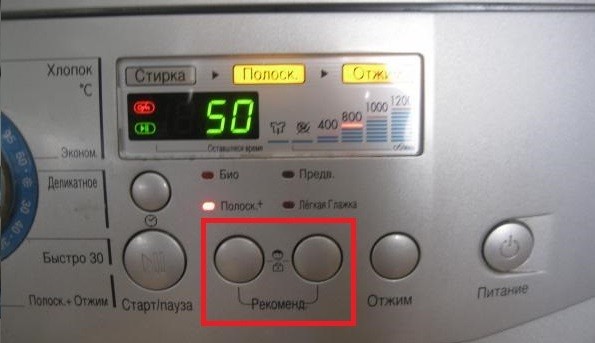
Finally, the lock buttons are most often located to the left of the display. There are four buttons arranged vertically; we'll be interested in the first and second.
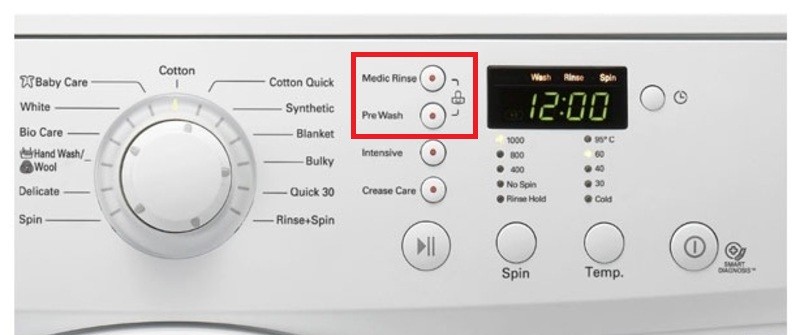
Press these two buttons to lock the control panel. Pressing these two buttons again will unlock the panel.
If a child accidentally turns off a locked LG washing machine, follow these steps: turn on the machine, set the program that was running when it was turned off, and press the two child lock buttons.
If CL appears on the display
Some housewives are genuinely terrified of any error code that appears on their LG washing machine's display. They think that if an error code appears, the machine is definitely broken. This is often the case, buterror code CL There's no need to panic. The CL code informs the owner that the washing machine is locked and the control panel will not function until the lock is removed. If the child lock is correctly disabled, the CL code will also disappear from the display.
So, we've covered the LG washing machine's child lock features. If you have any questions, please leave a comment; we'd be happy to start a discussion. Good luck!
Interesting:


14 reader comments
Add a comment
Headings
Washing machine repair




For buyers




For users


Dishwasher




You helped unlock my LG, thank you!
Good evening, I have a question. How can I set a password on my washing machine so that no one but me can turn it on?
Hello, I press and hold the two buttons with the lock icon to turn on the CL. But the off button still works, and kids can press it mid-wash. Then the machine turns off, and I have to reset the program and start all over again.
Unfortunately, the manufacturer doesn't include a lock for the on/off button. My child occasionally turns the washing machine off this way. It's annoying, but the manufacturer likely did this for safety reasons.
Same thing. I run the wash cycle 3 times.
This blocking is nonsense.
Hello, I can't unlock the child lock. Why?
I can't unlock it, why?
If you turn off the washing machine during a wash cycle, you can select "My Program" when you turn it back on, and it will continue washing from where you left off. No need to restart the wash cycle after naughty fingers.
After I set the child safety lock, my child turned the washing machine off several times. Now I can't remove it. The display shows CL.
Hello, I need some help. I'm having the same problem. My child turns the washing machine off halfway through a cycle. And when I turn it back on, it says it will take three times longer to wash on the same cycle. What can I do about this? It's really annoying me. 🙂 Am I doing something wrong? Is there a way to continue washing after my child turns it off like this?
I can't unlock the machine. It's a control panel. Please help!
I can't unlock it, please help.
The Koreans couldn't figure out how to hold the power button down for three seconds, like in the cheap Ariston models.