
Child lock on a Beko washing machine
 Modern automatic washing machines are equipped with a variety of useful features. For example, the child lock feature on a Beko washing machine helps protect your "home helper" from curious little ones, who are often drawn to the illuminated dashboard. To prevent a child from interrupting the wash cycle, it's best to turn on the child lock feature. Beko machines also have other features that are worth exploring. These features will make using the machine more convenient and also improve the quality of laundry care.
Activating and unlocking the lock
The locking feature is designed to prevent children and adults from interfering with the washing machine's operation. After all, curious little ones aren't the only ones who might tweak the dial and press a few buttons. No family member is immune to accidental touches of the dashboard. If the control panel is locked, it will not be possible to change the settings of the selected washing mode.
If you turn the programmer dial while the function is activated, the lights on the first and second additional options buttons will flash three times. No changes will be made to the current program. When the dial is locked, you cannot adjust the wash temperature or spin speed, nor can you add a rinse cycle or other options.
To enable the control panel lock, you must simultaneously press the first and second additional function buttons for 3 seconds.
You can disable child mode in the same way. Holding down the first and second additional options buttons will unlock the control panel. While the buttons are pressed, their indicators will flash.
On some Beko models, the key combination for activating child mode may be slightly different. Full details on how to activate this feature can be found in the appliance's manual. A hint is also provided on the control panel itself; the buttons required to activate the function are marked with a lock.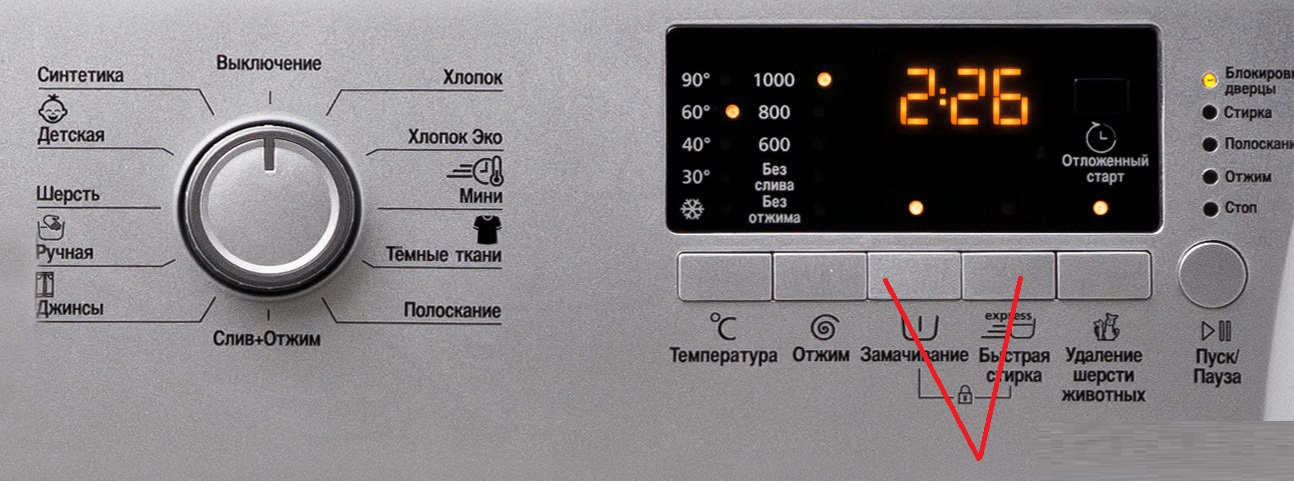
If the control panel is locked and you need to pause the cycle, you can do so without disabling the safety feature. Simply turn the program selector to the "OFF" position. To resume the wash, return the program selector to its original position.
If the power goes out while the machine is "locked," the cycle will resume with the feature enabled when the power comes back on. There's no need to reactivate the baby mode.
Delayed start
Most modern Beko washing machines have a delayed start option in their “arsenal”. This function allows you to delay the start of the washing program for a certain period of time (from 1 to 24 hours, depending on the model). Activating the add-on is very simple, we will tell you how to do it.
- Load the items into the drum.
- Pour the detergent into the detergent drawer. Do not use laundry detergents with the delay start setting. While the machine is waiting for the detergent to start, the detergent may drip onto the laundry, causing stains.
- Use the programmer to select the washing mode and, if necessary, adjust the water heating temperature and spin speed.
- Set the delay time using the "Delay Start" button. Pressing the button once will delay the wash cycle by 3 hours; pressing it again will delay the wash cycle by 6 hours. Pressing it a third time will delay the start of the cycle by 9 hours.
- Press the Start/Pause button. When the delay time expires, the machine will automatically start washing.
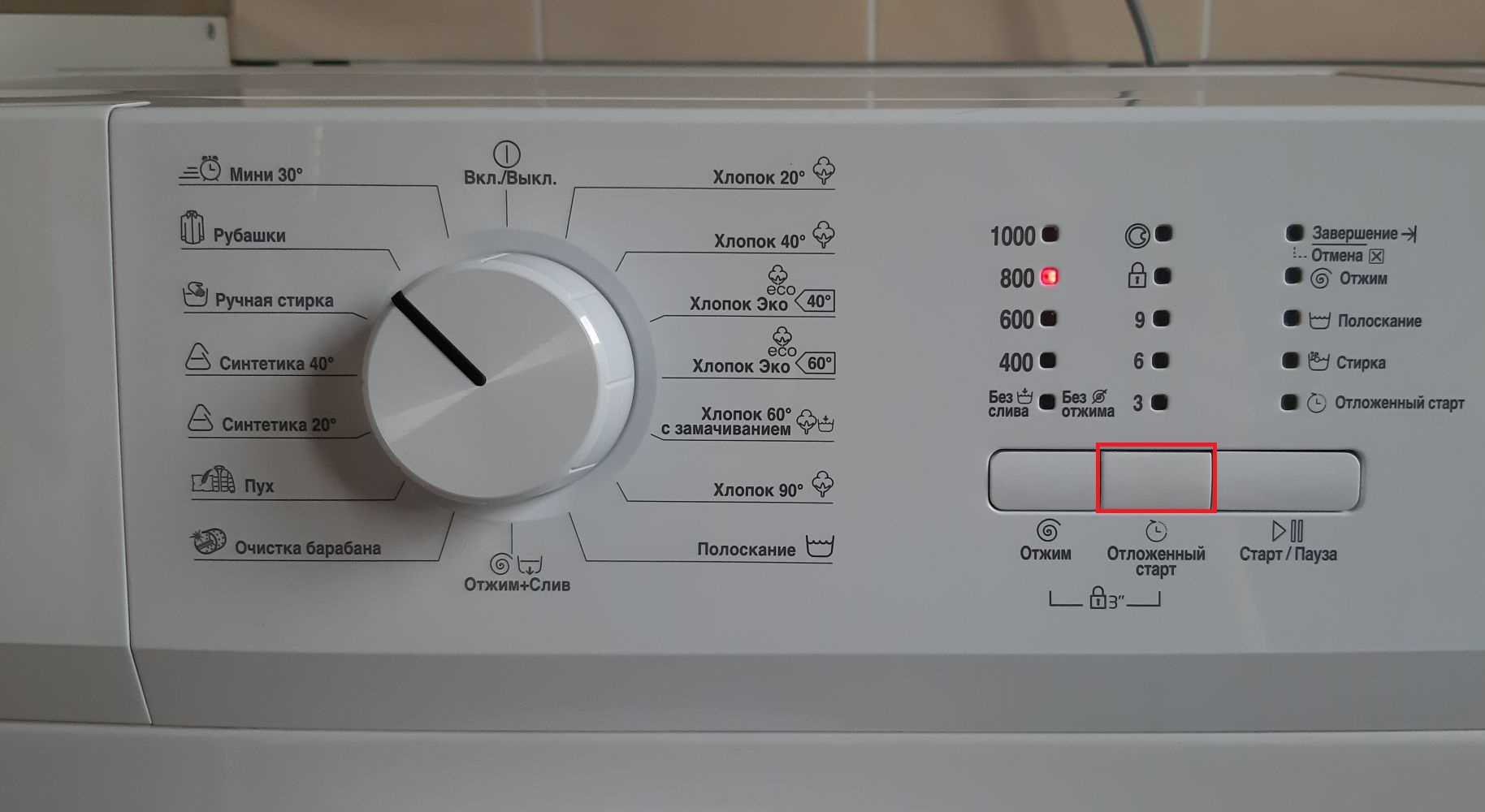
While the countdown is running, you can open the door and add laundry to the drum. The door is unlocked until the cycle starts.
If you've set a 3-hour delay but need to extend the interval, simply press the "Delay Start" button as many times as needed to set the optimal time. If you want to cancel the function and start washing immediately, follow these steps:
- set the delay interval to zero (this is done by pressing the “Delayed start” button or by turning the programmer to any position);
- select the desired washing mode, adjust the temperature and spin speed if necessary;
- Run the program using the "Start" button.
This feature is very convenient for starting a wash cycle at night. In the evening, you can set the machine to start at 5 a.m. Then, by the time your family wakes up, the clothes in the drum will be washed and ready to dry.
Other additional features
Various pre-programmed options in Beko washing machines can significantly improve laundry care. These options should be selected before starting the main program. You can also activate them during the cycle, but only if the machine hasn't yet entered the appropriate wash cycle.
Only those additional functions that are compatible with the main washing program can be connected to the cycle.
For example, the "Prewash" and "Quick Cycle" options are incompatible. Therefore, you can't activate them simultaneously; you'll have to choose the option that's more important at the time.
Depending on the model of your automatic washing machine, the range of additional features will vary. Let's take a look at the options programmed into the smart features of most Beko washing machines.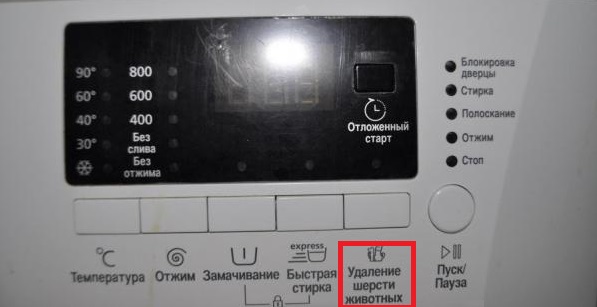
- Soak. This function should be added to the main wash cycle if the drum contains very dirty items. The laundry will soak in water and detergent for a while, which helps remove even the most stubborn stains.
- Quick Wash. This option can be used when running the Cotton and Synthetics programs, with a half-load, and for lightly soiled items. This feature reduces the main cycle time and the number of rinses.
- Easy Ironing. This feature allows the drum to move more gently and the spinning process to be less intense. This prevents wrinkles during the cycle. Furthermore, the wash cycle uses a larger amount of water.
- Pet Hair Removal. This feature is designed to more effectively remove pet hair from items. When activated, a prewash and several rinse stages are added to the main cycle. The machine also fills with 30% more water than usual.
- Extra Rinse. Activating this function completely removes detergent residue from the fabric fibers. This option is especially useful when washing baby clothes and items for people with skin irritations or allergies to detergent.
Enabling additional functions is very easy – the control panel has buttons corresponding to each option. You can check which programs they are compatible with and which ones they are not in your washing machine's manual.
Interesting:
Readers' comments
Headings
Washing machine repair




For buyers




For users


Dishwasher




Add a comment