
Child lock on a Samsung washing machine
 Young children are very curious and constantly explore all the appliances in the house: pressing buttons on the control panel, turning switches. They especially pay attention to the automatic washing machine, which makes noise while running, and various lights flash and blink. How can you protect the machine from tampering with it? Let's look at how to lock the control panel to prevent a child from accidentally turning off the machine mid-cycle.
Activating the protective mode
Enabling the child lock on a Samsung washing machine is actually quite simple. Once enabled, the appliance will stop responding to any touch. The key combination for activating the child lock will vary depending on the washing machine model. You can find the instructions in the machine's manual.
The washing machine manual tells you which keys to press to activate the "children's" mode.
You can also figure out how to activate the option by looking at the control panel. The buttons responsible for activating the function are usually marked with either a lock symbol or a child's face. To activate the lock, you need to simultaneously press and hold the required buttons for 3-5 seconds until you hear a beep. You can disable the “child” mode in a similar way.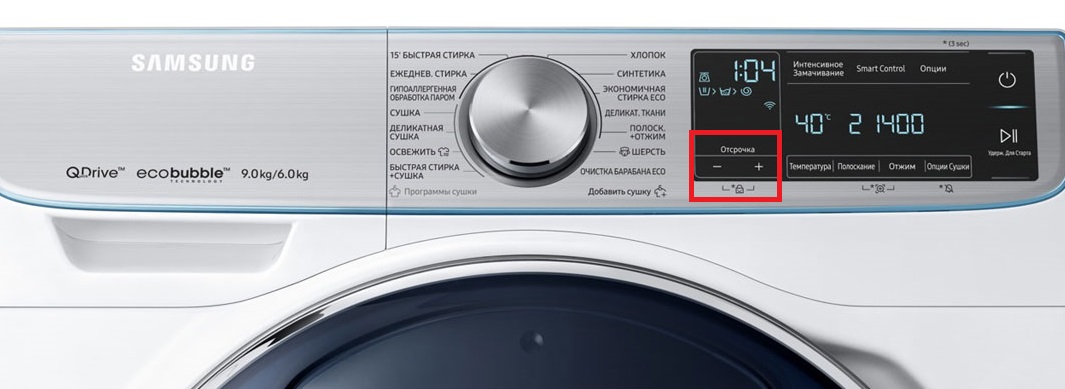
Here are some examples of how to enable the child safety lock option on different Samsung washing machine models.
- On this machine, you can activate the delayed start option by holding down the "+" and "-" buttons. These buttons are connected by a lock with a picture of a baby's face.
- WW70J52E04WD and WF8590NF. You can lock the control panel to prevent child tampering on these Samsung models by simultaneously pressing the "Temperature" and "Rinse" buttons.
- In this situation, the lock is activated by simultaneously pressing the "Spin" and "Option" buttons. The buttons are linked by a lock symbol with a child's face.
- The function can be started and stopped using the “Rinse” and “Spin” buttons.
As you can see, activating "child" mode is quite simple. You just need to find the keys responsible for turning it on. In the vast majority of cases, these are two buttons located next to each other on the control panel.
On-screen symbols
Once you've figured out how to activate the protective "child" mode, it's best to immediately find out what the other symbols on the control panel mean. Knowing all the capabilities of your washing machine will help you use it much more efficiently. Certain features can help you save time and improve the quality of your laundry.
- A basin with a Roman numeral (I). This symbol indicates a pre-wash program. The indicator will only light when the corresponding program is started.
- A basin with a Roman 2 (II) indicates the main wash cycle. The LED will light when any of the pre-programmed programs is started. The exception is when the separate "Rinse" or "Spin" program is selected.
- A basin with water and laundry drawn inside. A "Rinse" function indicator. When the main cycle is complete, the machine automatically switches to the rinse cycle. At this point, clean water and fabric softener (if added to the detergent drawer before the wash cycle) will begin to flow into the drum.
- The spiral is the "Spin" option icon. This is the final stage of the cycle. The indicator will light when the rinse process is complete. Exceptions are cases where the user disables the function in advance by selecting "No Spin."
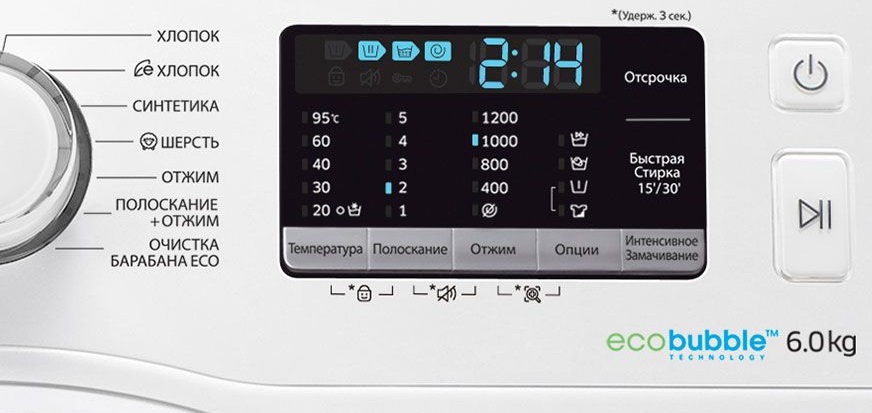
These represent the main stages of the washing cycle. Samsung washing machines also feature many other icons on their dashboards, representing various options. These icons can be used to improve the efficiency of the standard cycle.
- An image of a T-shirt and bubbles symbolizes the famous EcoBubble feature. When activated, the bubble generator activates a foam-liquid solution. It saturates the water in the washer with oxygen, allowing detergents to dissolve faster and effectively remove dirt. Bubble washing helps remove even the most stubborn stains from fabrics.
- The iron symbol indicates the "Easy Iron" option. The drum will rotate more smoothly and gently, preventing creases and folds from appearing.
- A basin with a Roman numeral (I). This is the familiar symbol for prewash. When you plan to run this program, be sure to pour detergent into the extra compartment of the detergent drawer.
- T-shirt with a "blot" stain. Intensive cleaning mode. This option is useful when loading laundry with old, stubborn stains. It's important to understand that this option will increase the standard program run time.
- A basin of water symbolizes the "Soak" option. This feature is useful for washing items with old, set-in stains.
Washing machines with a drying function will have additional buttons on the control panel that activate this mode. Depending on the model, the list of user options will vary.
There's also a subgroup of symbols denoting various add-ons. These enhance the ease of use of the automated machine. Let's explain what these symbols are.
- Clock. This is the delay timer symbol. You can tell the washing machine to start washing not immediately, but after a certain amount of time, such as one, two, or twelve hours.
- The drum with the "light" symbolizes the self-cleaning capability of the centrifuge's interior. If the tank becomes heavily clogged, the Eco-Clean indicator will light up, usually every 1-2 months. This serves as a reminder to the user.
Self-cleaning of the drum is necessary to prevent the formation and growth of mold on its surface and the accumulation of dirt there.
- The crossed-out speaker. By pressing certain buttons for 3-5 seconds, you can turn off the washing machine's sound. The key combination will vary depending on your Samsung model.
- The key symbol on the display. This indicates that the door of the automatic washing machine is locked. If the symbol lights up, the door is securely closed and the system is airtight.
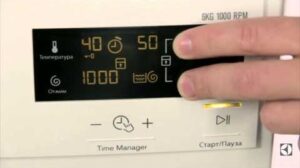
The washing machine's display also always features wash time indicators. It can also display the water temperature, the spin speed, and the number of rinse cycles.
The remaining wash time is displayed in the center of the display. It will be continuously adjusted downwards throughout the cycle. If a malfunction is detected during operation and the process cannot continue, an error code corresponding to the malfunction will be displayed on the display.
To decipher what's wrong with your washing machine, simply consult the washing machine's manual. The user manual will tell you which code indicates which malfunction.
Some Samsung models also display the washing temperature on the digital screen. It appears above the basin icon with a snowflake. You can adjust the temperature by pressing the "Temperature" button. If the bottom symbol is illuminated, the items are spinning in cold water and the heating element is not heating the water.
The number of rinses is displayed above the basin with a wavy line. The user can set up to five additional cycles. The number varies depending on the specific Samsung model.
A spiral symbol also lights up on the display when the spin cycle is active. The drum's RPM in this mode is displayed above the symbol. If a crossed-out symbol appears, the "No Spin" function is activated.
Once you understand the main symbols on the dashboard and the LED display of the washing machine, you can easily control the machine's intelligence.
The digital display, although quite compact, provides all the information about the washing process. At a glance, it's easy to see how much longer the machine will run, whether additional options are enabled, and what stage of the process the machine is currently in. The display makes the machine seem to "talk" to the user.
Some Samsung automatic washing machines also feature a program selector on the dashboard. By rotating the selector, you can select the desired program, such as "Delicate Wash," "Silk," "Sportswear," and so on. On some models, the programs are selected using a dedicated button.
Interesting:




4 reader comments
Add a comment
Headings
Washing machine repair




For buyers




For users


Dishwasher




When the child lock is pressed, the on/off button remains active. A child can easily turn the machine off during a wash cycle, and it will turn back on again from the start of the cycle. Washing machine model: ww70j52e04w.
Roman, the same crap.
The most important button for a child is the only one that remains active.
I also have a Samsung washing machine. The power button doesn't lock when the child lock is enabled. If I accidentally press it (it's touch-sensitive and easy to press), the machine shuts off completely and resets the program. So I have to reset the wash cycle. It's incredibly inconvenient!
A bottle or jar lid taped to the surface will help for a while.