
Extra rinse icon on a Bosch washing machine
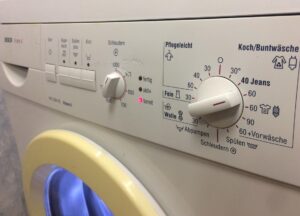 Bosch washing machines don't always have a Russian-language control panel, which can be confusing for owners. While it's possible to figure out the modes, finding the additional options buttons can be a real quest. Most often, owners of this appliance are looking for the extra rinse icon—a crucial feature that helps remove detergent residue.
Rinse again pattern
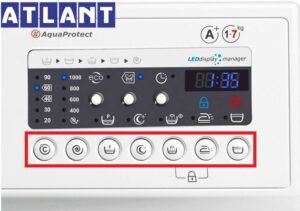
To find the extra rinse icon that allows you to activate the desired mode, carefully examine your home appliance's control panel. Most often, the desired option is represented by a button with a picture of a basin filled with water. Above it is an arrow pointing upward. The basin should only contain water, without any soap suds, hands, temperature symbols, or other similar symbols.
An alternative is a basin filled with water and a plus sign located above it.
The required button may be located near the program mode selector or next to the control panel lock. Enabling the extra rinse is easy—just press the desired button or the icon itself if the control panel is fully electronic. A beep or illuminated indicator will indicate that the desired function has been activated.
Drawings of additional and main programs
In addition to the additional wash function, the Bosch washing machine has a number of other functions, which are indicated graphically. Additional wash modes are also represented by symbolic images, categorized into appropriate groups.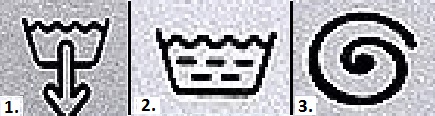
The first group includes clear icons that indicate:
- draining water from the tank;
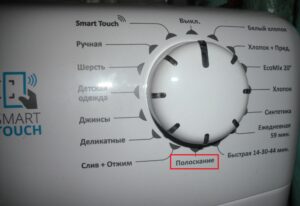
- rinsing;
- wringing.
Each function can be used outside of the wash cycle. Draining removes water from the drum if a cycle is not completed completely or if there is a problem (such as a breakdown, power outage, forced shutdown, etc.). An extra rinse removes detergent residue that didn't dissolve during the wash cycle, which often occurs when using low-temperature cycles. Spinning helps dry items, which is important for pre-washing by hand or when items are still too damp after the selected cycle.
The second group of Bosch washing machine icons is represented in the form of a clock.
The first symbol is an empty dial with both hands positioned at the 12 o'clock mark. This indicates a full wash cycle, lasting 1 hour. The second symbol consists of a filled quarter, indicating a quick wash cycle, which takes no more than 15 minutes. Both modes allow you to customize the temperature and spin intensity.
When setting a higher temperature, the owner of the household appliance should be prepared for the fact that the washing time may increase slightly, since the washing machine may take longer to heat the water to the required temperature.
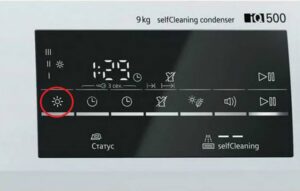
The third group contains images of special options, which include the extra rinse icon.
Each Bosch washing machine has a specific set of features specific to its model. For example, the Maxx series (several models in the line) includes four special options:
- heavily soiled clothing (icon 1) – requires intensive treatment;
- pre-wash (icon 2) – allows you to soak the laundry for several hours for better subsequent cleaning;
- Easy ironing (icon 3) – gently spins clothes and leaves them slightly damp, making them easier to care for;
- extra rinse (icon 4) – applies to any mode.
The extra rinse can be used as a separate function, regardless of the care regimen.This is convenient for items that only need to be refreshed in clean water, without pre-washing. Also, every Bosch washing machine is equipped with an on/off button, which has a distinctive diamond shape with a vertical stripe in the middle.
Interesting:
Readers' comments
Headings
Washing machine repair




For buyers




For users


Dishwasher




Add a comment