
Error E1 - Samsung washing machine
 The E1 error in a Samsung washing machine can be a very unpleasant surprise, especially when the basket is full of dirty laundry, and your beloved "house helper" just won't do the laundry. What should you do in this situation? Do you really have to get out the basin, hand washing powder, and washboard? Let's not rush into it; first, let's figure out the cause of the error, decipher it, and try to repair the automatic washing machine yourself. Then, we can always return to traditional methods of washing.
The moment this code appeared
Strictly speaking, the E1 error can appear on the display or control panel of a Samsung washing machine at any stage of the washing program. There have been cases where it has appeared immediately after turning on the washing machine, but this is the exception rather than the rule. Typically, in 90-95% of cases, the E1 code appears during the following stages of the washing program:
- during preparation for washing, when the washing machine begins to fill with water and rinse the powder from the powder compartment;
- during preparation for rinsing, when the washing machine begins to collect clean water;
- during the secondary rinse, if your washing machine has this function.
To identify the E1 error on the control panel of a Samsung washing machine without a display, pay attention to the illuminated and flashing lights. If you see the LED next to the "Cold Water" label illuminated and the LEDs next to the wash modes flashing, this is the E1 error.
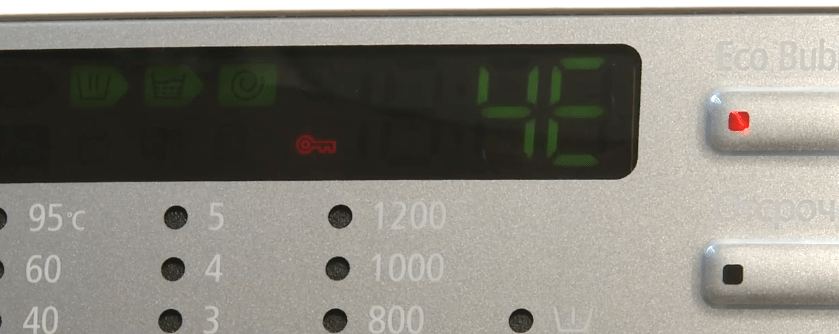
We'd also like to point out that error code E1 has many similarities. This is because different Samsung washing machine models have different self-diagnostic systems with their own code systems. Specifically, codes 4E, 4C, and CHE have similar meanings to error code E1. Moreover, 4E, 4C and CHE have completely replaced the E1 error on new Samsung washing machines, so the E1 code is generally not encountered on machines produced after 2013.
What does it mean and why does it appear?
All the error codes we've listed, namely E1, 4E, 4C, and CHE, have the same meaning: problems filling the drum with water. At first glance, it seems simple, but there can be many reasons for this kind of washing machine behavior. These include malfunctions, user error, and simple short-term glitches. Let's try to list these causes and draw some conclusions.
- There's no water in the tap. Your Samsung washing machine won't fill with water if there's no water in the tap. Utility companies often shut off the water unexpectedly, so it's quite possible this will happen just when you're about to do your laundry.
- The water supply is shut off. It's also possible that you simply forgot about the shut-off tee valve, which is usually installed before the inlet hose. In the article Selecting and installing a tee tap for a washing machine You can read about such taps in detail.
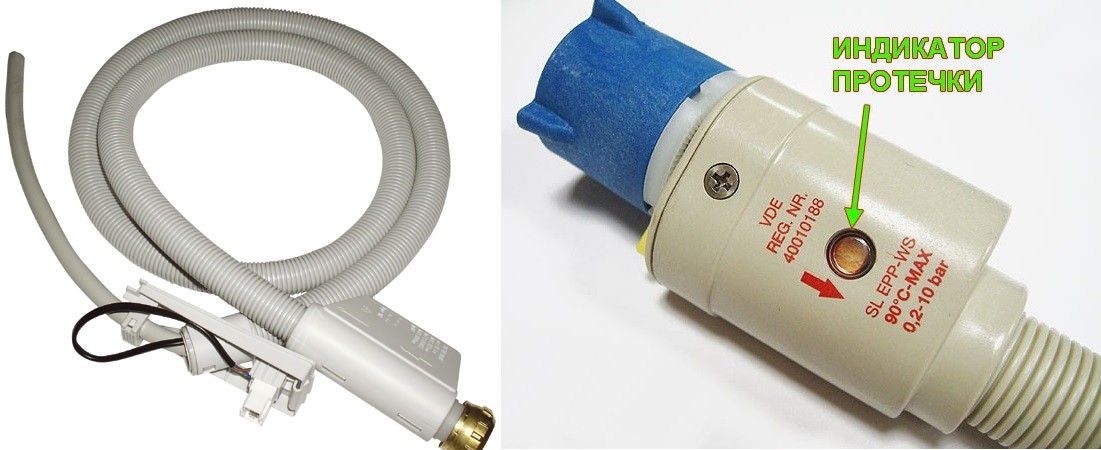
- Errors E1, 4E, 4C, and CHE may indicate the Aquastop system has been activated, if your Samsung washing machine is equipped with one. The vast majority of modern machines are equipped with similar leak-prevention devices, so they should be checked first.
To determine if your Samsung washing machine has a leak protection system, look at its inlet hose. If it looks like the picture below, it's definitely protected.
- Clogged inlet valve filter. There's a small mesh screen in the inlet port of the inlet valve, where the inlet hose attaches. This screen often becomes clogged with limescale and other debris brought in by the water, causing water to drain very slowly. As a result, you see an E1 error or similar error message on the display.
- A temporary failure in the control module. This problem usually resolves itself after rebooting the washing machine, and the E1 code only appears once or twice and then disappears.
- The contacts have oxidized or the wiring supplying the intake valve has burned out (frayed). This problem can cause not only the E1 error, but also a dangerous short circuit, which threatens not only the washing machine, but also you.
- The inlet valve has burned out. This malfunction is also quite often accompanied by error codes E1, 4E, 4C, and CHE. A burned-out valve is unable to open or close, so the error message appears on the display almost at the very beginning of the wash cycle.
- Serious problems with the electronics have arisen. If the control module of your Samsung washing machine has been exposed to water, short-circuited, or has a manufacturing defect, the machine may display any number of errors, including E1. To diagnose the problem with the electronics, you should contact a specialist.
Eliminating the causes of the problem
We're now discussing the methods and specifics for eliminating the most common causes of the E1 error and similar errors. Let's start with a damaged Aquastop hose. The image above clearly shows how to identify a damaged hose with leak protection. Its unit has a special indicator that shows whether the leak protection has been triggered. If the protection has been triggered, the hose must be replaced.
The inlet valve filter mesh is also quite easy to clean. First, turn off the tee valve. Unscrew the inlet hose from the washing machine. Remove the filter mesh from the connection between the hose and the body, soak it in a citric acid solution (2 tablespoons citric acid + 3 tablespoons water) for half an hour, then rinse it under running water and replace it. Screw the inlet hose back on and turn on the water. The E1 error should then disappear.
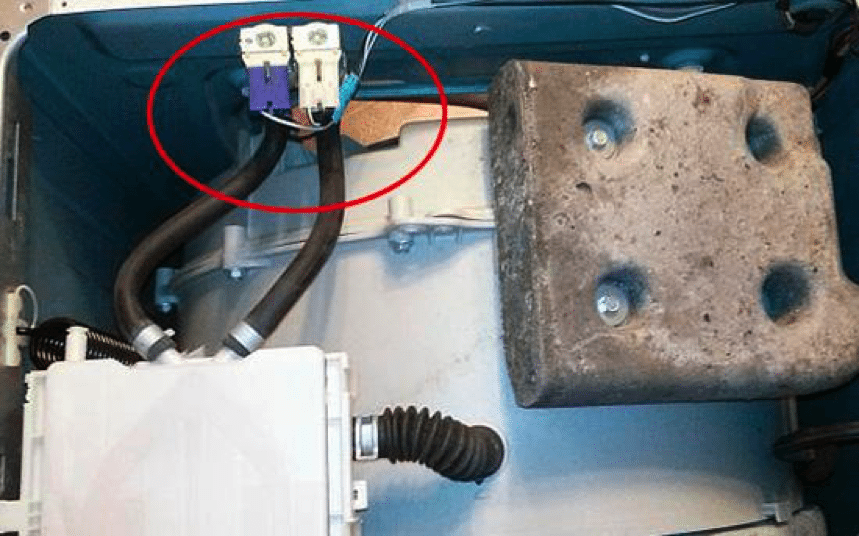
If there are problems with the inlet valve power wires or the inlet valve itself, you'll have to partially disassemble your Samsung washing machine to repair it. Completely disconnect the washing machine from the power supply, open the top cover, and locate the inlet valve underneath. Inspect the wire leading to it visually and with a multimeter. Use the same device to check the valve itself; if it's faulty, it needs to be replaced. You can learn how to do this in the article. Inlet solenoid valve for washing machine.
Finally, I'd like to mention the control module malfunction again. We certainly hope you won't encounter this problem, but if you do encounter it, don't attempt any DIY repairs. If you're not an experienced electronics technician, it's best to leave this work to professionals to avoid straining your family budget with even more expensive repairs.
Finally, if you suddenly notice that your Samsung washing machine has stopped and won't work, and two E1 symbols are flashing on its display, it's because the machine isn't filling the drum. You'll have to figure out the cause, but we hope this article will make it easier to find the problem and solve it. Good luck!
Interesting:


1 reader comment
Add a comment
Headings
Washing machine repair




For buyers




For users


Dishwasher




Simply disconnect the hose from the hopper refill pressure sensor.