
Error F10 on the Atlant washing machine
 Self-diagnostics for modern Atlant washing machines is a real help in troubleshooting any problem. If an unknown F10 code appears on your machine's display and you don't know what it means, reading this article will likely help you figure out how to fix the error. We'll decipher its meaning, discuss the causes, and provide brief repair instructions.
Decoding the code
Error F10 on an Atlant washing machine informs the user that the door locking device (HLD) is faulty. In practice, this happens something like this: the user closes the door, presses the start button, but the machine doesn't start, and at the same time, an error message appears on the display. The door isn't locked.
Error F10 on Atlant non-display washing machines manifests itself by flashing two indicators on the control panel: the first and third.
Reasons for failure
Let's take a closer look at why this error occurs and what causes it. The error code may appear when:
- The door lock system is faulty, specifically the bimetallic plates inside the lock are worn out. As a result, the plate doesn't engage, and the door doesn't lock;
- A short circuit occurs, causing the lock's thermal element to fail. This means current no longer flows through it, and the lock won't close;
- The electronic module is faulty and sends an incorrect code to the display, which stops the washing machine from working.
Troubleshooting
We've figured out how to decipher the error code. For more information on other codes in the Atlant washing machine self-diagnostic system, read the article. Atlant washing machine error codesNow let's figure out what to do in this situation. The solution is to replace the washing machine's door lock. Repairing a modern door lock is futile. To do this, you first need to unplug the washing machine and then follow the instructions:
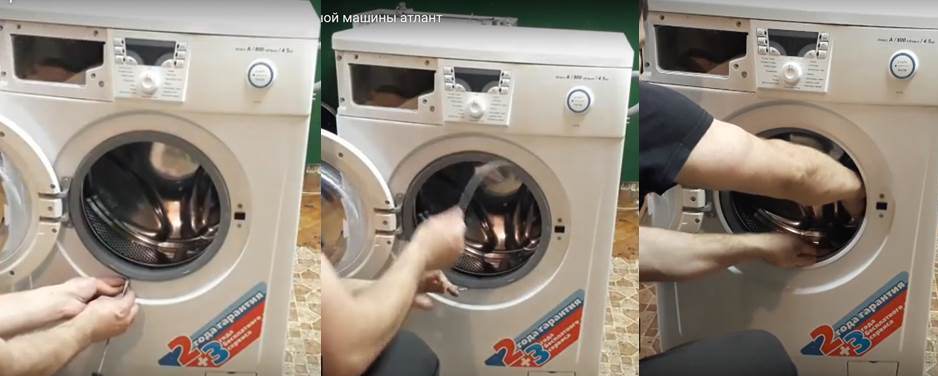
- Open the washing machine door and use a screwdriver to remove the metal clamp attached to the rubber cuff.
- Tuck the cuff into the drum so that it doesn’t get in your way.
- Unscrew the bolts holding the door lock.
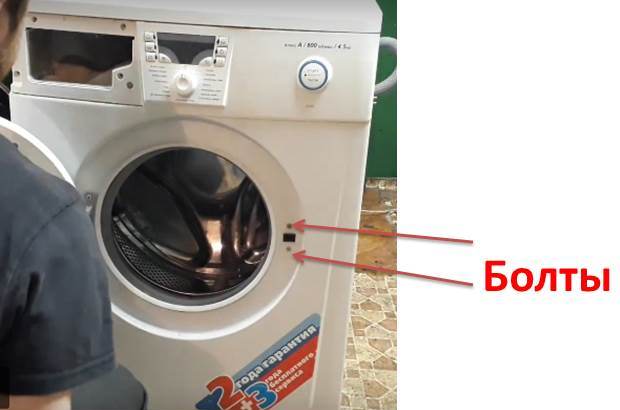
- Carefully pull the device out from the inside, being careful not to tear the wiring.
- Label or take a photo with your smartphone of the location of the wires connected to the UBL.
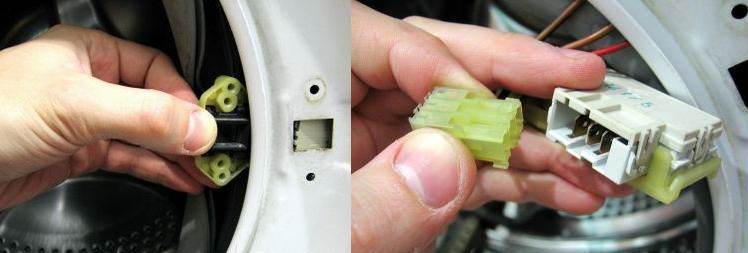
- Next, you need to take a multimeter and set it to the resistance test mode to make sure that the lock blocker is faulty.
- Place the multimeter probes on neutral and phase. If a three-digit number appears on the screen, the device is working properly, otherwise it is broken.
- Next, connect the probes to the neutral and common terminals. If the multimeter displays 0 or 1, everything is fine.
- Once you've confirmed the door lock malfunction, you can safely replace it with a new one. Simply purchase a working device and connect it to the connector with wires.
Repairing the door lock isn't particularly practical, and it's inexpensive. When purchasing, tell the seller not only the make but also the model of the washing machine. Better yet, take the faulty unit with you—they'll likely sell you a similar one. - Then you need to insert the locking device into place and secure it with screws.
- Turn the cuff out of the tank and secure the elastic with a clamp.
In rare cases, as we mentioned above, the error may be caused by the control module. You shouldn't attempt to repair this component of the washing machine yourself unless you're an expert in microchips, resistors, and similar semiconductor components. The photo below shows the electronic module and the damaged resistors highlighted, which caused the F10 error.
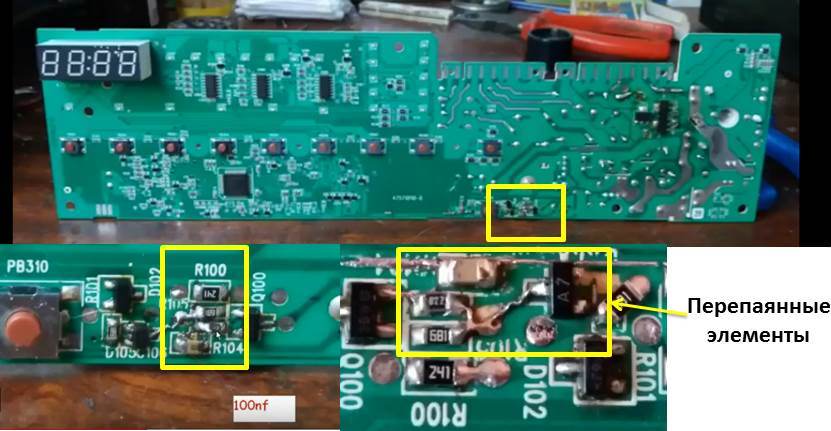
This module was repaired by service center technicians. To fix the problem, they had to resolder an entire resistor assembly. If you've done this kind of work before and have the necessary equipment, take it on. Otherwise, leave it to the professionals. Good luck!
Interesting:

Readers' comments
Headings
Washing machine repair




For buyers




For users


Dishwasher




Add a comment