
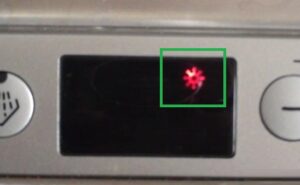
The star on the Bosch dishwasher is lit.
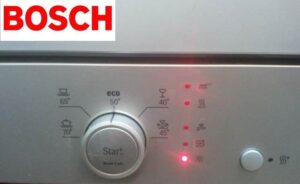 What should I do if the star light on my Bosch dishwasher is on? Could this blinking LED indicate a malfunction? Is it safe to use the dishwasher? Let's figure out what this persistently glowing light means.
Purpose of the indicator
Users call this LED by different names. Some say it resembles a star, others a snowflake, and still others a sun. The blinking light does not indicate anything serious – the dishwasher is indicating that it is time to fill the rinse aid dispenser.
Rinse aid serves several functions. First, it prevents white streaks from appearing on dishes. Second, it speeds up the drying process of cutlery. You can use your Bosch dishwasher with or without it—it's not required, but an optional feature.
This means the "star" light may remain on constantly if you don't use dishwashing detergent. This is normal. If the glow bothers you but you don't want to use a stain preventer, pour plain water into the compartment, and the light will go out. However, it's best to take no action and continue using the dishwasher with the flashing LED.
Icons on the Bosch PMM panel
Now it's clear that if the star on a Bosch dishwasher is illuminated, no action is required. However, beyond this LED, there are many other icons on the dishwasher's dashboard that may be confusing to the user. Let's explore what other symbols appear on Bosch dishwasher dashboards.
- A saucepan with a stand. This symbol indicates an intensive dishwashing cycle. The water in the chamber is heated to 70°C. The cycle lasts approximately 120 minutes.
- Cup and saucer (marked "Auto" on some models). Indicates the standard wash program. Water is heated to 45-65°C.
- "ECO." An algorithm that saves water and electricity. The water in the working chamber is heated to 50°C.
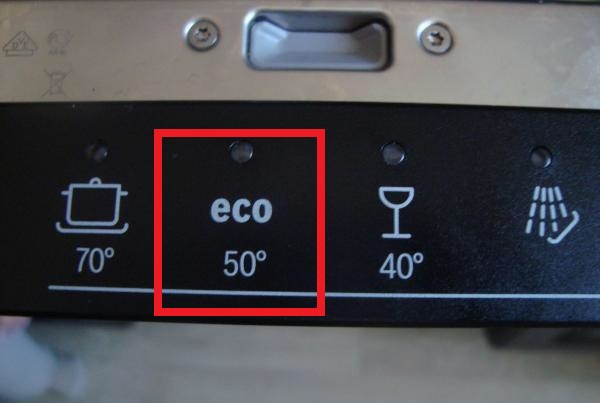
- A wine glass and mug on a stand, plus arrows. This design indicates the express mode, which lasts 30 minutes.
- A "fountain" of water droplets. This symbol indicates the "Pre-rinse" option. Before the main wash, the dishes are "sprayed" with water.
- +/- with the letter H. These buttons allow you to adjust the washing algorithm execution time.
- Glass. Indicates a delicate wash cycle. This program is designed for delicate tableware such as crystal, porcelain, and glass.
- A clock with its hands pointing to the right. The "VarioSpeed" option symbol. Activating this feature can reduce washing time by 20-50%.
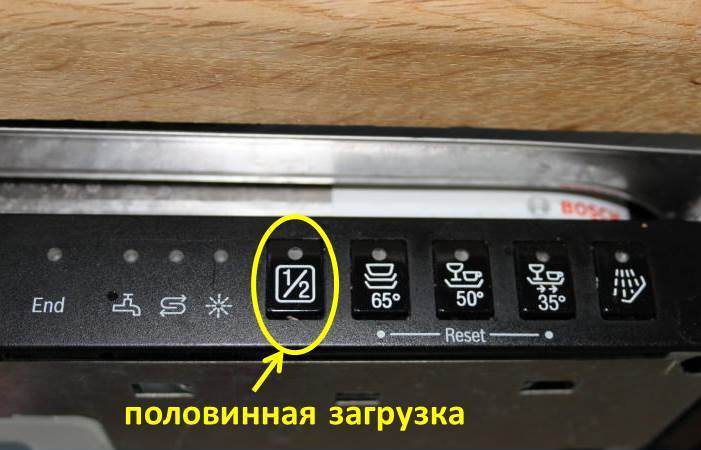
- "1/2" refers to the additional "Half Load" option. It's designed for situations where you only need to wash a small amount of dishes. The dishwasher uses 30% less water and kilowatts.
- Baby bottle. This image represents the "Hygiene Plus" option. When activated, it disinfects the dishes in the wash chamber.
- A saucepan in a rectangle. This symbol indicates a high-temperature cooking mode for cutlery in the lower basket.
Among the auxiliary indicators on the control panel of Bosch dishwashers:
- "brush" - lights up during the main wash;
- "END" - indicates that the cycle is complete;
- “tap” – lights up when water is being poured into the dishwasher;
- A pair of arrows in the form of waves is an indicator of the presence of regenerating salt in the ion exchanger.
A description of all indicators on the Bosch dishwasher dashboard is provided in the equipment manual.
Difficulties may arise only at first. Then, users learn what each indicator tells them, and operating the dishwasher becomes easier.
What if the lights are flashing?
It happens that unusual blinking of LEDs is observed, which is not typical for a normally functioning machine. Sometimes flickering indicators on the control panel indicate a breakdown of the dishwasher. To understand what exactly happened, it’s worth understanding the basic “combinations”.
- The "brush" indicator is flickering. In most cases, this indicates that the leak protection system has been activated. Sometimes the flickering is caused by a system failure. To rule this out, unplug the machine, leave it for 15-20 minutes, and then restart it. This often clears the error; if not, it means there really is a leak and will need to be repaired.
- The "faucet" LED is blinking. This indicates a problem with water intake. This problem can be caused by a variety of factors. Check to see if the shutoff valve is closed, the inlet hose is kinked, or the filter is clogged. Make sure the water supply to the house hasn't been shut off.
- The "faucet" and "END" LEDs are flashing. This indicates the Aquastop system has been activated. Check the inlet hose. If it's working properly, water has likely accumulated in the tray.
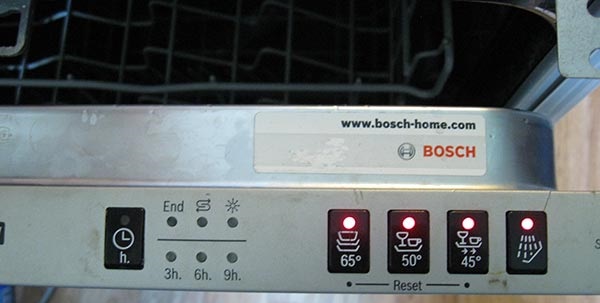
- All the dashboard indicators flicker simultaneously. This indicates damage to the main control module. A common cause is moisture getting on the circuit board. Sometimes, the problem lies in a defective semiconductor within the module.
- The "drying" light is flashing. This indicates difficulty draining water from the chamber. Check that the drain hose isn't kinked or that the filter assembly is clogged.
It is not recommended to use the dishwasher until the problem has been resolved.
You can fix some problems yourself. For example, cleaning the filter, replacing a hose, or another dishwasher component. For diagnostics and repair of the control module, it's best to call a professional.
Interesting:



Readers' comments
Headings
Washing machine repair




For buyers




For users


Dishwasher




Add a comment