
Instructions for the Indesit IWSB 5085 washing machine
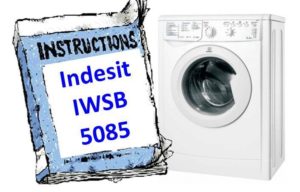 After purchasing a brand new Indesit IWSB 5085 washing machine, don't rush to use it without first reading the manual. Many overconfident users cause serious damage to the appliance by attempting to connect and use it themselves, resulting in unnecessary expenses. Our advice: take your time and read the manual. If you're too lazy to read the original, here's a shortened version.
Installing the machine
Once the movers have delivered your new appliance and the Indesit IWSB 5085 washing machine is at your feet, don't rush to sign the paperwork and send them packing. First, carefully open the box in front of the movers, being careful not to damage it too much, and check that all the included parts are present. Ask the movers to help you remove the washing machine from the box and carefully inspect its body. Even if the machine was defect-free at the store, any defects may have developed during transit.
If everything appears to be in order, sign the acceptance document and begin preparing to install the washing machine. First, prepare the location. Just any location won't do, as specific requirements apply.
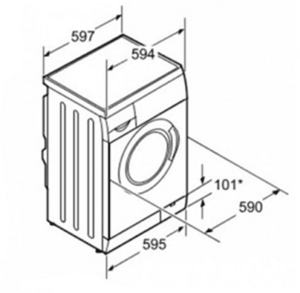
- There should be enough space to accommodate the washing machine, and there should be nothing in front of the body. Leave a gap of 1 cm between the lid, side walls and surrounding objects, and at least 7 cm between the back wall of the case and the wall.
- The floor under the machine must be level and solid, without carpeting and preferably without expensive floor coverings that are sensitive to water.
- There must be a water pipe running near the machine's connection point, a connection to a sewer system, or a regular drain. A dedicated electrical outlet must also be located within 1 meter of the machine.
There should be no objects sensitive to vibration near the machine body.
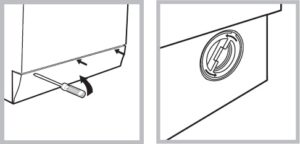
We unscrew the transport fasteners, plug the resulting holes, and move the washing machine to the prepared location. First, connect the inlet hose, then the drain hose, and leave the power connection for last, as it's a one-step process. How to install and connect a washing machine yourself, read the article of the same name posted on our website.
Control Panel
A short user manual for this brand's washing machine would be incomplete without a description of the control panel. Each control panel element is important in its own right, and using it correctly will significantly improve the quality of your washing. This article will cover three categories of control panel elements: knobs, buttons, and indicators.
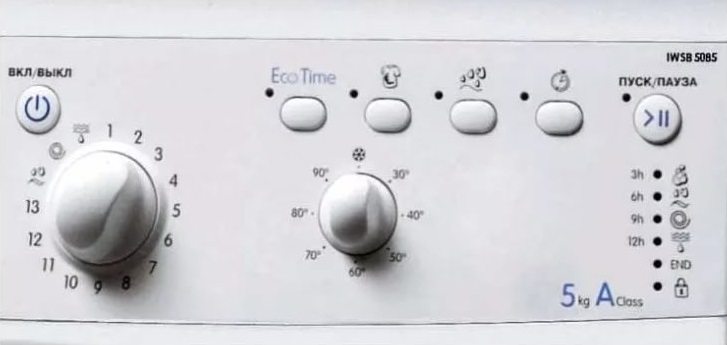
- A program selector knob that allows you to select 13 main washing programs and 3 sub-programs.
- A thermostat knob that allows you to leave the water cold or heat it up to 30, 40, 50, 60, 70, 80 and 90 degrees.
- The button turns the machine on and off. Its purpose is clear.
- Button to start and pause the program.
- Four additional function buttons are located above the thermostat knob. The Eco Time button allows you to save water and electricity. The button with a dirty T-shirt image is for bleaching. The button with a droplet image is for an extra rinse. And finally, the button with a stopwatch image is for a delayed start.
The Indesit IWSB 5085 washing machine may have a slightly different button layout than described above. Specifically, the "extra rinse" button may be missing, and instead, a spiral with numbers may be displayed—this is the "spin speed reduction" button.
- 11 indicators displaying a wide variety of information about the washing machine's operation.
The left side of the control panel of this brand's washing machine is occupied by the dispenser, also known as the detergent drawer. This is a very important part of the control panel, although its design is much simpler than its electronics. Let's discuss it in more detail.
Where to add detergents?
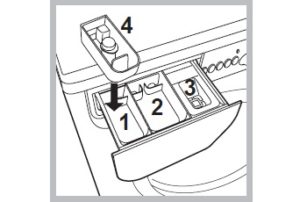 The Indesit IWSB 5085 washing machine's powder dispenser is a rectangular pull-out drawer containing three compartments. To be precise, there are four compartments in total, as one of them is removable and has a different purpose than the others. Let's take a look at each compartment's purpose.
So, pull the compartment out and look inside. Pour detergent into the far left compartment only if you've chosen to use the pre-wash (soak) mode or a program that includes a pre-wash. The middle compartment is for the main wash; in other words, you'll always put detergent there. The far right compartment is for rinse aid; feel free to pour conditioner there. The fourth compartment, as seen in the picture, is inserted into the first and is needed if the “whitening” function is activated.
Fabric softener is a liquid product used to soften and scent laundry, so it should be added immediately before washing, otherwise it will run into the drum.
Starting the washing program
So, we know where the buttons, knobs, and indicators are, we know what they do, we've examined the design of the detergent drawer, and now we can run our first wash, testing the washing machine, so to speak. We'll do this first test without laundry to remove any residual machine oil, plastic shavings, and other possible debris from the outlets after assembly.
- Press the on/off button and wait until all the lights turn on and off, and the LED next to the start/pause button continues to blink. This turns on the machine and puts it in standby mode.
- We pour the powder into the middle compartment and close it along with the hatch.
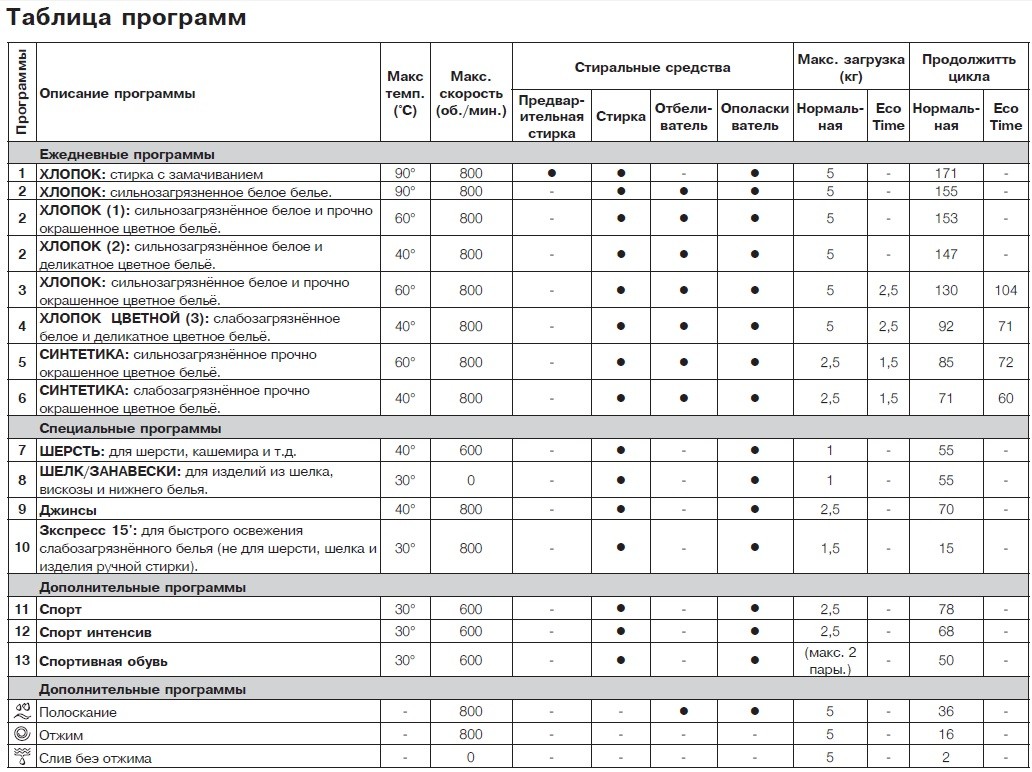
- Turn the program selector knob and select mode number 2 (90°C wash without pre-soak). This program will effectively clean the inside of the washing machine.
- Under normal conditions, we can turn the thermostat knob to adjust the washing temperature, but this is not necessary for the first wash without laundry.
- Press the start/pause button and wait until the wash is finished.
A few words about leaving
 The Russian-language instructions for the Indesit IWSB 5085 washing machine cover not only the design and operation of this "home helper" but also its maintenance. Indeed, despite the rigors of your washing machine, don't forget to give it at least a little attention, especially since it doesn't require any special care.
After washing your laundry, leave the door and detergent drawer open for 3-4 hours to dry. Use a cloth to wipe the door seal, the edges, the inside of the drum, and the dispenser. Once every 6-7 washes, remove the detergent drawer. Clean the dust filter once every 6 months and your Indesit machine will last much longer.
Don't forget to inspect the filter mesh at least once a year. It's located at the entrance to the washing machine's inlet valve (where we attached the inlet hose). The filter mesh tends to become clogged with debris.
In summary, many users dislike reading manufacturer's instructions because they are long, often filled with unnecessary information, and written in complex language. Moreover, in some cases, the translation of such texts leaves much to be desired. We've rewritten the manufacturer's instructions and created a condensed version that contains all the essential information every washing machine owner needs. We hope you find it useful. We've included the manufacturer's instructions with this publication. Good luck!
Interesting:


14 reader comments
Add a comment
Headings
Washing machine repair




For buyers




For users


Dishwasher




Does this washing machine have a half-hour or an hourly wash cycle? Could you please tell me which one to set it to?
Number "6" plus turn on the "Eco time" button.
On my 6 and eco time cycle, washing takes about 1.20 minutes 🙁
The program lasts 10-15 minutes.
The number 10 is half an hour
So 10 is just rinsing. No washing.
How to remove the powder tray?
And on what programs can Eco be used?
It's really hard to figure out. It doesn't show the wash time. I'd like to set it for 30 minutes, or 40 minutes at most. But there's no such setting. I started washing and rinsing for over three hours. We couldn't stop or turn it off. It's awful! I can't figure out anything.
When you press the eco-time button, should it light green constantly?
How do I reset the time on my Indesit washing machine? I tried resetting it, but it didn't help. The clock is not showing correctly.
Please answer me! I read the comments above, I have the same question: how to set the wash time? I don't need three hours. I need 20-30 minutes, an hour maximum. Please explain in more detail. Thanks in advance.
Good evening! Me too, please tell me what I need to press to make it wash for 30 minutes?
How do I set the spin cycle to 800? Where do I press?