
Siemens IQ500 Washing Machine Manual
 The manufacturer's operating instructions for the Siemens IQ500 washing machine are written in easy-to-understand language. They contain a wealth of information regarding the washing machine's operation. While the instructions themselves answer common user questions about Siemens washing machines, many users are reluctant to read them. We'll try to remedy this by offering you a basic and abridged version of this essential document.
How to use a washing machine?
Let's skip the background and start with the most important thing. Let's look at the steps required to use a Siemens washing machine.
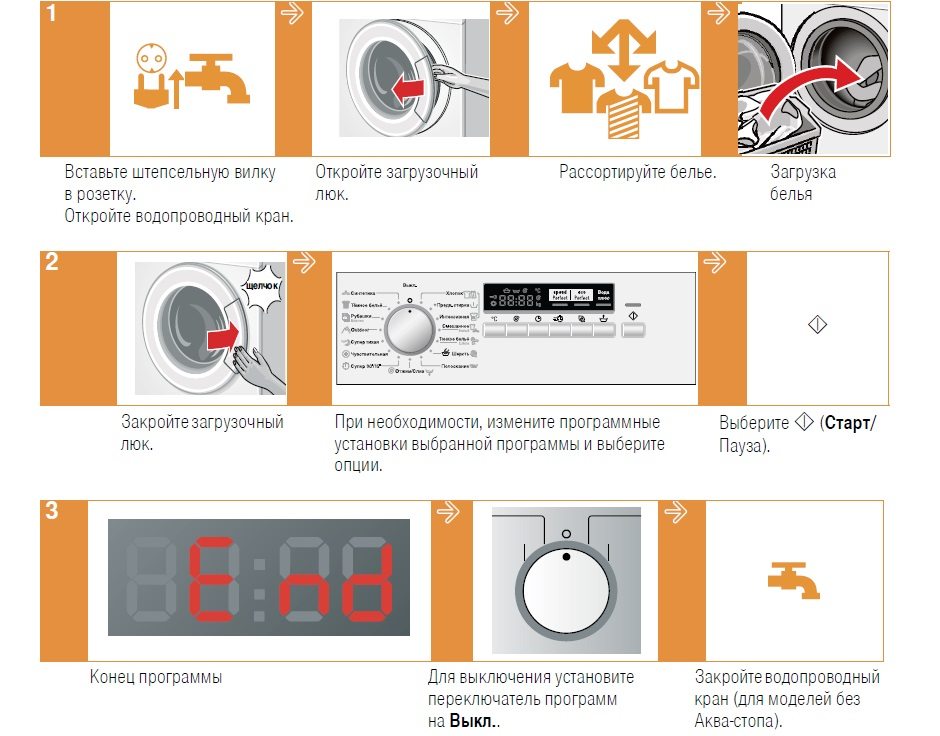
- Insert the machine plug into the socket and open the water supply tap.
- Let's open the hatch door and put the pre-sorted laundry in there.
Don't overload the machine. Overloading it will negatively impact the washing quality and may even cause a system error.
- Close the door, pressing it until it clicks. Don't press too hard. If the door doesn't close, contact an authorized service center.
- Turn the selector to select the desired program.
- Press the "Start Wash" button and wait for the wash cycle to complete. The end of the wash cycle will be indicated by the message "END" on the display.
- We return the selector to its original position and close the water supply tap.
Controls and indicators
Now that we understand the general operating procedures for a Siemens automatic washing machine, let's dive into the details. Let's examine the control panel elements that help the user effectively interact with the machine.
- First, there's the program selector we mentioned earlier, which is a rotary knob with a black circle indicating the position of the control. The programs and functions the selector allows you to activate are all labeled, so you shouldn't have any problems.
- Secondly, there are seven buttons for selecting the washing temperature, spin speed, and various functions. There's also a button that starts any program, located on the far right side of the panel, separate from the others.
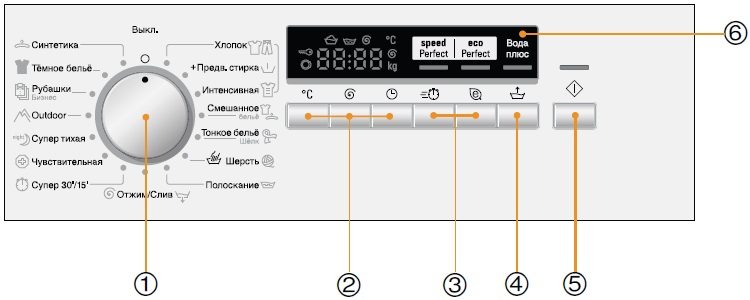
- Third, there's an informative LCD display. It displays a wealth of information that's helpful when operating the washing machine. Fourth, there's an indicator light on the panel. There's only one, as the display eliminates the need for indicators. It's located directly above the "start/stop" button.
A small pull-out drawer called a dispenser can also be considered a control panel element. It holds washing powder and other detergents. Perhaps it's worth discussing this in a little more detail.
Where to add powder?
The Siemens IQ500 washing machine has one of the simplest detergent drawers available. Its powder compartment slides in and out easily. Its compartments are also very basic, without any bells and whistles. This simplicity clearly conveys German reliability and robustness.
- The central compartment of the drawer is marked with a common flower symbol. This indicates that this is the compartment for pouring fabric softener or starch.
- To the left of the compartment with the flower is a compartment marked with the Roman numeral II. According to the manufacturer's instructions, this compartment is where you should place detergent if you plan to run a main wash, bleach, or simply soften the water with salt.
- To the right of the flower compartment is a compartment for adding detergent if you need to soak your laundry. Naturally, you'll need to select a pre-wash cycle to do this.
Helpful tips
After using a washing machine for a long time, users often notice a multitude of nuances they weren't even aware of when they first bought their new "home helper." This knowledge would have been very helpful at the beginning and would have helped avoid many mistakes. This is yet another reason to carefully read the manual, as most of these nuances are described there, either explicitly or implicitly. Let's summarize them.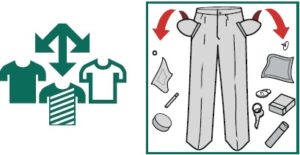
- Take the process of sorting your laundry before washing seriously. When sorting items into piles, consider the type of fabric, its color, the nature of the stain, and the quality of the dye. And be sure to study markings on clothes for washing (signs, icons, symbols).
- Before loading dirty laundry into your Siemens washing machine, check the pockets. They should be empty. Also, if any buttons are loose or there are holes, these should be corrected.
- Before washing, shirts, sweaters, and other items should be buttoned up or zipped and turned inside out.
- Before adding any product to your washing machine's detergent drawer, ensure its quality and be sure to follow the manufacturer's recommendations regarding dosage and application.
- Only add washing powders and gels directly into the washing machine drum as a last resort. If necessary, dissolve the powder in a small amount of water and then add the solution to the drum. This reduces the chances of the product ruining your clothes. The same recommendation applies to laundry gels.
- There are special laundry bags for small and delicate items. Throwing them into the drum is unsafe. They can get stuck between the walls of the tub and the drum or end up in the drain hose, causing a blockage.
- Hooks should be removed from curtains and drapes, or such textiles should be washed in a bag.
- You should not wash old textiles together with new ones.
Here's a shortened version of the manual for the Siemens IQ500 washing machine. In most cases, the information we've provided is sufficient. However, if you absolutely need the manufacturer's manual, you can download it from our website (the link is located just below the article). Good luck!
Interesting:

2 reader comments
Add a comment
Headings
Washing machine repair




For buyers




For users


Dishwasher




What buttons do I press on the control panel to release the button again or set the time as I want? Please explain in detail, and the image should be larger. And describe each button one by one.
It takes 1.5 hours to wash, how can I reduce the time?