
How to use an Indesit washing machine
 At first glance, the article's topic seems naive, as if there's nothing confusing about using an Indesit washing machine—just go ahead and use it. But if you have any questions, just pick up the instructions and read them; everything is clearly written there.
However, not everything is as simple as it seems at first glance. Firstly, the control panel of the Indesit machine is, frankly, not the most intuitive in the world. Secondly, the instructions that come with modern Indesit models are less than comprehensive.
Moreover, if you buy a used washing machine of this brand from Europe, it's a complete mystery. The instructions are in foreign languages, the control panel is completely blank, and the only way to learn the machine is by trial and error. We decided to help owners of such washing machines and, in this publication, explain the most important nuances of using these "home helpers."
Let's start washing
Let's start by learning the basics of using an Indesit washing machine. Operating this brand's automatic washing machine is quite simple, but it's still best to read the instructions. Here they are.
- Open the door of the washing machine and load the amount of laundry that does not exceed the maximum load capacity of the drum.
- Make sure the machine is connected to the network and press the power button.
- We set the program selector to the desired position, selecting the washing mode.
- We adjust the washing temperature using the temperature selection switch.
- Using the buttons, which we will describe below, we adjust the washing program as we need.
- We press the start button and the washing begins. If necessary, you can select rinsing and spinning separately or just spinning.
Please note! Some Indesit washing machine models do not have a start button. To activate it, you must first select a wash program, set the temperature, and then press the on/off button.
General recommendations
Indesit washing machines are traditionally unencumbered by unnecessary electronics—touch panels, remote and voice controls, and large color displays. While this makes them somewhat outdated and unappealing to those who enjoy modern gadgets, it also makes them much cheaper, potentially making them more appealing to consumers.
The lack of fancy electronics doesn't mean the washing machine is performing worse; quite the contrary, its control module is simpler and therefore more reliable. However, washing quality depends not only on the technology but also on the users who turn it on and set it up, so proper use of your Indesit washing machine is crucial for achieving the best results. First, let's look at some general recommendations that everyone should be familiar with.
- When loading laundry into the drum, be sure to sort it. Consider not only color (white/black), but also dye fastness, fabric type, and any loose items.

- Before loading new items into your Indesit washing machine, check the care labels. Typically, if an item is non-washable or can be washed only on a special cycle, the manufacturer will indicate this on the care label. You can read more about this in the article. Washing instructions on clothes.
- Always check the pockets of items of clothing you place in the drum. Any needle, pin or paper clip that gets inside the washing machine Indesit, it can seriously harm her. Machine washing your passport or credit card won't do many people any good, so decide for yourself whether to adopt this healthy habit or not.
- Always check that the buttons on the clothes you're about to wash are secure, and zip up all zippers. It's best to wash clothes with plastic zippers in a special bag.
- For best washing results, it is best to turn T-shirts, shirts, sweaters, cardigans, pants, socks and other clothing inside out.
- To better balance the drum, do not wash many large items at once; divide the wash into two or even three batches and mix large items with small ones.
Please note! Don't wash very large items alone. Add a couple of smaller items with them – the washing results will be significantly better.
- Do not use hand washing powders, as they will cause increased foaming.
- Place your detergents correctly in the detergent drawer. Each type of detergent has its own compartment in the detergent drawer: the first compartment is for prewash, the second for the main wash, and the third for rinse aid.
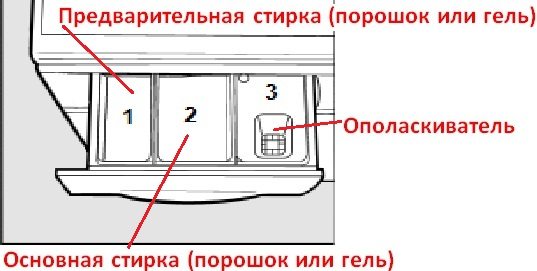
- If you wash clothes without heating the water, you need to use half as much powder. Otherwise, it will not dissolve and will be removed along with the waste water – money down the drain.
- The washing program selection can only be performed when the Indesit washing machine is stopped. Failure to do so may result in damage to the control module.
Popular programs
Like any other washing machine, Indesit washing machines have quite a few modes that people rarely use. This is always the case: we use some modes two or three times during the machine's life, while others are used constantly. Our Italian partners conducted a survey of Indesit washing machine users and found that the most frequently used programs are:
- heavily soiled white items (number 1 on the program selector);
- mixed things (number 3);
- colored things (number 4);
- moderately soiled non-shedding synthetics (number 9);
- wool (number 14).
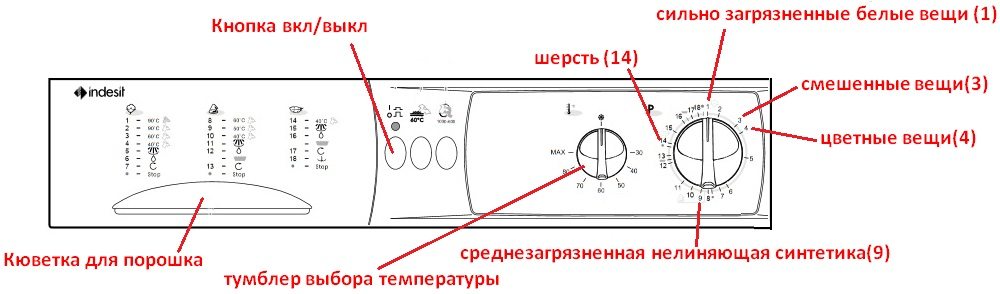
If you need to wash heavily soiled white items, select washing mode 1 using the program selector. Then, using the temperature selection toggle, you set either MAX or 900C. You can also put 600C, if you don't need to boil things, but not less.
The Indesit washing machine's control panel switch, number 3, features the most popular and versatile program, called "Mixed Items." This can be selected when you need to wash faded colored items at 40°C.0When you need to wash fade-resistant colored or white items, the temperature range in this case is 50-60°C.0WITH.
When washing with an Indesit washing machine, users often use the "colored items" mode, which is indicated on the selector by the number 4. The popularity of this mode is explained by the fact that it is fast and can be used to wash lightly and moderately soiled items at a temperature of 400C. Moreover, despite the name of the mode, you can wash both colored and white items on it.
It is better to wash synthetic items on a setting of 9 at a temperature of 50 degrees, but for wool there is nothing better than setting number 14.
Please note! Only woolen items approved for machine washing by the manufacturer can be washed on the "Wool" cycle. If a woolen item has a label prohibiting machine washing, do not wash it on any cycle.
Selectors and buttons
We've covered the popular programs. If you're interested in the characteristics of all the washing modes, consult the manual for your washing machine model, although this isn't necessary. You can simply try each of the less popular washing modes over time and determine their suitability.
Let's start with the main control panel elements found on every Indesit washing machine model.
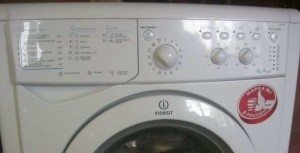
- The program selector. A crucial part of the control panel, it allows you to select the desired washing mode by turning the knob.
- Temperature selection selector. When you select a washing program, the control module automatically sets the drum rotation speed and water temperature, but all of this can be adjusted. The temperature selector provides just such an opportunity.
- Speed controller. This control allows you to adjust the drum's rotation speed.
- On/off button. This button is a must-have on all Indesit washing machine models. It's used to turn the washing machine on and off.
Please note! Typically, an LED indicator located next to the on/off button alerts you when your Indesit washing machine is turned on.
Now let's look at the additional buttons that may appear on the Indesit washing machine control panel. Here are the buttons with a brief description.
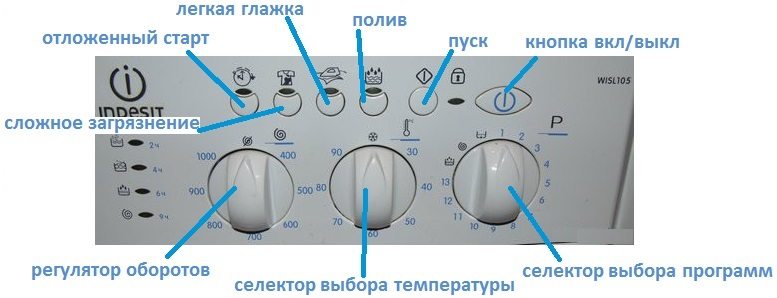
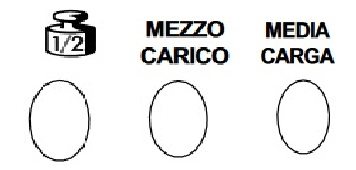
- Half Load. This button helps save water and energy when washing a small load.
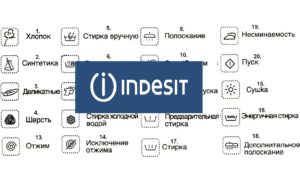
- Reduced load button. This button is identical to the previous one and helps save water, energy, and detergent. These buttons may be marked with a weight or text, as shown in the image below.
- A button that helps reduce the spin speed. Usually indicated by a symbol of spinning laundry. The spin speed often needs to be reduced when washing cotton and linen items.
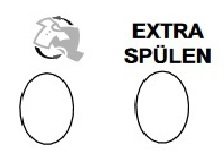
- The extra rinse button, marked "Extra Spulen," is a special feature. Some fabrics require more water to rinse thoroughly, so this button will come in handy.
- Cold wash button. Useful when rinsing lightly soiled clothes or washing delicate fabrics. Pressing the button activates a cold wash cycle.
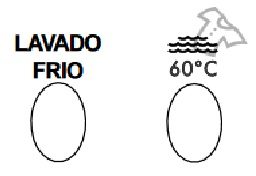
- Economy mode 600C. Pressing this button does not allow heating water above 600WITH.
- Spin off. Pressing this button turns off the spin cycle. It's indicated by the words "EXCLUSION CENTRIFUGADO."
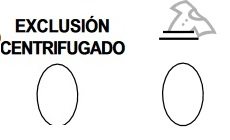
- A button that stops the washing machine from filling with water. The button's name speaks for itself. It's symbolized by a picture of a shirt submerged in water.
In conclusion, anyone can use an Indesit washing machine. Moreover, once you get used to the controls, you'll never want to use another brand's "home helper." Don't be afraid to experiment, and be sure to read the instructions carefully. Good luck!
Interesting:
28 reader comments
Add a comment
Headings
Washing machine repair




For buyers




For users


Dishwasher




Hello, I also have an Indesit, but I couldn’t set it up. When the machine fills with water, it doesn’t wash, the drum doesn’t spin, and all the water pours out at once.
Check the drain hose level. If the hose is too low, water will drain out immediately.
Hello, how do I use compartment 4 for bleach?
Hello, how do I set up my Indesit washing machine? The wash cycle now takes up to 3 hours, sometimes even up to 5. What's wrong?
Hello. How do I set the washing machine to wash for 1 hour?
I mostly use the quick wash cycle on my Indesit 🙂 My machine washes quickly. Maybe you've chosen too many cycles, which is why the wash cycle takes so long.
What schedule do you set? And how much time do you get?
What's the fastest mode? Is the number on the display 3? 4? 2?
Hello. The machine washes, but it doesn't drain. There are no instructions; it was bought second-hand.
Can someone please help? I installed the washer level, but it's jumping a meter and the drum is rattling during the spin cycle. It's making my ears pop. Is this a factory defect?
How do I remove the detergent drawer from my washing machine? No matter how hard I try, it won't come out.
Can you tell me how to wash in my old 461w? We can't set the modes. It seems simple, but it stops spinning after a couple of minutes.
Tell me, have you figured out this washing machine yet? Could you tell me how to use it? I have the exact same model, and I can't figure it out.
Tell me, is it normal that throughout the entire wash cycle, water keeps filling up (the drum spins 2-3 times and then fills up again)?
Which mode should I choose if I need to hand wash? My washing machine doesn't have that mode.
The washing machine doesn't finish washing, why?
When the Anti-Wrinkle button is pressed, the machine stops before the wash cycle is complete. Should I remove the laundry or will it continue washing? And do I need to release the button to do this?
How do I reset my Indesit washing machine? It doesn't wash and drains the water immediately.
The machine won't drain or spin. What should I do?
My Indesit washing machine isn't filling with water. What could be the cause?
I turn on the machine for the rinse and spin cycle, but the water doesn't drain, it makes noise, and the F05 indicator flashes on the display.
What does this mean? And what should I do?
Hello, what setting should I choose for a 2-hour, 40-minute wash? Thanks in advance.
I wouldn't recommend an Indesit to anyone. It makes a noise like a tractor and constantly crashes.
Hello. I paused the wash cycle and changed the cycle, but the machine still won't wash. What should I do?
After washing, clean clothes smell like a swamp. What should I do?
Where do I put the detergent? Hello? In the first container or the second one just for washing? It's completely inconvenient, where's the countdown? I need to know when the wash is finished so I can go to the store and buy laundry detergent.
Hello, the machine washed the laundry and it says "end." It won't open. I pressed the power button and it says "door." What should I do?
We bought an Indesit, this crap. They won't take it back. Ryazan.