
Ardo washing machine icons
 To maximize washing results and get the most out of your washing machine, you need to know the symbols for the buttons that control the various washing modes and other functions. If you've lost your manual or otherwise can't see the symbols, read this article.
Washing program symbols
In this section, we'll discuss the symbols on your washing machine that directly relate to the washing process. While these symbols are generally straightforward, it's still a good idea to highlight them just in case.
- The "Container and item in it with the letter P" symbol represents the "Pre-wash" mode. This is a type of soaking.
- The "Stained T-shirt" symbol corresponds to the "Stain Removal" program. This program is best used for washing items with stubborn stains only.
- The "T-shirt in a bowl of bubbling water" icon indicates a power rinse. It's used to better rinse out laundry detergent.
- The image of two T-shirts separated by a wave is the "Intensive Wash" cycle. This cycle is only suitable for washing bedding, bath accessories, etc.
- The container marked 90 stands for "Wash at 90 degrees." This setting is typically used for heavy, dense fabrics that don't wash well at lower temperatures.
- The container marked 60 is the appropriate setting. At 60 degrees, synthetics and medium-weight fabrics are washed well.
The easiest symbols to decipher are those with numbers.
- The "Flower over the container" icon represents a delicate wash cycle. Delicate fabrics include, for example, silk.
- The T-shirt and wind symbol indicates the "Everyday Wash" cycle. This cycle is designed for washing lightweight fabrics.
- A container with a T-shirt and a flower inside is a cold wash cycle. The garment is washed in cold water. This cycle is suitable for fabrics that don't tolerate hot water.
- The clock icon is "Speed Wash." It's faster.
- The icon with a T-shirt being watered from the shower is the "Hand Wash" mode. This is the most gentle mode for washing fabrics. The intensity is equal to hand washing.
- The curtain symbol indicates the "Silk and Curtains" program, which is designed for washing silk curtains, drapes, tulle, and other items.
- Flower - rinse with softener.
- Kapelka – an economical wash mode that consumes very little water and electricity.
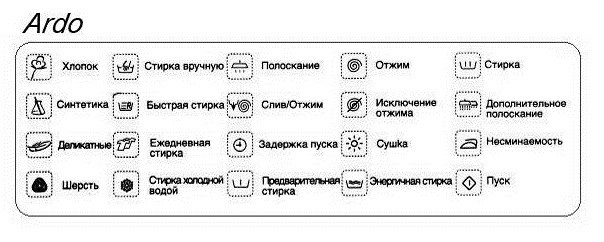
As you can see, among these Ardo washing machine programs, you can find one suitable for any item and any type of fabric. However, be careful and carefully study which items are best washed in which program.
Images of additional features
Additional functions allow you to select a mode as needed. While one of the programs in the previous section must be activated, otherwise the wash cycle won't start, here you can only do so when needed.
- The thermometer indicates the ability to select the temperature yourself.
- A container of bubbling water is the rinse cycle. The dirtier the laundry, the more cycles are needed.
- The container with the black square is the rinse hold. For washing delicate fabrics.
- Spiral is a spin cycle. The heavier the fabric, the more cycles you need to use.
- A container with flowing water is a drain icon. This mode is used in situations where it is necessary to drain water into the sewer before the end of the washing process.
- The pile of items is "Change Spin Speed," and the crossed-out pile is "Exclude Spin Cycle." The lighter the fabric, the lower the spin speed should be. The second program is used for washing delicate fabrics.
- The half-load icon with a black drum indicates a half load. This is used when the drum is not completely full.
- The crossed-out iron means "Easy Ironing." It minimizes creasing.
- A T-shirt with rays emanating from it – "Hygiene Items." A cycle for washing towels, washcloths, and other items.
Many users rarely use additional features. However, using them can significantly improve the quality of your washing.
Auxiliary designations
Auxiliary symbols include images that are not directly related to functions or modes. Rather, they are responsible for the operation of the machine itself. For example:
- the button with a stick and a zero is the ON/OFF button of the washing machine;
- the black dot is STOP/RESET, pressing the button during washing will stop the process, and during mode settings it will reset the selected parameters;
- The lock is a "Door Lock" and is used to provide additional sealing for the hatch door. This is a good choice if you have small children in the apartment.
By using all the functions, you can achieve excellent results. However, you need to activate them wisely to avoid damaging your washing machine.
Interesting:




Readers' comments
Headings
Washing machine repair




For buyers




For users


Dishwasher




Add a comment