
Siemens washing machine icons
 The Siemens washing machine's control panel features numerous symbols and labels, not all of which are easily understood by Russian-speaking users. But you'll agree, it's impossible to fully utilize the washing machine without knowing even half of what the control panel buttons do. So, let's find out what the icons on the Siemens washing machine represent and what functions they correspond to.
Signs appearing on the "screen"
The display of any washing machine is designed to show the user the stages and parameters of the selected washing program. Siemens washing machines typically display information on the selected spin speed, the remaining time until the end of the cycle, the maximum drum load for the selected mode, as well as information about the specific cycle stage and the door lock status. The washing machine displays information about the lock status and the cycle stage using symbols. How do they decipher them?
- If the key icon appears on the display, the hatch is locked. To activate or deactivate the lock, press and hold the "Start/Pause" button for about 5 seconds.

- Now about the washing cycle stages. If you see a basin with a heap on top on the display, this indicates the washing process. A full container indicates the rinse cycle, and a spiral symbol indicates the spin cycle.
- Some Siemens models also have a drum reloading feature. If you see an image of an open door and the word "YES" next to it, you can open the door and add any forgotten items. If the image of the door is accompanied by the word "NO," you can't add more laundry at this stage of the cycle.
The washing machine displays information about spinning, time remaining until the end of washing and maximum load in numbers.
Washing mode symbols
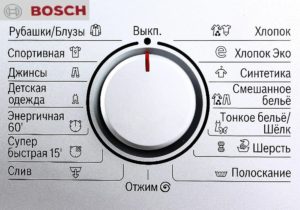
Now let's turn directly to the images on the control panel, which symbolize the various washing modes.
- The "T-shirt and Pants" picture represents the program commonly known as "Cotton," which allows you to wash a wide range of everyday items and set the water temperature from cool to very hot.
- An image of a container with a vertical stripe on it indicates the pre-wash mode or, in other words, soaking for items with a high degree of contamination (the water temperature is 60 degrees).
- The T-shirt icon with three stripes indicates an intensive wash program for textile items.
- The image of a hanger with a shirt symbolizes a program for washing mixed fabrics (cotton + synthetics) at a temperature of 40 degrees.
- The image of a ball traditionally denotes the washing mode for woolen products or products containing a large proportion of wool.
Important! Sometimes, on Siemens machines, the "wool" wash program is indicated not by a ball of wool, but by a basin of water with a hand dipped into it.
- The image of a hanger without a shirt indicates washing synthetic fabrics with a temperature selection of 30 to 40 degrees.
- The black T-shirt design symbolizes the "Dark Items" wash program.
- The picture with the clock indicates an express program, the duration of which is 30 minutes on its own, but when using the additional SpeedPerfect function it can be reduced to 15.

- The image of the moon and the inscription "Night" is designed to activate the ultra-silent washing mode (intended for use at night). However, the program does not include spinning; you will have to start the spin function yourself later!
- The image, which resembles a ribbon with crossed ends, indicates a delicate wash cycle, intended for silk, satin and sateen.
- The spiral design and the container with an arrow pointing downwards symbolise the extreme spin option.
- The picture of a container full of water indicates an additional rinse program, which is necessarily followed by an automatic spin.
Siemens washing machines feature a bidirectional rotating cylindrical selector with a marking to select the desired program. To select the desired mode, rotate the selector until the marking is aligned with the desired program.
Auxiliary function keys
Of course, the Siemens washing machine does not have as many optional features as the washing modes, which are 5 in number.
- The button we are accustomed to simply calling “Start/Pause” and which is designated by a diamond with a vertical line inside also performs a number of other functions. For example, it allows you to stop a running mode to add more laundry, or stop the program altogether.
- The program marked with a spiral icon controls everything related to the spin cycle. It allows you to change the speed displayed on the display or cancel the spin cycle entirely. However, keep in mind that the maximum speed is limited by the program.
- The button with the image of a clock face allows you to delay the end time of the cycle by hourly intervals for up to a day.
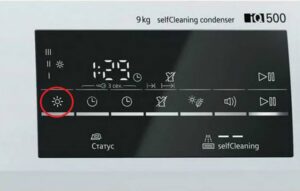
- The ringing alarm clock icon signifies the SpeedPerfect feature, mentioned above. It cuts the cycle time in half.
- An image of a basin with an arrow pointing upward indicates the activation of another rinse cycle with more water. It may be accompanied by the written note "Water Plus."
Please note! The maximum drum load is also reduced when the SpeedPerfect function is enabled.
Once you've enabled one of the additional options, the corresponding indicator on the front panel will light. Before using the washing machine, it's best to double-check all the images on the panel against the user manual.
Interesting:


Readers' comments
Headings
Washing machine repair




For buyers




For users


Dishwasher




Add a comment