
Symbols on a Bosch washing machine
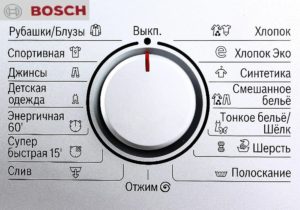 The markings on Bosch washing machines, as well as the symbols displayed on the control panel by the manufacturer, aren't always clear to the user. Moreover, novice users often ruin clothes by selecting the wrong program, wash subprogram, or function. After 7-10 washes, they eventually find the correct washing algorithm, but the damaged item cannot be recovered. We'll now examine the symbols displayed on the control panels of different Bosch washing machine models; we hope this information is helpful.
Why do we need badges?
To avoid cluttering the Bosch washing machine's control panel with labels describing a particular washing program or function, the manufacturer came up with the idea of using special symbols to designate them.
- The signs are compact and do not take up much space;
- They are very informative;
- Due to their unification, they can be easily deciphered.
The image of one icon can encode several sentences of text information that characterize the program, subroutine and function of the washing machine.
In some cases, it is intuitively clear what a particular icon characterizes, but sometimes the image is so vague in meaning that deciphering it without outside help is impossible. Based on their semantic load, all the icons on the Bosch washing machine control panel are divided into: symbols for items and types of fabric, symbols for programs and subprograms, and symbols for special functions. Let's look at this classification in more detail.
Icons about things and types of fabrics
Let's start with the icons that indicate the washing modes ideal for specific types of fabric. Specifically, the image below shows the icons on a Bosch washing machine, which are found on many models.
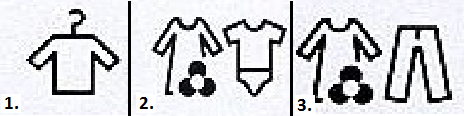
Under the number "1," we see the icon of a shirt hanging on a hanger—this mode is ideal for washing synthetic items. The program runs from 0:55 to 1:31 hours, and the water consumption for 2.5 kg of laundry is 40 liters. The water is heated to 400C. Under the number "2" we see the designation of the washing mode for cotton clothes; cotton is washed from 1:20 h to 2:15 h, depending on the model of the washing machine and the user's choice. Washing temperature ranges vary from 40 to 90 degrees.
The number "3" symbol indicates a mixed wash cycle. This symbol can also be used to indicate a quick wash or a low-maintenance cycle. Program durations average 0:50 hours, but may vary, especially in Maxx 5 machines. Water temperature: 40-60°C.0C. The next picture also shows three icons indicating washing modes for specific fabrics.
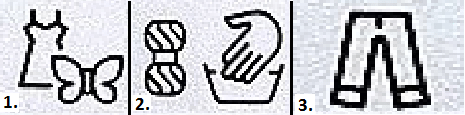
The image below the number "1" shows a dress with a butterfly next to it. This indicates the lightness of the fabric this type of garment is made from. It's easy to see that this refers to various fine fabrics, primarily silk. Silk clothes wash beautifully on this cycle. The program takes 0:30 hours to complete, and the wash is done in water heated to 30°C.0WITH.
The picture under the number "2" eloquently tells us that it hides a washing mode that imitates hand washing and is suitable for woolen clothes. We are definitely talking about wool, since on the left in the picture there is a skein of woolen threads.
Wool items are essentially soaked in a drum in warm water (30 degrees) for 40 minutes, with the drum rotating very slowly and stopping frequently to ensure gentle washing.
The third part of the image shows pants. This icon hides the denim wash program. Jeans can be washed on a medium intensity cycle at a temperature of 40-600For 40 minutes. Some models extend the wash time to 1:20 hours. The following group of icons represents three popular washing modes:
- shirts/blouses;
- sportswear;
- clothes of a small child.
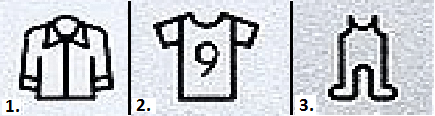
Shirts/blouses are marked with the number "1" in the image above. This symbol is hard to confuse with anything else, as it's a picture of a shirt. Program duration: 0:40–1:20 h, water temperature: 40–600C. The number two represents a T-shirt with a number, so it's clear that this refers to a special washing cycle for sportswear. Washing parameters: 1:20 h, temperature 600C, water consumption per 2.5 kg – 40 l.
Program and subroutine icons
The icons on a Bosch washing machine can represent general programs and wash subprograms. These are also very popular among users, so it's essential to decipher them. The image below shows the first group of such icons; let's discuss them.
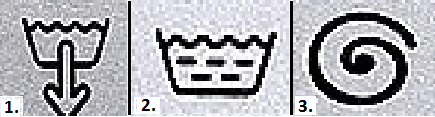
The first icon, counting from left to right, is well known and means draining water from the tank. You can use the drain if the washing program was not completed or had to be stopped forcibly. Under the number two is an icon that's easy to decipher—it's a rinse cycle. If the wash cycle has completed but you're unsure whether the detergent has been rinsed out of the clothes properly, you can enable a separate rinse cycle outside of the main cycle.
At first glance, the symbol number "3" looks confusing—a spiral of some sort! But if you look closely and use your logic, you can easily recognize the spin cycle in this spiral. The spin cycle is activated when, for example, you've washed clothes by hand and used the machine as a centrifuge. Or if the main wash cycle doesn't spin the clothes properly the first time. We've shown two more symbols commonly found on Bosch washing machine control panels in the image below.

The picture shows two dials. In picture "1," the dial is full, indicating a vigorous wash cycle, which lasts exactly one hour. The second dial is only a quarter full, indicating a super-quick wash cycle, lasting 15 minutes.
By selecting an energetic or super quick wash, the user can manually set the water temperature and spin speed of the laundry.
Special function signs
By special functions, we mean certain features unique to certain Bosch washing machine models. These functions also have fairly concise designations. Washing machine series Maxx 5 has 4 special features (all Maxx have almost the same ones):
- heavily soiled clothes – allows you to wash items using particularly intensive methods;
- Pre-wash – allows you to pre-wash items so that they wash better later during the main wash;
- Easy ironing – this function allows you to wash items at low speeds, leaving the laundry less wrinkled and slightly damper;
- Extra rinse – this function allows you to automatically start a second rinse during any washing program.

The usefulness of these features is undeniable, but competitors – automatic washing machines from other brands – also have similar features. If you are interested signs on the washing machine For brands like AEG, Electrolux, and others, please read the article with the same name published on our website.
It's also worth mentioning the icon on the control panel that represents the washing machine's on/off button—it's a diamond with a small symbol inside. We decided not to include an image of it in this article, as it's hard to confuse with anything else.
Well, that's it. We've covered the main icons found on Bosch washing machine control panels. We think after such a comprehensive explanation, you won't have any further questions, although anything is possible. Good luck!
Interesting:
8 reader comments
Add a comment
Headings
Washing machine repair




For buyers




For users


Dishwasher




Thank you! Everything is clear!
Super.
I don't understand the 60°C symbol. It's just 60°C (that's clear—60°C) and then there's this. What is that? Economy mode? Eco-friendly?
My BOSCH washing machine has a lighted circle inside a dot and a droplet on the side! What is it?
I had the same problem. Did you figure it out?
You need to run the drum cleaning mode
What does the sign in the form of an electrical plug with a red cord and four short red lines to the right of it mean on a Bosch 8 series washing machine?
Hello, how do I start this mode?