
Error code CL on an LG washing machine
 Despite the fact that we advise people to read their washing machine manuals in nearly every article, they continue to ignore this advice, which leads to many problems. One such problem is the CL error on an LG washing machine. What is this CL error, or maybe it's not an error at all? Let's find out what this CL code is that prevents you from using the control panel.
Reasons for the code appearing, what does it mean?
The cl code on an LG washing machine is not an error code at all, but a so-called information code. a code that tells the user that the control panel lock mode, or simply "child protection," is enabled. Developers of automatic front-loading washing machines were almost immediately concerned with the need for a lock, as the control panel of such machines is located very low, within reach of small children, which is very dangerous.
Please note! The code cl is essentially a shorthand for the English word "children," which translates into Russian as "children."
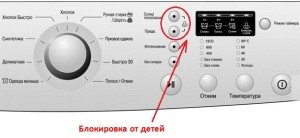 A child can easily stop the washing machine by pressing a few buttons, not only but also damage it, so if you have a small child in the house, remember to use this feature. So, the cl code on an LG washing machine is an information code, and if it appears after pressing a combination of buttons, that's normal. But what if this code always appears after turning on the washing machine, or even worse, suddenly appears mid-cycle, even though no one pressed anything? But let's not get ahead of ourselves.
How to set/remove a lock, lock options?
Almost all modern LG automatic washing machines feature a child lock, and the key combination for this lock is the same: super rinse plus prewash. The key layout varies across different models. They may be:
- to the left of the display;
- above the display;
- under the display.
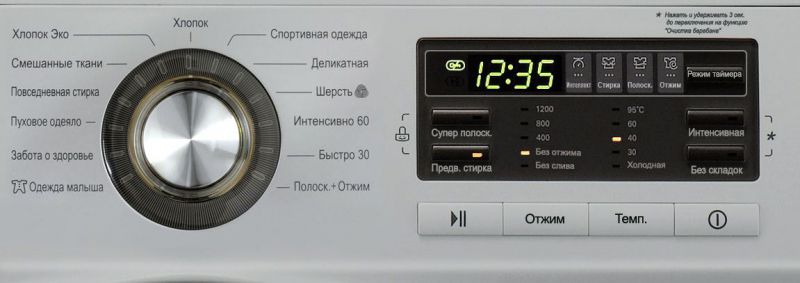
The essence of this does not change - Pressing two buttons, super rinse plus pre-wash, simultaneously and holding them for 3 seconds activates the child lock mode, The mode is also switched off.
It's quite difficult to confuse the buttons. The manufacturer has taken care of this by including symbols on the control panel. Specifically, the "child lock" buttons are marked with a smiling lock, with two curved lines extending from them, pointing to these buttons.
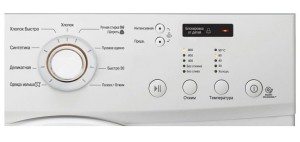 Once the cl mode is set, it remains until the end of the wash cycle. At the end of the washing process on some models of machines LG, child protection is reset, and on some it remains even if the machine is turned off. In some LG washing machine models, you can lock all buttons from children, and in some, all buttons except the on/off button.
This is a real challenge for consumers who purchased washing machines with a partial lock. After all, a child could ruin the wash cycle by pressing the on/off button. So what's the point of a lock at all if a child can still manipulate the machine? Moreover, this problem is typical for expensive machines packed with features, and the more complex the machine, the more delicate its control module. A sudden shutdown during a wash cycle could damage the microprocessor, which would certainly cause an error.
Important! If your LG washing machine model is supposed to have a complete control panel lock, as stated in the operating instructions, but everything except the on/off button is actually locked, this may indicate a faulty control module.
The blocking occurs spontaneously and cannot be turned off.
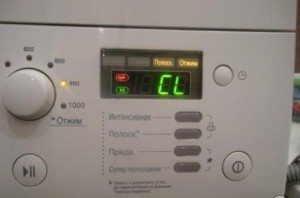 If your LG washing machine is working properly, turning the child lock mode on and off shouldn't be too difficult. But what if the "cl" message appears on the display when you turn it on, and you can't unlock the machine no matter how many times you press the buttons—is this a malfunction? There are several possible causes for this malfunction.
- The cl lock is activated spontaneously after the washing machine is plugged in and does not turn off, making it impossible to set a washing program.
- The cl lock is activated spontaneously during the washing process (for example, at the end of the wash before rinsing).
- The cl lock is activated by the user, but cannot be disabled or can be disabled only once.
In this case, you'll need to either seek help from a service center or attempt to repair the LG appliance yourself. Doing the repair yourself will require disassemble the washing machine, after removing the control module. Then, using a multimeter, you'll need to test the contacts of the super rinse and prewash buttons, as well as the on/off button. Most often, the causes of the above malfunctions are oxidized button contacts, frayed wires, or defects in the control module board.
Important! If you've checked the electrical system and determined that the problem lies with the control module board, contact a specialist. It's best not to attempt to repair this component yourself.
Finally, if your LG washing machine's display shows "cl" but the control panel isn't working, don't panic. In this case, it's not an error; your machine is simply child-proof locked, and you need to unlock it by simultaneously pressing the Super Rinse and Prewash buttons. Only if the lock doesn't unlock does this indicate a malfunction.
Interesting:


46 reader comments
Add a comment
Headings
Washing machine repair




For buyers




For users


Dishwasher




Thank you
Thank you very much, you helped a lot!!!!
Thanks for your help! But why bother pointing to the manual? If it's there, it's only natural to read it. People search for help online when the manual is lost. Isn't that obvious?
Thank you!!! I was about to panic! On my washing machine, I had to press both the super rinse and temperature settings at the same time!!
Thank you so much! It helped. I'm incredibly glad I didn't have to call a professional, wasting time, or even money.
Hello, I have an LG WD 10160NUP with a lock screen. Everything is on on the panel, but there's no water. Basically, it doesn't work. How can I remove it?
Thanks a lot!!!
Thanks a lot!
And I'll say thank you, the instructions are long gone. But I want to wash it 🙂
Hello, could you please tell me? I didn't turn on the lock. My husband wanted to add some pants, so he stopped the machine and didn't open the door, and kept clicking. I said, "You can't do that." He then restarted it. The machine finished washing, but the door wouldn't open.
Thank you.
Thanks a lot.
Thank you! You helped!
Thanks a lot!
The lock can be removed by pressing one key on the sensor if it is child-proof.
Thank you very much, you calmed my grandmother down.
Thanks a lot.!!!
My washing machine has touch-sensitive buttons, and under one of them is the word "child lock." I pressed and held just that button, and the lock was released.
Thank you so much. I thought the machine was finished. Hooray! It worked, everything's great!
Thank you so much. You were very helpful!
Thanks for clarifying that you have to hold the button combination for 3 seconds! We never used the lock feature, but it seems like it just locked all the buttons on its own, even after unplugging. Excellent protection! 🙂
Thank you so much! It worked! You helped!
Thank you very much, and you're wrong about the instructions. The machine is brand new and the manual is still there. We've reread everything, and there's nothing about this code. You saved us!
Thanks a lot!!!
Thank you very much for the advice.
We have an LG F2J5QN4W model with a touchscreen. The lock has somehow turned on and I can't turn it off. 🙁 Can you tell me how to do this?
LG FOJ5NN4W washing machine. The child lock activated before the wash cycle, and nothing works. The lock, as it turns out, lights up EL on the display (child lock). I can't unlock it, help!
Hello. The child safety lock on my LG F1281TD washing machine stopped working. I used it a lot because my son was small and constantly pressing the buttons. Is there a way to fix this?
What if it's a touchscreen on an LG? There are no buttons. I can't unlock it. Help!
Hello, I have an LG washing machine. It has a touchscreen, but there are no buttons. I can't unlock it. What should I do?
Bro, the spin button is the child lock button, press it and you'll be happy 🙂
Thanks for the squeeze, you saved me 🙂
Thank you very much 🙂
Thanks for the help with the machine, I didn’t call a repairman.
Thank you! I read it, pressed the buttons, and everything worked!
Thank you! You helped.
Thank you!
Thanks for the article. I spent half an hour searching for instructions and found them. Another half hour spent searching for the error code. I decided to look for a solution online, came to your site, and read about child lock. I spent another half hour trying all sorts of combinations. The hint was right there on the dashboard.
Thank you so much! Everything worked out perfectly! I didn't have to call a repairman! Thank you for your expert help!
Thanks! You saved the Bachelor!
Thank you. You were very helpful. CL mode turned on by itself. We couldn't figure out how to unlock the panel. Now everything is great.
My LG F1022ND washing machine—the pre-soak button lights up when I turn it on, and the wash cycles don't change, even though the control panel lights up. The machine won't start. Could you please advise me what to do?
Thanks for the help, I thought it was broken.
Thanks for your help
I read the entire article as "Chlorine Mode." If you read it that way, leave a + in the comments.
The machine doesn't have such buttons, so how can I remove this lock?