
LG washing machine dhe error
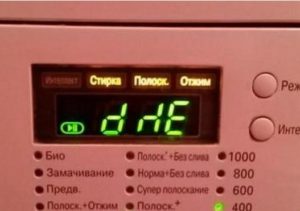 Only owners of washing machines equipped with a dryer may see the DHE error code on the display. What exactly could be faulty: the heating element, the temperature sensor, or the fan? Let's figure out what the DHE error means on a washing machine and how to repair it yourself.
The origin of this code
The user manual for the LG washer-dryer does not describe this error code in great detail. The manufacturer gives the following interpretation of the error: dhe: "problem with drying temperature". Additionally, the manual describes what to do to fix the problem. You should check:
- a heater responsible for drying things;
- temperature sensor and wiring supplying the thermostat;
- control board thyristors responsible for the operation of the heating element.
The further course of repair will depend on the diagnostics performed. In some cases, the heating element will need to be replaced or temperature sensorWork on the electronic board will be more complex. It may require either reinstalling the triacs or re-soldering the tracks leading from them.
Experienced technicians also recommend checking the dryer fan connector.
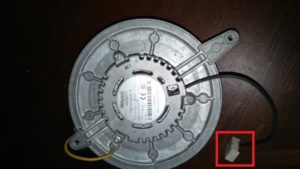 In some cases, especially on Russian-made LG washing machines, these connectors are not fully seated. After some time of use, the connection is lost, resulting in problems with drying clothes. The fan stops working. The solution can be very simple: securely fastening the connectors in place.
If your LG washer displays the DHE code, pay special attention to checking the temperature sensor. The dryer thermostat resistance at a room temperature of approximately 25°C should be 49 kOhm. If the diagnostic reading significantly deviates from the specified value, the sensor will need to be replaced.
Replacing the heating element
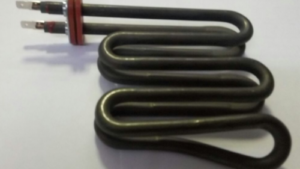 If your washing machine displays the DHE code and a faulty heating element is detected during the inspection, the element needs to be replaced immediately. We'll explore how to fix the problem and whether it's possible to repair it yourself. So, the steps for replacing the heating element in a washer-dryer are as follows:
- de-energize the device;
- Remove the top cover of the machine housing. To do this, unscrew the two bolts holding the panel in place;
- remove the metal bar located under the lid to gain free access to the inside of the washing machine;
The drying heating element is located in the heating chamber; to access the element, it is necessary to open it.
- disconnect the hatch cuff and all electrical connectors from the heater chamber, unscrew the screws holding the upper part of the part;
- remove the heating chamber cover, the heating element is located directly underneath it;
- unscrew the bolt holding the heating element;
- install the new heating element in its original place and secure it with a screw;
- Make sure the chamber seal is tucked into place around the entire perimeter of the part;
- Assemble the washing machine in reverse order.
When pulling the cuff onto the heating chamber, it is better to put on the back part of the seal first, then the front one.
If your machine displays the DHE code, there are problems with the drying system. It's necessary to identify the fault in the system and, based on the diagnostic data, replace the damaged component. Simple repairs can be performed independently, but if the defect is found on the control board, it's best to contact a professional.
Interesting:



4 reader comments
Add a comment
Headings
Washing machine repair




For buyers




For users


Dishwasher




I wonder if the designer of this unit will ever figure out that the problem in the drying chamber is regularly caused by dust from laundry, which accumulates in the chamber containing the heating elements during the drying process. The fan jams, and the sensor detects overheating and stops the drying process.
Thanks for the comment. I lifted the lid of the washing machine, unscrewed the fan chamber, and found a ton of dust. I pulled out as much as I could and cleaned the temperature sensor (it had a lot of dust stuck to it). The fan wasn't spinning properly either, so I pulled out a dust ball, and after that, the fan started spinning smoothly. I put it back together, and everything worked fine.
After 15 minutes, the unit displayed a dHE error in drying mode. After disassembling, a visual inspection revealed that the fan chamber and the impeller itself were completely clogged with dust and dirt from laundry. I cleaned everything and also tested the power circuit going to the heating element. The circuit is as follows: neutral goes directly to one contact of the heating element, and the live wire goes first through a thermal fuse (in a square, tablet-shaped housing), then through a ceramic short-circuit fuse (located in heat-resistant cambric) to the second contact of the heating element. I tested the fuses and they were working, the heating element resistance was 33 ohms, also working. The temperature sensor was 49 kOhm, also working. I reassembled everything, and it worked. In this case, cleaning the fan chamber and the fan itself helped.
It's important to clarify which specific LG washer-dryers this article is fully accurate for. For the LG F2V9GC9W, the statement that the thermostat resistance should read 49 kOhm is incorrect. The ELTH K-II 262A T175 NC155 thermostat with manufacturer code 6931FR3108A has a resistance within the multimeter's error range, but definitely not 49 kOhm. I can confirm this because a new, identical thermostat ordered from ITA GROUP, with the same manufacturer code, showed the same resistance, within the multimeter's error range. I have no reason to doubt the multimeter's readings; it accurately measures the internal resistance difference for an AA battery when the battery load changes. Therefore, I'm sorry I wasted my money and, especially, my time waiting for the thermostat to arrive. The bottom line is that the solution was to clean the fan chamber and the fan itself, as suggested in all the comments above.