
Error E04 in Candy washing machine
 The self-diagnostic system makes life much easier for washing machine owners by displaying a coded "explanation" on the display when the machine freezes or shuts down. The displayed symbols help identify the problem area and expedite repairs. All you need to do is read the code correctly. For example, if you encounter the E04 error in a Candy washing machine, you should check for an overfilled drum. What happened and how can you resolve the issue?
Manifestation and deciphering of the code
Error E04 occurs suddenly: the laundry is loaded, the program is selected, the wash cycle is started, but the machine remains silent. Sometimes the machine displays a warning signal before the water has even started filling, but more often, it reports the problem immediately after the water has been drawn. The code on Candy washing machines can also vary and be displayed as “E4”, “Err 4” or “Error 4”.
If your Candy washing machine doesn't have a display, the E4 error will manifest itself differently: by flashing lights on the dashboard. The number of flashes corresponds to the code—the LEDs will flash four times, then go out for about 10 seconds, and then flash again. Which lights will illuminate depends on the machine model.
- Holiday and Aquamatic. When the E04 error code appears, the light next to the "Cold Water Wash" program lights up, accompanied by a snowflake icon.
- Candy Grand. Machines in this model range display the E04 error code by flashing the "Intensive Wash" and "90" lights. The first indicator is schematically represented by a shirt, and the second is located on the left side of the countdown timer.
- Smart. The situation is similar here: the "Intensive Wash" button (shirt icon) and "90" or "Start."
Error 4 manifests itself differently depending on the Candy model, but the distinguishing feature will be the appearance of the number “4”.
Error 4 has a simple meaning: the washing machine's water level sensor has detected an overfilled drum. We'll discuss the causes of excess liquid in the drum and what to check first.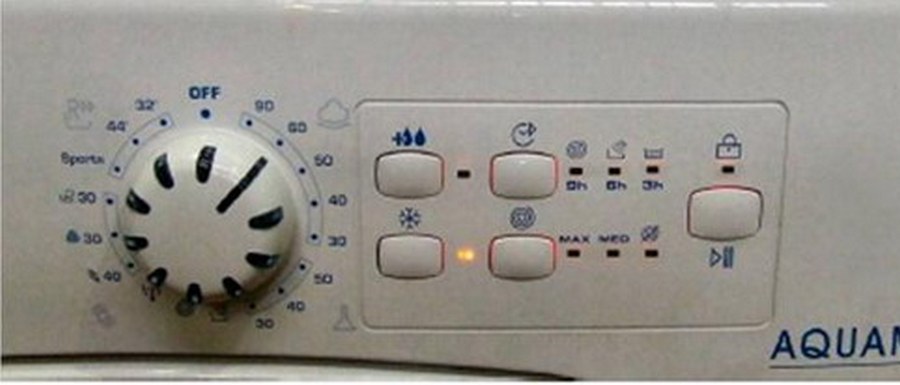
What should you check first?
Error E04 does not always indicate a serious breakdown. It is quite possible that the water level sensor has detected a slight overflow in the washing machine. It is worth considering the situations in which this signal code appears.
- The drain line is clogged. When the machine is connected to a siphon, if the siphon becomes clogged, previously drained liquid returns to the machine. This causes pressure surges, and the washing machine may fill with excess water even when turned off. To fix the problem, clear the pipes and run the drain program.
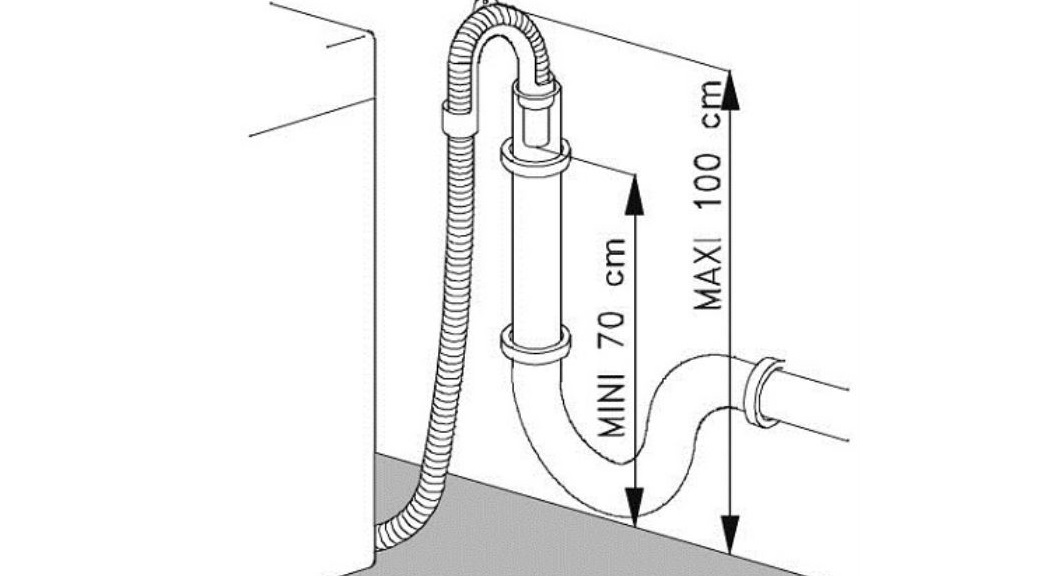
- The machine is installed incorrectly. According to the instructions, the drain hose should be raised 60-100 cm from the floor, otherwise wastewater will not drain from the drum. Failure to comply with the established standard causes a so-called siphon effect. To break the "chain," you will need to connect the machine according to the manufacturer's recommendations or install a special check valve.
- Excessive foaming. This indicates that the maximum water level has been exceeded, and that the drum is overloaded with foam. This can occur if the detergent dosage is too high, the wrong detergent is used, or porous items such as tulle, down jackets, or wool are washed on a standard cycle. Depending on the cause, a "cure" is selected: reduce the amount of detergent, select a different detergent, or use a delicate cycle for fluffy items.
- System failure. A one-time failure of the control board cannot be ruled out. The module often overheats, freezes, and randomly displays an error code. It's worth turning off the machine for 15-20 minutes to clear the signal, and then try starting the machine again. If the display is clear, there was no problem.
If none of the above solutions apply, you need to dig deeper. You'll need to check the inlet valve and test the pressure switch. Doing this yourself isn't difficult. Full instructions are provided below.
Inlet valve
The washing machine's inlet valve can fail at any time, resulting in Error 4 appearing on the display. Therefore, it's recommended to start checking it. Anyone can handle this task – just follow this simple procedure:
- unscrew the screws holding the top cover and remove it;
- find the valve on the inner wall where it meets the inlet hose;
- inspect the valve body for damage;
- if there are no visible defects, then remove the device for manual diagnostics;
- disconnect the pipes connected to the “box” by loosening the fixing clamps with pliers;
- disconnect the wiring;
- loosen the bolts holding the part and remove the valve.
Error 4 in Candy may indicate a faulty inlet valve in the washing machine.
Once you have the valve in your hands, carefully inspect its surface and the integrity of the connected hoses once again. Next, check the device for functionality: lift the box over the sink, connect the inlet hose to it, and turn on the water. A functioning part will not leak liquid. If there is a leak, repair will not help – only a complete replacement.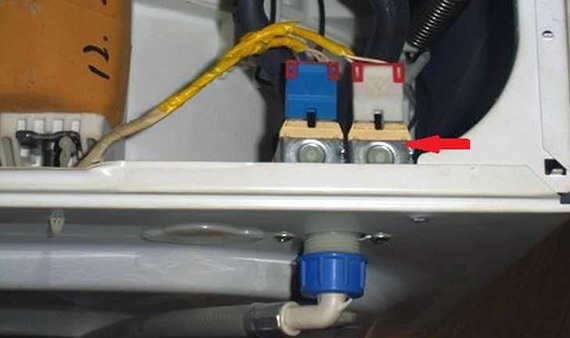
You can also test the valve another way: apply 220 volts to the coil and observe the reaction. If the section opens and fills with water, everything is fine. Otherwise, you should purchase a working unit. But be careful, as electricity and water should not come into contact.
It's best to be on the safe side with a final check using a multimeter. Simply set the tester to resistance mode and attach the probes to each winding. Normally, the display should read around 3 kOhm. If anything deviates, replace it.
We check the sensor that monitors the water level
If the valve is working properly, check the pressure switch. The level sensor is located under the top cover of the Candy washing machine, making it easy to access. Furthermore, you can diagnose the problem without the help of a professional repairman. Follow the instructions.
- We disconnect the washing machine from the power supply and turn off the water.
- We unscrew the screws holding the cover and pull the cover towards ourselves.
Be careful when removing the cover from the Candy machine: its edges are sharp.
- We remove the panel and look for the pressure switch.
The pressure switch is a round plastic box with a long tube inserted into the tank. To begin testing, you need to disconnect the wiring and remove the sensor. What do you do next?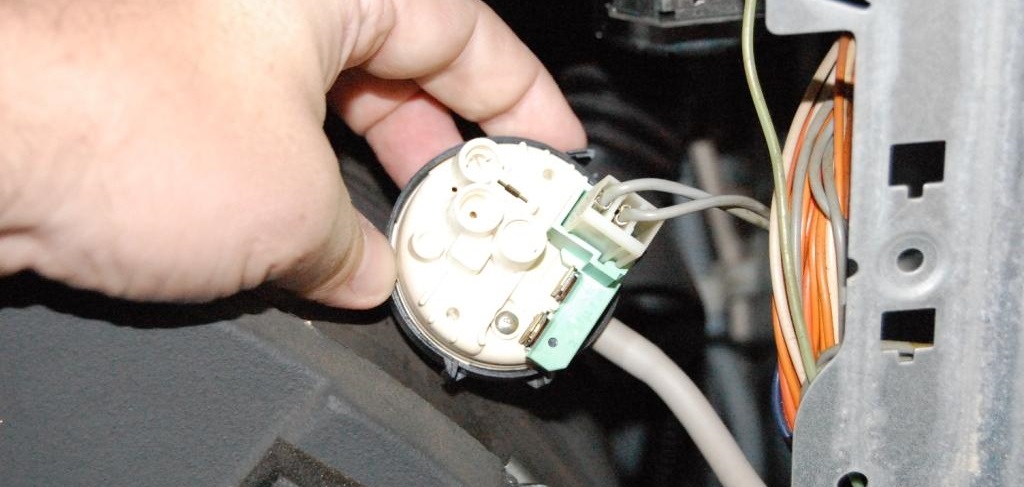
- Find a tube of the appropriate diameter, install it on the fitting, and gently blow on it. A functioning sensor will "respond" by engaging the contacts—1-3 clicks.
- We inspect the tube and body for damage or blockages. To clean the pressure switch hose, simply rinse it under strong water pressure.
- Take a multimeter, set it to "Resistance" mode, and apply the probes to the pressure switch relay contacts. Each contact activation on a working sensor causes the display to change. If the display doesn't change, the device is faulty.
Error 4 is easy to fix on your own. Just follow our instructions and remember safety precautions.
Interesting:

1 reader comment
Add a comment
Headings
Washing machine repair




For buyers




For users


Dishwasher




I checked according to your instructions: I have a Digital DWA8530W machine, the feed valve is working properly, the level sensor - pressure switch too, I checked the contacts, but the Err4 error did not go away.