
Error F03 in a Dexp washing machine
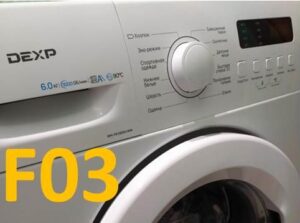 The more modern a home appliance, the more components can fail, which the "home assistant" will alert the user with a special code. Error F03 in a Dexp washing machine occurs when the appliance fails to heat the water in the drum. This is most often caused by a damaged heating element, but sometimes the cause lies in other parts of the washing machine. We'll take a detailed look at all the causes of this error and how to fix it at home.
Why doesn't the machine heat water?
The F03 error code is very annoying, because the machine can wash, but it cannot heat the water even to 30 degrees Celsius, let alone 90. However, you shouldn't immediately dismantle the heating element and go buy a new one, since several components are always involved in heating the liquid in the tank, and these could also fail.
Moreover, we recommend not disassembling the Dexp washing machine, but rather performing a service test first. This will confirm that the machine's performance has indeed been reduced due to damage, not a one-time system failure. What should you do to run this test?
- Turn on your device.
- Press and hold the Options and Temperature keys simultaneously.
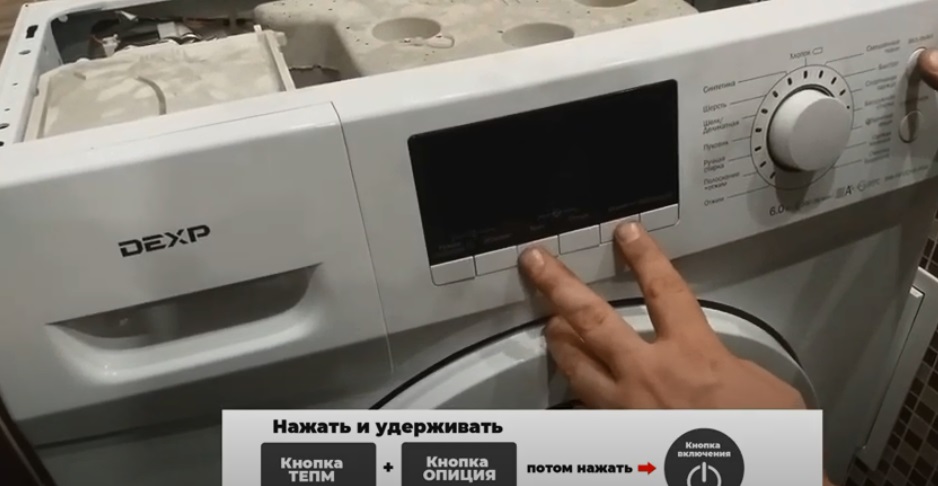
- Without releasing the buttons, press the power key to start the test cycle.
- Wait until the service test starts and only then release the keys.
- Turn the programmer to test different components of your “home assistant” in turn.
- Once the test is complete, simply press the power button to turn off the machine.
It's advisable to check absolutely all components of your household appliance during a service test to accurately identify the component requiring repair. After diagnostics, you can begin repairing the appliance.
It's easier to start with the pressure switch
The first thing to check is the water level sensor, as this is the easiest and quickest way to do it. The pressure switch is located directly under the top panel of the washing machine, near the back wall on the right. The element itself looks like a round plastic box with a long, thin hose running to the washing machine's drum. To check the element yourself, you need: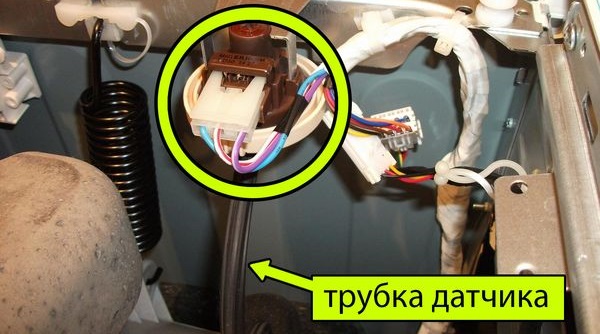
- find a tube that is comparable in diameter to the water level sensor fitting;
- loosen the clamp on the thin hose and unclip it;
- place the tube against the nozzle and blow gently into it;
- If after this you hear 1 to 3 clicks, then the element is OK.
For a complete test, it is better to also check the pressure switch using a regular multimeter set to resistance measurement mode.
If the pressure switch does not respond to all tests, and the readings on the multimeter do not change, then the only option left is to replace the element. There is no point in trying to repair the water level sensor; it is much easier and safer to just buy a new one from the store.Loosen the clamp of the faulty pressure switch, remove the connector, take out the old part, and immediately install the new one in its place.
Be sure to check the heating element
The water heating element is the next step in the mandatory troubleshooting process when the F03 error code appears. The unit is located at the bottom of the Dexp washing machine, hidden by the rear panel. To access it, you'll need to turn the machine over, release the fasteners from the rear panel, and then remove the panel itself.
Be sure to disconnect household appliances from all utilities before starting work.
Once you have free access to the washing machine's internal components, all that's left to do is locate the heating element with the thermistor and begin testing. What to do with the heating element?
- Take a photo of the wiring connected to the part so that you have an example of the correct connection when reassembling.
- Disconnect all wires from the water heating element.
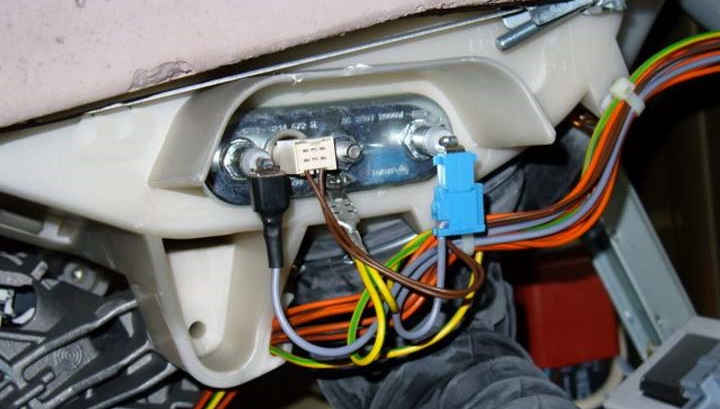
- Using the same multimeter in resistance measurement mode, check the heating element contacts, having first set the tester to “200”.
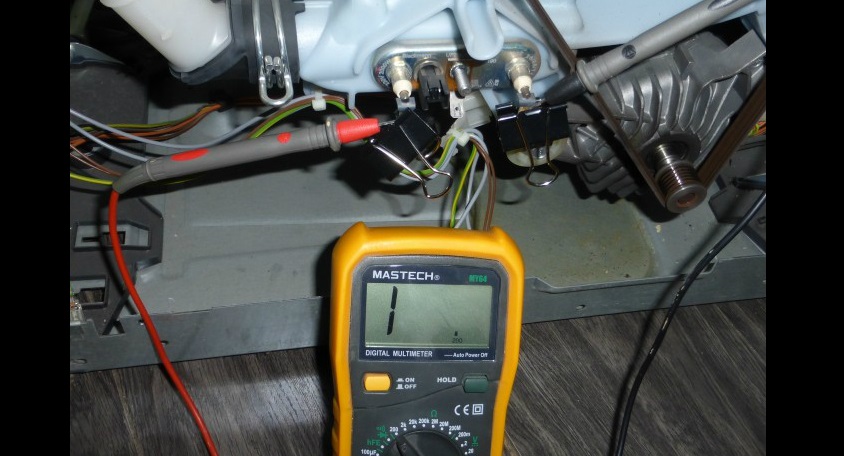
- If the part is in good working order, the values should be within 26-28 Ohms. If the display shows “1,” then there is an internal break in the element, and if “0,” then this means that a short circuit occurred earlier.
Do not attempt to repair the heating element yourself if the multimeter shows an open or short circuit - you can throw the part away and buy a new one instead.
- Now set the multimeter to "Buzzer" mode and check the contacts. If the tester produces a loud beep, the heater needs to be replaced.
Of course, to replace a damaged element, it must be removed. This is easy to do yourself without calling a service center specialist. However, if the machine is old, the seal may have expanded and become blocked. In this case, the rubber gasket needs to be treated WD-40, wait about 15 minutes and only then begin the main work: remove the thermistor, the retainer, and then the water heating element itself.
Always buy only genuine parts for your Dexp washing machine to extend its lifespan and avoid damaging your appliance. The easiest way to find a new heating element is by the serial number on the washing machine body, or you can take the faulty part with you to the store as a sample. Before installing the new heating element, be sure to clean the mounting area.
Interesting:




Readers' comments
Headings
Washing machine repair




For buyers




For users


Dishwasher




Add a comment