
Error code F05 on an Indesit washing machine
 Indesit washing machines with a control panel display have built-in error codes that alert you to any malfunctions or faults. One such code is F05, which can appear due to both serious issues and poor maintenance. Let's look at how to troubleshoot this issue.
Why does this error appear and what does it mean?
If your Indesit washing machine stops draining, you may see error code f05 on the screen. This indicates a problem with the drainage system. What could be wrong? There are two possibilities:
- drain pump (most likely failure);
- water level sensor (pressure switch).
If the water sensor fails, the pump will drain the tank, the draining process will complete, but the pressure switch will not signal that the machine is out of water. As a result, the program will freeze, and an error will appear on the display.
In some cases, this error can cause the Indesit machine's drain hose, pipe, or sewer line to become clogged. Cleaning these will resolve the issue.
Where to look for and how to fix the problem?
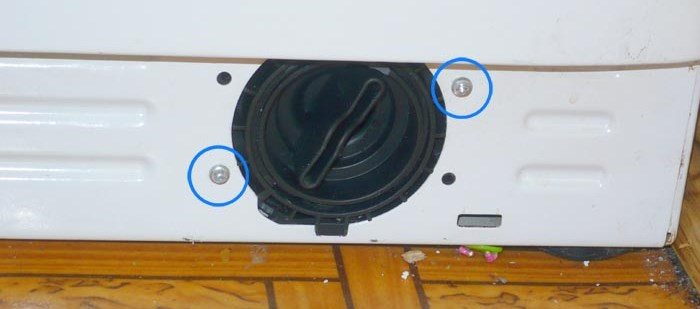
The first thing to do when the F05 error appears is to rule out any possible blockages throughout the drain line. To check the drain filter, locate the small door or panel at the bottom of the Indesit washing machine and open it. Behind it, you'll see a cover. Gently turn it counterclockwise and pull it out. Before unscrewing, do not forget to place a large cloth underneath to absorb any remaining waste water flowing out of the tank.
The filter should be inspected and rinsed thoroughly with tap water. If it appears relatively clean and no blockages are found, we move on to cleaning the drain hose running from the machine to the sewer outlet. To do this:
- prepare a bucket for waste water;
- loosen the clamp holding the drain hose to the sewer branch;
Important! Check your sewer line for blockages. It's possible the water simply can't get past the blockage.
- lower the hose into the bucket to drain the remaining water;
- we take out the drain filter;
- unscrew the bolt that holds the pump to the body;
- Now the Indesit machine needs to be laid on its side;
- we take out the pump from the bottom;
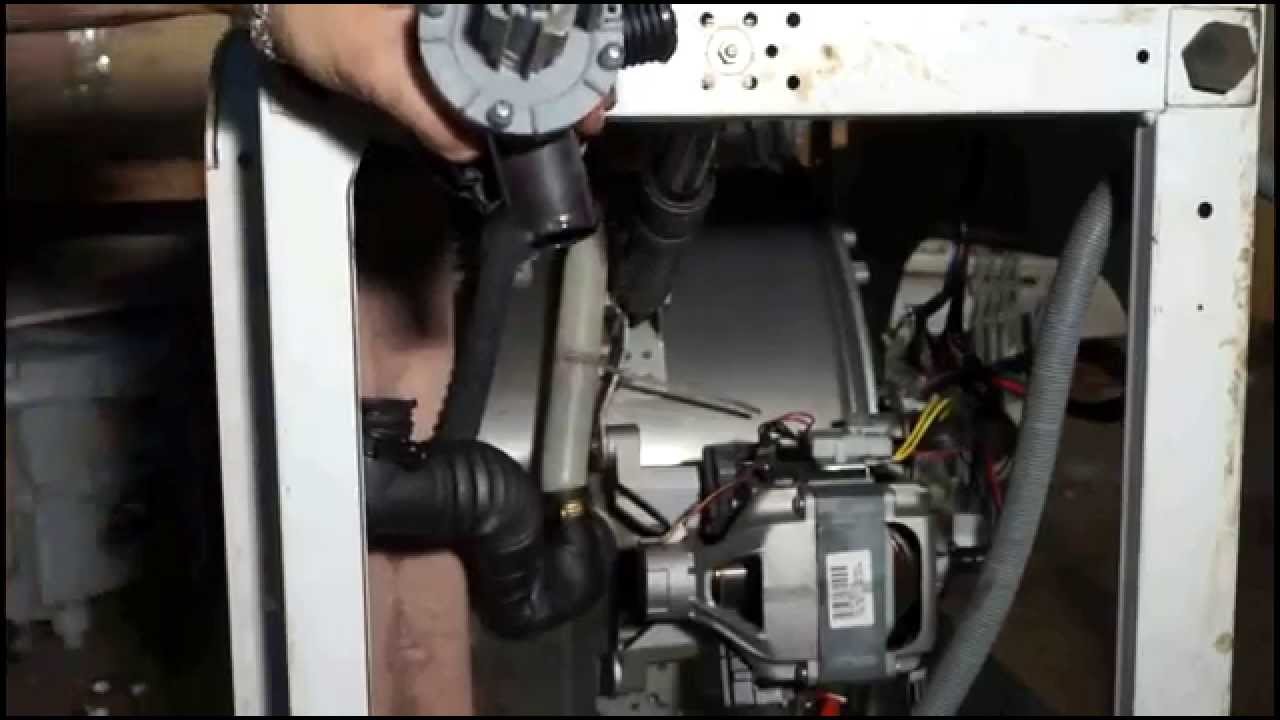
- loosen the clamp on the hose;
- we take the hose out of the housing;
- we flush the hose;
- We assemble the machine in reverse order.
You can immediately check for blockages in the drain hose by disconnecting it from the pump and tank. Rinse it under water and reinstall it. If the drainage system also turns out to be without any significant blockages, then do not rush to assemble the machine, but immediately inspect the pumpIt also needs to be disassembled and cleaned, and possibly replaced with a new one. Detailed instructions for this work are described in the article on How to clean a drain pump.
After checking the drainage system and pump, run the machine in test mode to verify the problem has been resolved. If the F05 error appears again, you need to look for the water level sensor. The pressure switch in the Indesit washing machine is located under the top cover; it's easily removed by unscrewing two screws on the back of the machine. On the side panel, you'll see a round part with two wires and a small hose.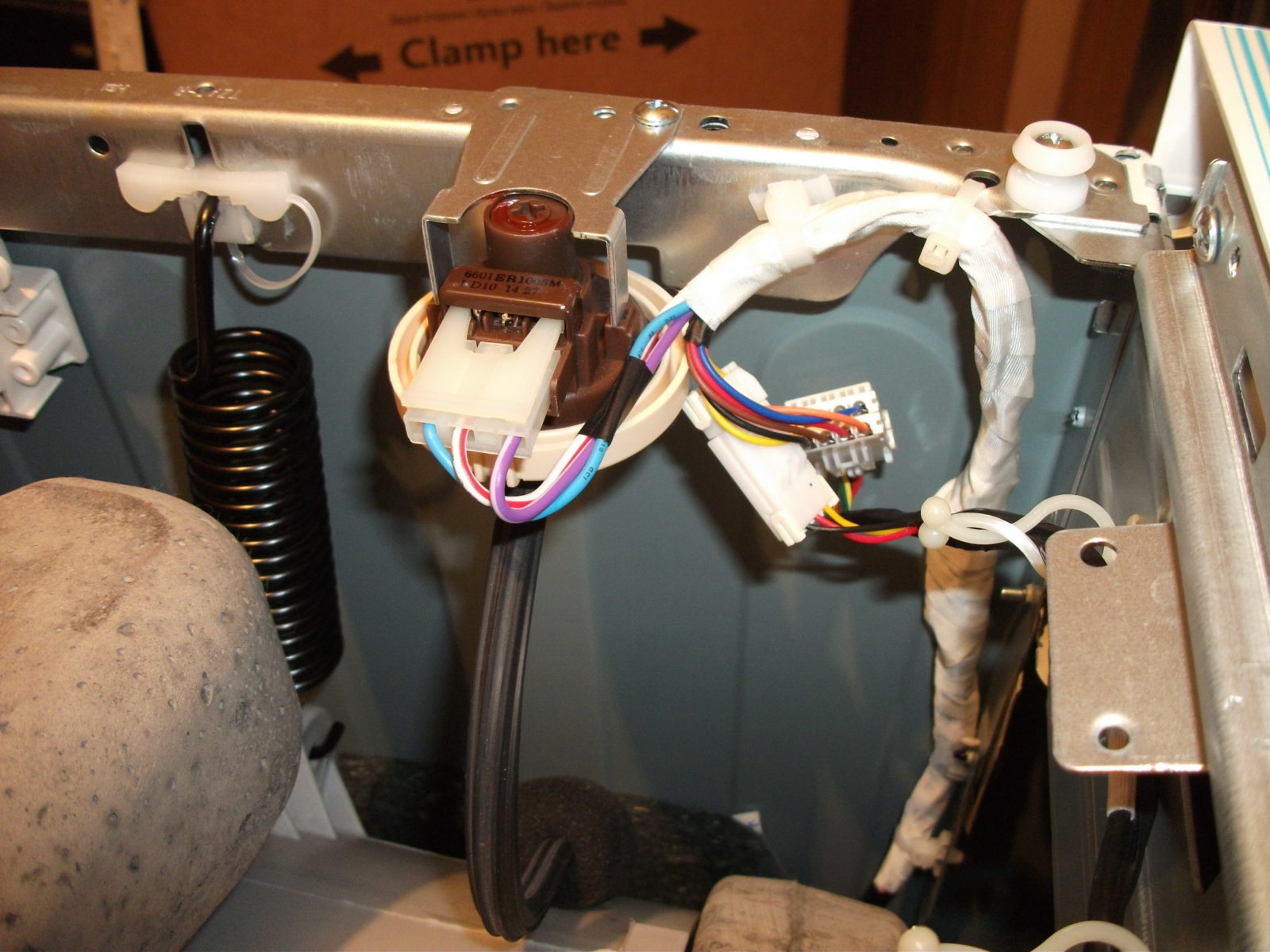
Don't rush to change it to a new one right away, you need to first check the pressure switch Check for proper operation. The problem is that the wire contacts or the hose that supplies pressure from the tank to the pressure switch may be damaged. After checking all the components and the pressure switch itself, reassemble the machine and run the test run.
If the problem persists after this, which happens extremely rarely, then the cause must be sought in the electronic module of the Indesit machine. It's quite difficult to cope with such a task on your own; it's better to contact a professional. But if you have the desire and time, you can read the article about repair of electronic modules in washing machines.
So, error f05 is related to the Indesit washing machine's drainage system, including the pump and pressure switch. A careful, step-by-step inspection of all components will, in most cases, help resolve the issue yourself. Happy repairing!
Interesting:



16 reader comments
Add a comment
Headings
Washing machine repair




For buyers




For users


Dishwasher




Thank you very much for the detailed instructions!
Thank you so much! Even I could do it!
Thank you! Everything is written clearly!
Great! Thanks! The hose was clogged, fixed it in 5 minutes.
The machine is turned off, but sometimes it collects a little water in the drum.
Thanks a lot!
Thanks a lot!
Thank you for the detailed information.
I had an F05 error occasionally. The pump seemed to be working, but it turned out the rotor bearings had developed significant wear, and the rotor would occasionally stick to the stator. The pump needed replacing; the machine is 15 years old. I temporarily solved the problem by rotating the rotor shaft 180 degrees.
What nonsense you wrote
Thanks, guys!
Thank you. Everything is clear and precise.
Sock in a pump
Sock in the filter.
Thank you so much!!! You're probably a washing machine expert and you've revealed such a valuable secret to us! We were about to pay to fix it, but you saved us! 🙂
Thank you. The information was helpful, everything was clear and understandable!