
Siemens washing machine error code F16
 Every washing machine owner knows that there are certain error codes that can help pinpoint the source of a problem. While this feature doesn't allow for 100% accurate diagnosis of the fault on the first try, it can identify a range of issues, making things easier for both the owner and the technician. One of the most common Siemens errors is F16, so it's important to know everything about it, including what to do and how to fix it.
Let's decipher the code
As soon as you see error F16 on the display, you can be sure the problem is in the door. This is also indicated by the machine refusing to start the wash cycle. In this case, the owner of a Siemens washing machine has two options: replace a defective door element or repair it. But first, you need to understand the problem. First, conduct a cursory inspection:
- If the door does not lock when closed, proceed to dismantling the door, as the problem is likely with the lock or the locking tongue.
- If everything closes but does not lock, then replacement is needed.
- The door hinges may be worn out. They will also need to be replaced.
- The plastic handle itself can also break. Replacing this part with a new one is easy.
None of these symptoms apply? Then you need to look deeper inside the machine. To do this, open the door, unscrew all bolts and fasteners, and remove it. Disassemble as much of the locking element, the door itself, and so on as possible to inspect for any defects. Pay special attention to the lock. Small parts like springs or pins can pop out, but they can easily be replaced. If the damage is more serious, for example, the door locking system has failed, you will have to buy a new one.
Let's remove the locking device
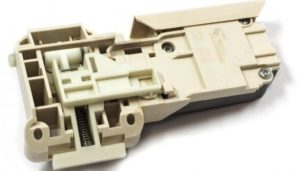 DIY repairs are entirely possible; the main thing is to identify the cause and remember safety precautions. First, unplug your Siemens washing machine and turn off the water. Second, the door may be stuck closed, meaning you'll need to open it first. In this case, follow these steps:
- Place the home assistant on its side so that you can reach the bottom;
- unscrew the screws and remove the panel;
- put your hand through the bottom hole and feel the UBL;
- Use your fingers to push the latch until the door opens.
Important! If you're worried about laying the machine on its side, you can access the locking device through the top wall. Remove the panel and follow the same steps.
Now that the hatch door is accessible, you can begin replacing the door locking system. First, lift the rubber seal. It's held in place by a clamp from below. If it's plastic, unfasten the clamp; if it's metal, pry it with a sharp object and remove it. Now the rubber seal can easily be bent back into the drum.
After this, you'll see the locking mechanism itself. Unscrew the two bolts holding it in place on the outside. On the inside, it's secured only by a plastic clip. Note the contact locations and release the connections. Reach into the lock from the back of the hatch and pry it out. Now you can begin inspecting it and, if necessary, troubleshooting.
We will test and replace the UBL
Since the blocker is an electronic device, it must be tested with a multimeter or tester. To do this, you need to know what each contact is called and what it does. To do this, download the electronic circuit diagram for the component from the internet. Now you can begin:
- set the tester to resistance measurement mode;
- Find the phase and neutral contacts and attach the tester clamps to them. If the screen displays a three-digit number, everything is OK;
- Now move the probe from the live contact to the common contact, leaving the neutral one in place. Did the number 1 or 0 appear? Then there's nothing to worry about.
In other cases, you'll have to replace it, as repairing the door lock is pointless. Choose the right part for your SM model carefully.
Interesting:



Readers' comments
Headings
Washing machine repair




For buyers




For users


Dishwasher




Add a comment