
Siemens Washing Machine Error Code F21
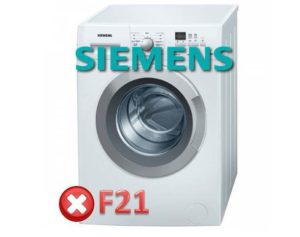 Regardless of the model and configuration, the F21 error in a Siemens washing machine indicates one thing: a serious malfunction. You won't be able to start the machine or continue washing; first, you need to troubleshoot the problem and reset the alarm code. This will require attention to the washing machine's motor and control system. We'll explain how to restore your "home assistant" to working order without worsening the problem with step-by-step instructions and explanations.
What kind of problems does the code cause?
The main advantage of Siemens washing machine error codes is that they help narrow down the problem. For example, an illuminated error code with F21 indicates a forced drum stop. To correct the problem, we first properly diagnose the source of the problem. This could be:
- broken tachogenerator;
- worn out electric brushes;
- burnt out triacs;
- damaged reverse relay.
The mentioned faults prevent the full functioning of the control system and the operation of the engine. The drum stops rotating and the machine cancels the set cycle. Despite the severity of the problem, you can determine the cause and carry out repairs yourself. Here's a step-by-step guide on what to do if the F21 error appears.
- We disconnect the washing machine from the utilities.
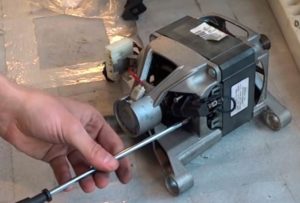
- Unscrew the two screws at the back and move the top cover.
- We remove the back wall.
- We remove the drive belt.
- We turn the machine over onto its left side.
- We loosen the screws holding the motor.
- We disconnect the supply wires, the connector and the ground.
- We sharply pull the engine towards ourselves.
After placing the engine on a level surface, we begin checking it sequentially for any existing faults. First, let's inspect the tachometer generator. On Siemens automatic transmissions, this sensor rarely fails, so its failure is unlikely.
We test using a multimeter, connect the probes to the contacts and evaluate the result: the final voltage should not be high.
Next, we turn our attention to the brushes. They are located on both sides of the motor and are removed from the housing after unscrewing the retaining bolts. We remove them from their holders by pulling out the brass strip and carefully disconnecting the contacts, and then measure the carbon tip. If the length is less than 0.7-1 cm, replace both brushes with new ones.
Checking the engine correctly
The DIY repair continues with a more complex procedure: checking the motor for fin integrity. To do this, completely remove the rotor from the motor and inspect the commutator. If any peeling or delamination is noticeable, the motor or rotor must be replaced (if the peeling is up to 0.5 mm, the surface can be temporarily ground down).
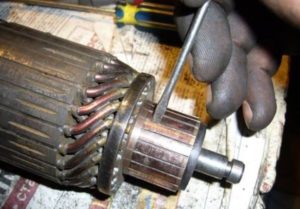 Be sure to clean the engine body of any dust and dirt. We pay special attention to the grooves between the lamellas and polishing the entire surface. You shouldn’t neglect the grinding process, which is carried out as follows:
- we install the motor back;
- connect the wires (do not put on the drive belt);
- we run the spin cycle twice at minimum speed;
- we put the belt back in place;
- We turn on the mode for at least an hour with an empty drum and minimum spin.
Afterwards, follow safety precautions. For the first 2-3 cycles, load the drum halfway and select low power settings. Then, use the machine as usual.
After renovation
To resume washing, Siemens machines require not only fixing the problem but also resetting the alarm code. The error cancellation algorithm may vary for different models, but it's not critical. Most often, the following steps are sufficient:
- turn the program selector to position “0”;
- move one division to the left;
- press “Start” and hold for 2-3 seconds;
- return the cursor to its previous position.
Just wait a bit, after which the code will reset and the machine will be ready to use. Often, this procedure needs to be repeated several times. Sometimes, instead of "Start," you have to try the "Spin" button.
Interesting:


2 reader comments
Add a comment
Headings
Washing machine repair




For buyers




For users


Dishwasher




I am very pleased with the technical support, it is written clearly.
The SIEMENS ADVANTIQ IQ300 won't erase, error f21. The touch buttons aren't responding.