
Error code H1 on a Samsung washing machine
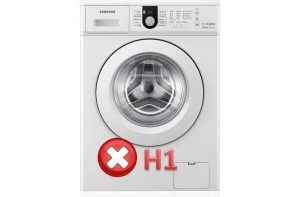 Self-diagnosis is a great innovation in washing machines. The more modern the washing machine, the more accurately it can identify the cause of its malfunction and pinpoint the error. If your Samsung washing machine displays the H1 error code, you should immediately stop using your "home assistant" and begin working on deciphering the code. We can help you with this.
Possible situations that generate error H1
Let's start with the specifics of the H1 error. Not all Samsung washing machine models display the H1 error when similar problems occur; in some cases, the HE or HE1 codes appear. Remember that these codes mean roughly the same thing – you will have to check the heating element. It would seem that there is nothing difficult about unscrewing the back panel of the washing machine and checking the heating element for proper operation?
 The problem is that the heating element in a Samsung machine is located at the front, not the back of the drum. This means you'll have to remove the front panel along with the control panel to gain access to the heating element. One of our website's articles explains how to remove the front panel of a Samsung machine. disassembling a washing machine (Indesit, Hansa, Samsung, LG, Siemens, etc.)Once the wall is removed, it will be necessary to find the cause of the H1 error.
- Perhaps the reason is that the heating element itself or the temperature sensor has burned out.
- It is possible that the heating element has short-circuited or one of the power supply wires is not making contact.
- Either both the heating element and the temperature sensor are working properly, but the overheating protection has simply tripped.
Important! Each of the above causes requires inspection, and once the problem is identified, it must be repaired immediately, and the machine will operate without interruption.
The heating element is short-circuited, burned out, or its wire is not making contact.
After removing the front panel of the Samsung washing machine, we need to remove the protective cover from the heating element, which is located directly under the hatch in a small niche. Pull out the cover and you'll see two large contacts with wires attached. First, we need to visually inspect the wires to ensure they are secure and undamaged. This could be the cause of the error. Next, take a multimeter and measure the resistance of the contacts and wires. To do this, follow these steps: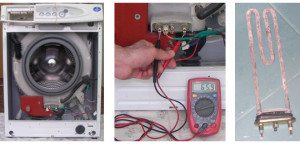
- remove the wires from the contacts of the heating element and the temperature sensor;
- We measure the resistance of the heating element contacts. If the multimeter display shows a value of 28-30 Ohms, it means the heater is working properly; if the display shows one, it means the heating element has burned out;
- We measure the resistance on the wires; the device should show approximately the same value as when measuring the heating element, unless, of course, the wire is broken.
If you discover a broken wire or a burnt-out heating element, you'll need to either replace the wire or the heating element. Replacing the wire is straightforward, so we won't provide any detailed explanations. We'll discuss replacing the heating element in more detail.
- We unscrew the nut that secures the heating element to the tank; it is located right in the center between the contacts.
- We grab the heating element contacts and begin to pull it towards ourselves, not forgetting to swing it from side to side.
- We remove the old heating element, then take an old toothbrush and push it into the hole. Our goal is to clean out any scale and other debris that has accumulated at the bottom of the tank.
- We lubricate the edges of the hole with soap and carefully insert the new heating element of the Samsung washing machine into it.
Please note! Make sure the rubber seal on the new heating element doesn't get knocked off during installation, and especially doesn't break.
- We connect the wires to the new heating element and temperature sensor, install the protective cover, and reassemble the washing machine. Next, run a test wash and enjoy your Samsung washing machine.
The temperature sensor burned out
In the vast majority of cases, the cause of the H1 error popping up on a Samsung washing machine comes down to damaged wires, contacts, or a burnt-out heating element. It happens that the heating element is working properly, the wires are intact, but the error still appears. In this case, a burnt-out temperature sensor is a possible cause. Samsung washing machines have one type of temperature sensor—a thermistor. It's installed directly in the heating element and easy to find. Here's what to do: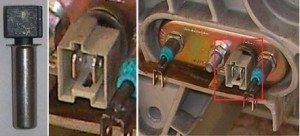
- we find the temperature sensor - it is a black plastic element with contacts, which is located directly on the heating element;
- we measure its resistance using a multimeter;
- we remove the wiring from it;
- carefully pry it up with a flat-head screwdriver and pull it out;
- we insert a new temperature sensor in its place and connect the wires;
- After these simple manipulations, everything should work fine.
Important! A properly functioning, disconnected temperature sensor should show a value close to 35 kOhm.
The overheat protection has been activated
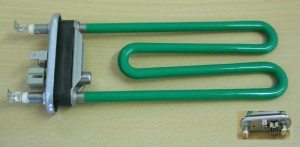 All modern heating elements are equipped with overheating protection. It works very simply. A coil runs inside the heating element's tubes. This coil is connected to the heating element's contacts through a fusible link—this is the fuse. If the coil overheats, the fuse will melt, interrupting the circuit, and the heating element's coil will survive, but the machine's display will show error H1.
The problem is that these types of fuses cannot be reset, and if they trip, the heating element will have to be replaced. But There are heating elements with reusable ceramic fuses. When overheated, the fuse breaks off and the circuit is also interrupted. How to restore the fuse and bring the heating element back to life?
- We break off the plastic rivets of the heating element base and disassemble it.
- We remove the broken ceramic element, cut it with a hacksaw blade and put it back.
- We glue the heating element body with some good heat-resistant glue.
- We check the resistance with a multimeter to avoid surprises.
- We put the heating element back in place.
Please note! In places where there were previously plastic rivets on the heating element housing, you can drill holes and insert small bolts, then tighten the housing with a nut. This will allow you to disassemble the heating element multiple times in case the problem reoccurs.
Finally, it's worth noting that the H1 error on a Samsung washing machine is quite common. Poor water quality, unfavorable operating conditions, and low-quality components all contribute to the rapid failure of the heating element and its auxiliary components. Is it possible to identify and fix the problem if the H1 error appears on your own? Of course, you can. The main thing is to follow the advice of professionals, and any problems caused by the system error will not affect you.
Interesting:

6 reader comments
Add a comment
Headings
Washing machine repair




For buyers




For users


Dishwasher




HI error
By the way, not all Samsung washing machines have a heating element under the front panel. For example, the wf-1500nhw. Don't try to remove the rubber seal right away—it'll be a pain to put it back on later. Simply unscrew the back panel, three screws...
Samsung Diamond 6.0 kg. Heating element behind the back cover. Take your time.
Error P1
Samsung 6 kg error code?
1. 5pod, or something similar. The message popped up very quickly and then disappeared.
2. There are dark flakes and scale in the drain water.