
SEL error in Atlant washing machine
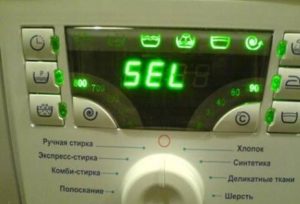 The SEL error occurs rarely but decisively in Atlant washing machines: the machine stops, completely paralyzing the wash cycle. Machines without displays signal an "SOS" by turning off all indicators and intermittently interfering with the selector. Inaction is essential – the fault must be diagnosed and repaired immediately. How can this be done without assistance?
Let's decipher the code
If your Atlant washing machine displays an error, it's because the interface module has failed. It's responsible for recognizing programs and, if it malfunctions, stops sending a cycle signal to the control board. The washing machine loses control of the wash cycle and shuts off automatically for safety reasons. To bring the machine back to life, you will have to check the control panel for functionality.
The Atlant washing machine displays the “Sel” code due to an interface module error.
If the indicators on the dashboard do not light up, then there is a high probability that the cause is a number of unpleasant problems.
- Keys wear out due to long-term use of the machine. This also includes keys sticking due to detergent or dust getting underneath them.
- Defective gear selector. The rotary mechanism is clogged or broken.
- Problem with electronic controller.
In this case, the first thing to do is follow safety precautions. Sticking keys and flashing lights on Atlant washing machines are warning signs that require immediate unplugging. Otherwise, the machine owner faces a short circuit and fire. The next step should be a thorough diagnosis or a call to a professional repairman.
We are trying to fix the problem
To fix the "Sel" error on Atlant washing machines, follow these steps. First, reset the machine by unplugging it for 15-20 minutes. If a system failure was the culprit, restarting it will clear the error. Otherwise, continue investigating the cause of the malfunction. The problem can be identified by inspecting several parts of the machine.
- Wiring, contacts, and connectors connected to the instrument panel from the control board. Carefully remove the top cover and visually inspect the condition of the cables.If you notice a burning smell, darkened or damaged insulation, or loose terminals, replace the old one with a new one.
- Control board and selector. It's impossible to visually assess the functionality of these components. A thorough diagnosis is required, which requires removing the components from the housing.
The control board requires careful handling, as the replacement part is very expensive.
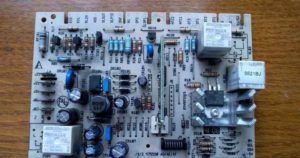 To assess the condition of the selector and board and begin repairs, you'll need to remove them. Here's how:
- disconnect the Atlant machine from the electricity supply;
- We pay attention to the powder receptacle, we find a lock in the middle of the tray, by pressing which you can detach the dispenser from the body and take it out;
- we release the bolts located behind the tray;
- remove the front panel.
It's recommended to take a photo of all connectors and wires connected to the panel to avoid misplacing them during reassembly. Next, remove the wiring, disconnect the bolts holding the module in place, and remove the board. Remove the selector in the same manner. Then, replace all the parts with new ones.
Control board diagnostics
A new selector and board are expensive, so it's often cheaper to repair faulty systems. To do this, we inspect the board, clean any burned-out traces, test the contacts, and solder if necessary.
An experienced electrician can easily fix the "Sel" light, but without experience and knowledge of the parts, it's best not to experiment. Ideally, you should contact a service center for a consultation. It's likely cheaper to buy a new machine.
Interesting:





Readers' comments
Headings
Washing machine repair




For buyers




For users


Dishwasher




Add a comment