
TCL error on LG washing machine
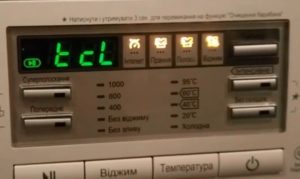 Surely every washing machine user knows that there are certain error codes that indicate a particular problem with the machine. Typically, the codes' meanings are either similar or obvious, but sometimes an LG washing machine displays the tcL error code. It's a rather strange code, isn't it? It's essential to find out what this code is and what it means, as even brand-new washing machines can sometimes display this error.
The meaning of this code
Housewives constantly mention that this code persists on the display even after restarting the washing machine. But it turns out that it doesn't indicate a malfunction. It is rather an informational message which can be deciphered as Tub Clean, or in Russian, drum cleaningIn other words, the machine notifies the user that it would be appropriate to run the internal cleaning function. All LG washing machines are equipped with this option.
To clear the code from the display, simply press the corresponding "Drum Clean" button and wait for the program to complete. The error will disappear for a while afterward.
What is this mode for?
Any washing machine operating manual states that the inside of the unit—the pipes, tank, and drum—should be thoroughly cleaned periodically. Hard water causes limescale deposits to settle on the surface of the parts, forming scale. This layer simply clogs the components and prevents them from functioning properly, as everyone knows. However, many users either don't notice when it's time to repair their machine, constantly put it off, or simply forget. The "Drum Clean" option in LG machines solves this problem.
What does this program actually look like? It's essentially the same high-temperature wash cycle, but the drum speed is significantly higher, as is the amount of water in the drum. This "wash" removes all debris, including detergent residue, from the machine and prevents it from settling inside.
The question remains whether adding detergent is necessary. Manufacturers generally remain silent about this need, but experience shows that in regions with hard water, adding some kind of descaler to the tray is advisable: it certainly won't make things worse.
We are cleaning
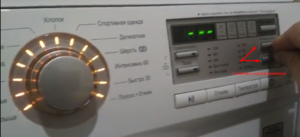 Not all LG machines use the same procedure for starting the drum cleaning program. Please note the first letters of your model name. If it's an FH*******, when the tcL error code appears on the display, simply press the "Start/Pause" button, and the repair will begin automatically. What should I do with other units in the series?
- Start the washing machine in the usual way.
- Press and hold the "Drum Clean" button, or simultaneously press and hold the two buttons marked with a *. These are typically called "Intensive" and "Wrinkle Free," but they may be different.
- After this, an error code will appear on the display.
- Press the "Start/Pause" button.
Important! If you simply want to remove the code without actually cleaning it, you can start the process and then immediately interrupt it. But don't forget to resume the process later! Even if the CM doesn't display an error code, that doesn't mean it doesn't need troubleshooting.
We restore the machine to working order
If left unchecked, the tcL error code may persist. Let's pause and consider two options for fixing the problem:
- You press the Start button and begin the cleaning process. Tub Clean recommends performing this every 30 cycles.
- You start the program, but immediately turn off the machine by pressing the power button.
Important! Sometimes restarting the washing machine doesn't help reset the tcL error code. In this case, the solution is easy: unplug the power for 5-10 minutes.
When restarting, the display will be clear, but the code will soon return if the clearing is not performed.
Interesting:


Readers' comments
Headings
Washing machine repair




For buyers




For users


Dishwasher




Add a comment