
Error codes DE and E2
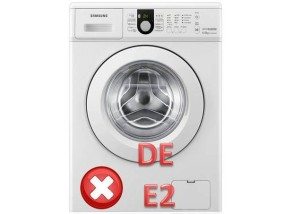 The code displayed on the washing machine's display informs you of a malfunction in one of its components. The error code helps you understand the cause of the problem and the steps you need to take to fix it.
In many cases, by correctly deciphering the code, the user can resolve the problem and repair the appliance at home. Much less frequently, a Samsung washing machine breaks down so badly that a technician has to be called. So, what should you do if the DE or E2 code appears on the display? Let's discuss this in detail.
Decoding errors, reasons for their appearance
Let's start with the DE error, which is related to the sunroof locking device. This error can occur if:
- The door was opened with excessive force.
- The lock hook is deformed.
- The hatch door has shifted due to high temperature or pressure, this usually happens during the boiling process.
The E2 error in a Samsung washing machine informs the user that the wastewater drain is unable to drain, is draining slowly, or has exceeded the drain timeout. This error may be caused by:
- clogging of the drainage filter;
- debris getting into the drain pump or its breakdown;
- blockage in the pump pipe;
- clogged sewer drain;
- defect in the water level sensor;
- electronic board malfunction.
In some models of washing machines, for the same reasons, error 5E may occur instead of error E2.
Repairing the hatch door
If a DE error occurs, the first thing you can try is to open the hatch door and close it again. If the DE error persists or the hatch door won't open, you'll need to check and replace the interlock. But first, you need to open the door. All the methods for doing this are in the article on... How to open a washing machine.
After the door is open, inspect the lock and hook. If the hook is deformed, the cause of the DE error is obvious. Replacing the hook is very simple:
- we unscrew the bolts in a circle that hold the two parts of the washing machine door together;
- carefully remove the plastic part;
- unscrew the hook and install a new one;
- we put the door back together.
Replacing the deadbolt lock, if necessary, is also easy; the main thing is to buy the original part, and then follow the instructions:
- take a Phillips screwdriver and unscrew the bolts holding the lock;
- Using a flat-head screwdriver, very carefully bend back the spring of the clamp that holds the rubber cuff; this spring is located under the rubber band at the bottom.
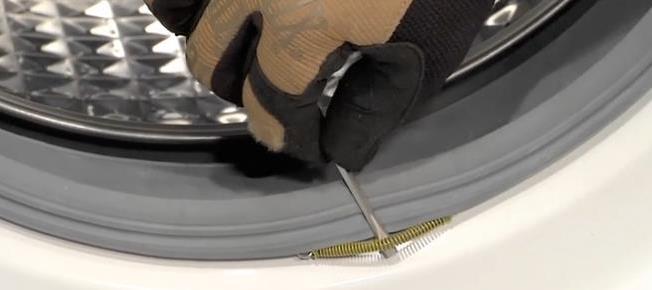
- then pull out the clamp counterclockwise;
- we move the rubber band away from the lock;
- We pull the lock out through the drum and remove the cover from it;
- disconnect the connectors with wires;
- we connect the new original lock and assemble everything in reverse order;
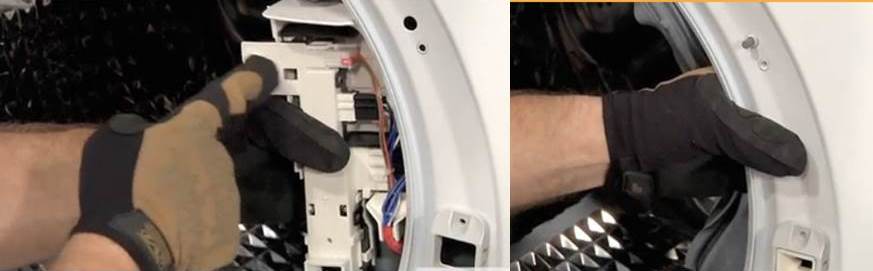
- We run a test wash to check if the DE error appears.
Cleaning the drain system
If error E2 appears, you can start checking to see if the machine's drainage system is clogged. The simplest thing that absolutely any user can check is the drainage filter, It's located behind a small door at the front of the machine. Open the door, unscrew the plug counterclockwise, and pull the filter out slightly.
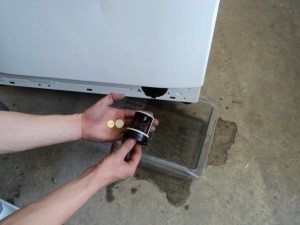 Be sure to place a rag near the machine to prevent any remaining water from spilling on the floor or leaking under the machine. If the machine's tank is full, it's best to first drain the water through the emergency drain, the hose of which is located next to the filter plug.
The next thing you can check without disassembling the washing machine body is the sewer drain. To do this, disconnect the hose from the sewer and tilt it into a bucket. If water flows out of the machine normally, then there is a 100% blockage in the sewer. Call a plumber and fix the problem. If the water doesn't drain or drains poorly, the problem is with the machine.
Accessing the pump and the hose leading from it in a Samsung washing machine is easy. This can be done through the bottom of the machine, which is either missing or easily unscrewed. The operating algorithm can be summarized as follows:
- We take out the powder container from the machine.
- We drain all the water that is in it.
Water should not remain in the machine because when it is tilted, it may fall on the control board, which will get wet upon contact with water and then burn out. - Carefully lay the car on its side.
- From the end side, unscrew the bolts holding the pump.
- From the bottom side, disconnect the terminals from the pump, loosen the clamp and remove the pipe.
- Now we find the bolts on the pump that hold its two parts together, unscrew them and inspect the impeller. There should be no hair, wool or other debris on it.
- Check to see if the motor rotor is rotating. If not, the drain pump winding is likely burned out. In this case, buy a new pump and install it in its place.
- If the pump is working properly, we check the pipe disconnected from the pump and inspect it to make sure there is no debris in it.
- We are assembling the car.
How to test a water level sensor
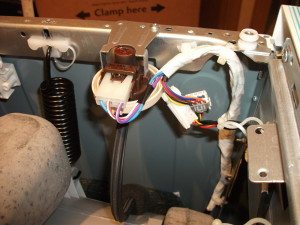 If the drain system is in good working order and no blockages are detected, we move on to checking the water level sensor, also known as the pressure switch. Why is it important to check it? It's simple: if the pressure switch doesn't send a signal to the control board that the tank is full, the drain pump won't activate and the water won't drain. Here's what might happen to the pressure switch:
- The main and most common cause of the malfunction is oxidized terminals. Simply clean them, treat them, and reconnect them, and the E2 error will be resolved.
- The wiring has burned out. In this case, we arm ourselves with a multimeter and check all the wires running from the pump to the pressure switch and from the pressure switch to the board, one by one. We find the faulty wire and replace it with a new one. This is a painstaking, but not at all difficult, job.
- The pressure switch thyristor on the control board burned out.
- If points 1-3 were excluded during the check, this indicates that the pressure switch is faulty, it is necessary replace the water level sensor.
Checking the control board
Very rarely, the cause of the E2 code appearing on the Samsung washing machine display is a malfunction of the control board. This is the most complex part of the machine. Replacing it with a similar one can be simple, as all you need to do is reconnect the sensors from the old board to the new one.
Important! One incorrectly connected wire can cause the new board to burn out right before your eyes, so be very careful or entrust this work to professionals.
However, there are cases where the board can be repaired by re-soldering a few components. We definitely wouldn't recommend attempting this type of repair yourself. It's better to contact a service center. The control board is an expensive component, so in this case, DIY repair is risky.
Finally, it's worth noting that most problems indicated by DE and E2 errors on a Samsung washing machine can be resolved independently. Therefore, before panicking, it's best to understand the issue first and then draw conclusions.
Interesting:



4 reader comments
Add a comment
Headings
Washing machine repair




For buyers




For users


Dishwasher




Can't fix E2 itself?
Error dE – re-closed the door, everything worked! Thank you!
Thank you for your help!
How to drain water from a Samsung washing machine?