
Error codes for Atlant washing machines without a display
 Modern washing machines equipped with a display display an error code when a malfunction is detected. The user simply needs to decipher the error code using the instructions and begin diagnosing and troubleshooting. Things are more complicated if the machine doesn't have an LED display.
If the display is missing, the Atlant washing machine will alert you to an error by flashing its indicator lights. Which lights on the dashboard will be illuminated? How can you avoid confusion about what malfunction the machine is reporting? Let's take a closer look.
How does an Atlant washing machine display a service code without a display?
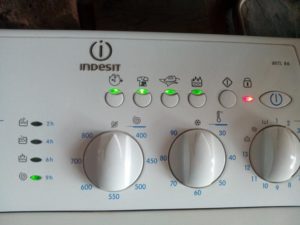
The most popular models without a display are the Atlant 1 SOFT CONTROL, 08 OPTIMA CONTROL, and 08+ OPTIMA CONTROL series. These machines display error codes in the same way. To determine the error the machine is indicating, look at the control panel.
There are four indicators on the dashboard that are responsible for displaying the error, each of which is assigned a specific number.
If you have trouble finding the right lights, consult your user manual. Your washing machine's manual will detail which indicators are responsible for error notifications.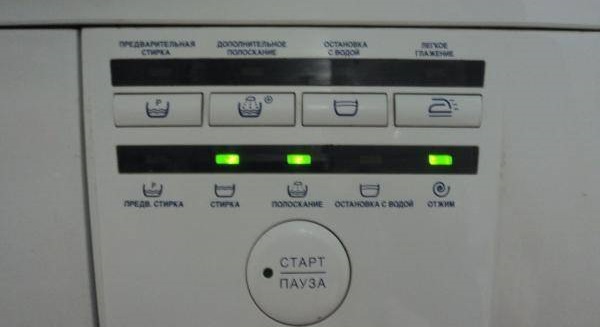
The required lights are located to the right of the powder compartment. The first light corresponds to 8, the second to 4, the third to 2, and the last to 1. To determine the error code, you need to add up the numbers of the flashing LEDs.
For example, the second, third, and fourth indicators are lit. They correspond to the numbers 4, 2, and 1. This gives 4+2+1=7, which means the machine is reporting error code F7. To determine the cause of the problem, consult the washing machine's manual.
How specific numbers are displayed and their description
Understanding the error message on an Atlant washing machine without a display is easy. Just look at the specific indicators and add up the numbers corresponding to the LEDs. The calculations are extremely simple, so it's impossible to mix anything up.
Sometimes the washing machine simply stops working, and none of the four indicators light up. This indicates a faulty program selector (error "SEL"). This means the user is unable to select the desired wash cycle.
The reasons for the "SEL" error may be the following:
- no voltage in the electrical network;
- there is no connection between the washing machine's power cord plug and the socket;
- the user did not turn on the washing machine's power button;
- breakdown of the washing machine control module.
Troubleshooting methods will depend on the cause. One of the following may be necessary: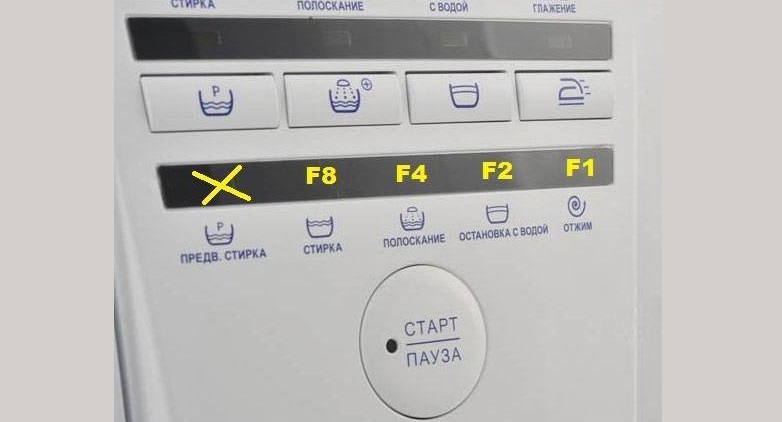
- check the voltage in the socket;
- Make sure the plug and socket are working;
- Restart the washing machine;
- turn on the washing machine using the power button;
- Replace the damaged area on the control module.
Also, on an Atlant washing machine, all four lights may be lit simultaneously. Don't add up the numbers—this is the "NONE" error. Usually, the machine freezes mid-cycle, and the lights begin to glow.
The "NONE" error indicates excessive foaming. This is caused by too much detergent being added to the washing machine. No repairs are required; simply drain the water from the machine and restart the cycle, carefully adjusting the detergent dosage.
Now we'll take a closer look at what other errors an Atlant washing machine without a display might indicate. We'll also explain what steps need to be taken to resolve each code.
- F2. One indicator, corresponding to the number 2, is lit. Informs about a temperature sensor malfunction.
- F3. Two lights, corresponding to the numbers 1 and 2, are flashing. This indicates a problem with the water heating system.
- F4. One indicator 4 is on. Indicates problems with draining water from the system.
- F5. Lights 1 and 4 are lit. This error indicates that there are problems filling the washing machine with water.
- F6. Indicator 2 and 4 light up. Indicates a malfunction in the engine management system.
- F7. Three indicators (1, 2, and 4) are lit at once. This error indicates a problem with the washing machine's power supply.
- F8. One LED flashes – 8. Informs about the failure of the pressure switch.
- F9. Lights 1 and 8 are lit. Indicates a problem with the electric motor speed control system.
- F10. LEDs 2 and 8 are lit. The error indicates a malfunction in the hatch locking system.
- F11. (Door). In this case, indicators 1, 2, and 8 will light. The car is signaling a problem with closing the sunroof.
- F12. Lights 4 and 8 are flashing. This code indicates a problem with the electric motor control system.
- F13. Three indicators are lit: 1, 4, and 8. A serious error indicating problems with the electronic module software.
- F14. LEDs 2, 4, and 8 are lit. In this case, it was detected that there is no communication between the washing machine modules.
- F15. Lights 1, 2, 4, 8 are flashing. This error indicates problems with Aquastop.
By decoding the error code, it will become clear which components of the washing machine should be checked first.
It is not always necessary to repair your “home assistant”. In some cases, simply resetting the washing machine correctly will be enough. We'll tell you what steps to take for each possible problem.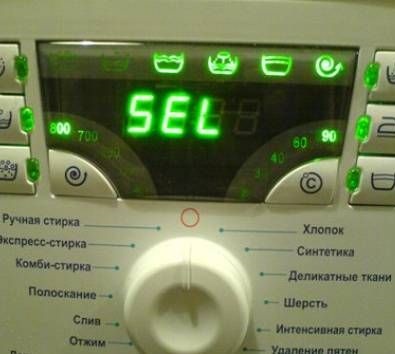
Error F2 indicates a malfunctioning temperature sensor. This may be a system error, and turning the machine off for 10-15 minutes will reset the code. If the problem persists, the thermostat will need to be replaced.
Code F3. The indicators begin to illuminate approximately 15-20 minutes after the cycle starts. The machine is unable to heat the water. The heater contacts, the heating element itself, and the thermistor need to be checked. Repairs will require replacing the faulty components.
Error F4 is displayed if the washing machine is unable to drain the water from the system. This could be due to:
- the drain hose is not installed correctly;
- the drain hose is pinched;
- clogged waste filter, drain hose, pipe, pump or sewer pipe.
First, check the drain hose for kinks. Next, clean any parts that may be clogged (the debris filter, hoses, pump, and drain pipe). If this doesn't help, check the pump's electrical circuit for continuity.
Error F5 indicates a problem with the water intake. The problem could be with the inlet hose, inlet valve, pressure switch, or control board. Another possible cause is a disconnected water supply to the apartment. What should the user do?
- check that there is water in the pipes and that it is supplied under sufficient pressure;
- make sure that the inlet hose is intact and not pinched or kinked;
- clean the mesh filter installed in front of the inlet valve;
- Check the solenoid valve for functionality; if it is broken, replace the element.

Error F6 appears if the washing machine doesn't rotate the drum or only rotates in one direction. Reasons why the machine might behave this way:
- the engine is not functioning properly;
- the engine electric brushes are worn out;
- The engine control unit is faulty.
In this situation, it's recommended to start checking the motor brushes. If the carbon rods are worn, they will need to be replaced. Next, inspect the motor wiring. The contacts may have come loose due to strong vibrations in the housing.
Finally, the control module is diagnosed. The board may need to be repaired. In extreme cases, the entire electronic unit will need to be replaced.
Atlant washing machines display the F7 error when a cycle fails to start. This is most likely due to a power supply issue. Check that the outlet is working and the cord is intact. If all is well, the control module will need to be diagnosed.
The F8 code indicates a problem with the water level sensor in the drum. The pressure switch and inlet valve should be checked. The sensor may be transmitting incorrect information about the volume of liquid in the system to the module. Alternatively, the fill valve may not be closing, forcing the washer to drain.
Error F9 occurs if the washing machine drum isn't rotating. This could be due to:
- overloading the drum (exceeding the maximum permissible weight of laundry established by the manufacturer);
- imbalance;
- incorrect operation of the tachometer sensor;
- failure of the control module.
The course of action will depend on the cause. If there is overload or imbalance, you need to remove some items from the drum or evenly distribute the laundry inside. The tachometer sensor will have to be replaced or the integrity of its contacts will have to be restored.
Error F10 indicates a problem with the door locking system. The locking mechanism isn't engaged, so the cycle won't start. You'll need to check that the door is closed tightly and that the drum seal isn't damaged. You'll also need to inspect the locking system itself.
The F11 code also appears almost immediately after the cycle starts. It indicates that the washing machine's door is not closed. You should press the door firmly and restart the wash cycle.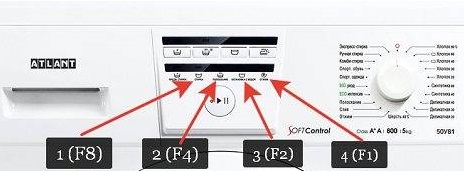
Error F12 appears when the washing machine drum rotates very slowly or even stops completely during a wash cycle. This indicates problems with the motor or power surges. The motor brushes, windings, and motor wiring should be checked. Any defects identified should be corrected.
The F13 code appears if the washing machine doesn't turn on after pressing the "Start" button. This could be due to a memory or module failure, or a faulty display unit. Restarting the machine may help. If not, you'll need to inspect the circuits on the microcontroller, check the semiconductors on the board, and reflash the washing machine.
Error F14 indicates a lack of contact between the display unit and the control board. First, restart the machine. If that doesn't help, try troubleshooting the electronic module.
Diagnosing and repairing the control module is a complex task that is best left to specialists.
Code F15 indicates that the leak protection system has been activated. You should immediately unplug the washing machine. Next, inspect all components responsible for the machine's leak protection: hoses, pipes, and the seal.
If everything is dry, check the Aquastop system contacts and wiring. It may be triggered by mistake. Correct any defects found.
Error F16 indicates that the water in the tank is overheated by 10 degrees (compared to the temperature set in the mode settings). This could be due to a faulty temperature sensor or a temporary malfunction of the control platform. Restart the cycle; if this doesn't help, replace the thermistor.
Interesting:
Readers' comments
Headings
Washing machine repair




For buyers




For users


Dishwasher




Add a comment