
How to turn off music on an LG washing machine
 There are a variety of reasons why you might need to turn off the sound in your LG washing machine. Some people might have a small child who gets scared when they hear a loud, unpleasant noise, while others might want to make the washing machine quieter because it's in their living room. While everyone's motivations vary, the goal is the same: turning off the sound. We'll explain how to do this in this article.
The main way to disable
When deciding how to turn off the sound in an LG washing machine, we should first pay attention to the instructions. If a given LG washing machine model has a technical option to turn off the sound, the manufacturer will definitely describe it in the instructions, another matter is how this description will be made.
In some cases, whether there were translation issues or the manufacturer simply didn't consider it necessary to describe this action in understandable language, even after reading the instructions, it's unclear how to turn off music and other sounds so they don't irritate the user. In several LG washing machine models, the sound is muted by pressing a special button labeled "Timer Mode" on the control panel. Here's how it works:
- turn on the washing machine by pressing the on/off button;
- without selecting a washing mode, press the “start program” button;
- then immediately press the button located in the upper right corner of the control panel “timer mode” and hold the button for three seconds;
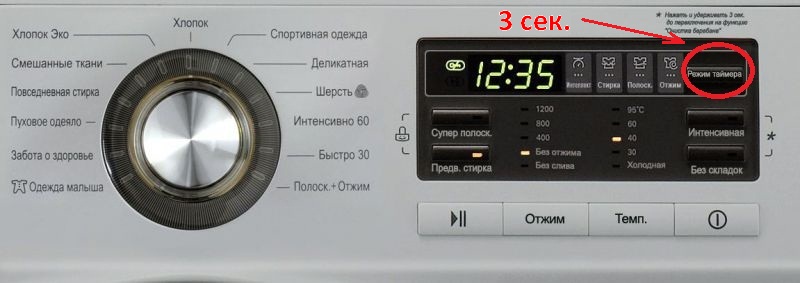
- After this, press the "start program" button again, check if there is sound from the LG washing machine, if there is sound, then repeat the action again, only this time hold the "timer mode" button longer.
Important! The downside of this method is that it's impossible to permanently disable the sound in one go. You'll have to repeat this procedure every time you turn on your LG machine. Only some models save the setting.
Alternative way to disable
Other methods for turning off the sound of an LG washing machine are not provided by the manufacturer, but they are also acceptable, especially if the machine's warranty has already expired. You can turn off the sound of your washing machine permanently by turning off the speaker that produces the sound. You can completely unsolder the speaker, and then the LG machine will lose all ability to emit signals, or you can glue or tape the speaker with something, then the signal will remain, but will not be so loud and intrusive.
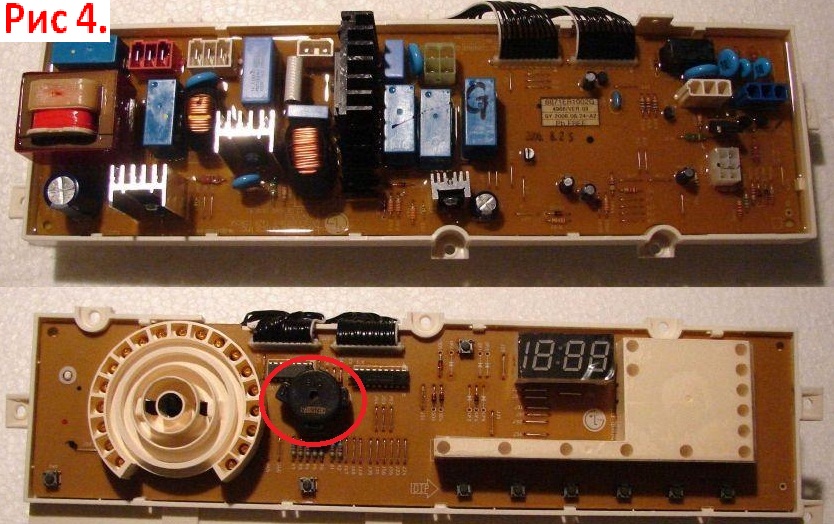
To perform these manipulations on the speaker of an LG washing machine, you first need to access it. As a warning, the speaker is located on the control board, so to perform any manipulations on it, you must first properly remove the control board.
How to do this?
- We disconnect the washing machine from the power supply, turn off the water and disconnect the inlet and drain hoses.
- We take the washing machine out of the niche and turn it so that the back wall is facing us.
- Removing the top cover of the washing machine. The correct procedure is described in the article with the self-explanatory title. Removing the top cover of the washing machine.
- Now turn the machine so that the front part is facing you and take out the detergent drawer. To do this, you need to pull it towards you and at the same time press the central part of the drawer with your finger.
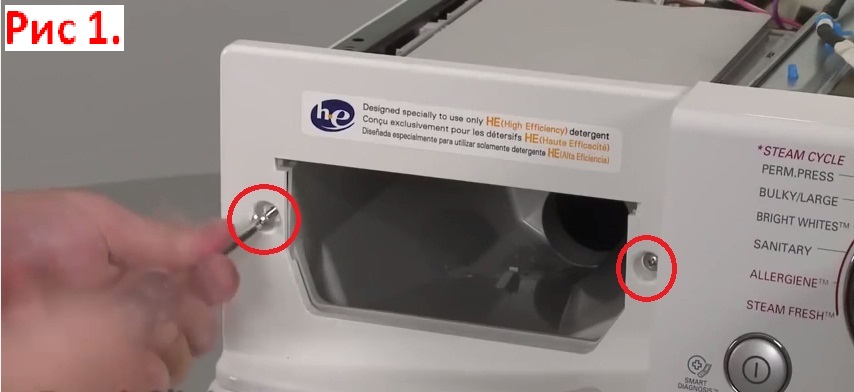
- There are screws to the right and left of the tray hole that need to be unscrewed.
- Next, unscrew the two screws from the upper left corner.
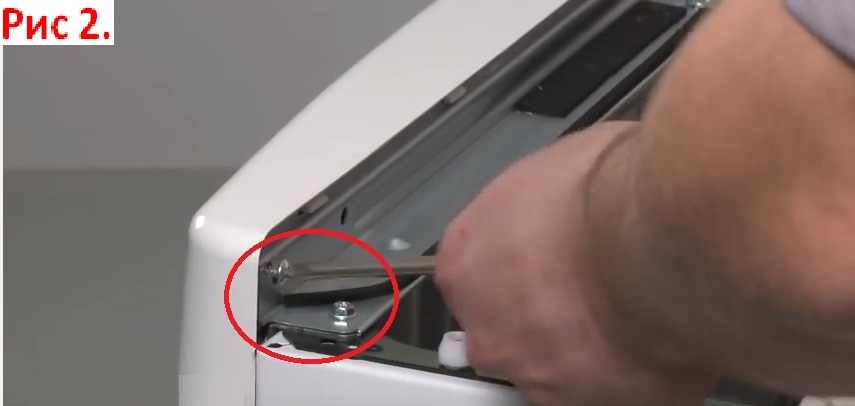
- Carefully, so as not to damage the latches, pull out the control panel entirely.
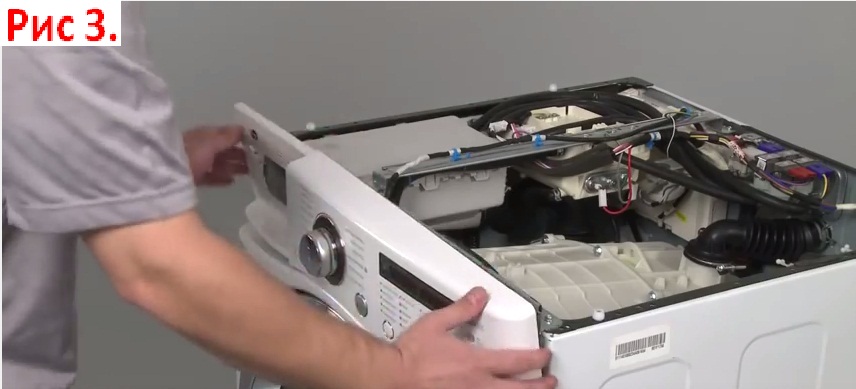
- We turn it over and unscrew the screws holding the board.
- We detach the latches with a screwdriver, take out the control board and turn it over with the front side facing us.
Important! Be careful not to tear the wires running from the control panel into the vehicle's body.
Now our task is to find the ill-fated speaker on the board. It's usually located near the toggle switch, but depending on the washing machine model and its module, the location may vary. Next, proceed carefully: either use a soldering iron to desolder the speaker, or fill it with epoxy resin and reassemble the car in reverse order.
 Finally, it's worth noting that disabling the annoying sounds of your LG washing machine is quite easy if you read the instructions. This can be done by pressing special buttons after each machine start, but if you want to turn it off permanently, you'll have to slightly modify the control board.
Interesting:





18 reader comments
Add a comment
Headings
Washing machine repair




For buyers




For users


Dishwasher




Thank you for the tip! My wife is very happy that the music is back.
Thank you so much for the article and video! They were very helpful.
Thanks, I turned it off!
Thank you. The sound has been muted.
What joy! I turned it off! Thank you.
Thank you so much! It worked! She finally shut up! The baby is sleeping, and she's doing the laundry! 🙂
Thanks
This simple method helped, thanks! This sound has been annoying me for a long time.
Thank you very much, it turns out everything is so simple 🙂
Thank you very much. Otherwise, everyone will wake up in the morning.
Thank you!
Thank you very much 🙂
Thank you very much. LG F1068LD machine.
The settings were retained even after the power was turned off. Thanks again for the advice!
This was the most helpful advice! I've looked through so many websites, and even the manufacturer's official website doesn't say that you have to turn it on and press start without a program, and then press the timer. Thank you! The mute function worked after repeatedly turning it on and off!
Thank you very much, I looked through so much and only your article helped!
Thank you very much!
Hooray! Victory! Finally, this idiotic music has shut its mouth once and for all! Thank you so much!
Thank you so much! It worked right away! That sound was annoying me for so long. It worked right while I was washing my clothes.