
How to turn off the sound on a Samsung washing machine
 Most washing machines have a sound system that lets you know when a cycle has completed successfully. But not everyone appreciates such melodies: the sudden sound can wake a sleeping child, startle, or simply become annoying after years of use. Even more inconveniently, it makes nighttime washing impossible.
Methods for "fighting" this annoying feature vary greatly. Some prefer to lock the doors tightly and cover their ears, while others simply destroy the offending speaker. But there's a more discreet and civilized option: turning off the sound on your Samsung washing machine using the buttons.
How does deactivation work?
A "Mute" button is present on a few Samsung models, but for others, it's not as obvious. If you left the included instructions untouched after purchasing the washing machine, you might not even know about the hidden sound deactivation feature. However, this isn't a reason to get rid of annoying beeps by removing the speaker from the machine's control board.
And without radical methods, music can be left in the past forever. It is enough to turn off the sound option once, so that subsequent washes will not suffer from the final melody. Neither changing modes nor repeatedly rebooting the machine will bring back the unpleasant signals. Only a system failure that resets all user settings can cause this, but this is rare and can be quickly corrected by the user.
We remove the voiceover
To turn off music playback after the wash cycle, you don't have to look for tools or disassemble the machine. It's much simpler and faster. What's more, the music option can be turned off during any wash cycle. Simply access the washing machine's control panel and follow a few simple steps.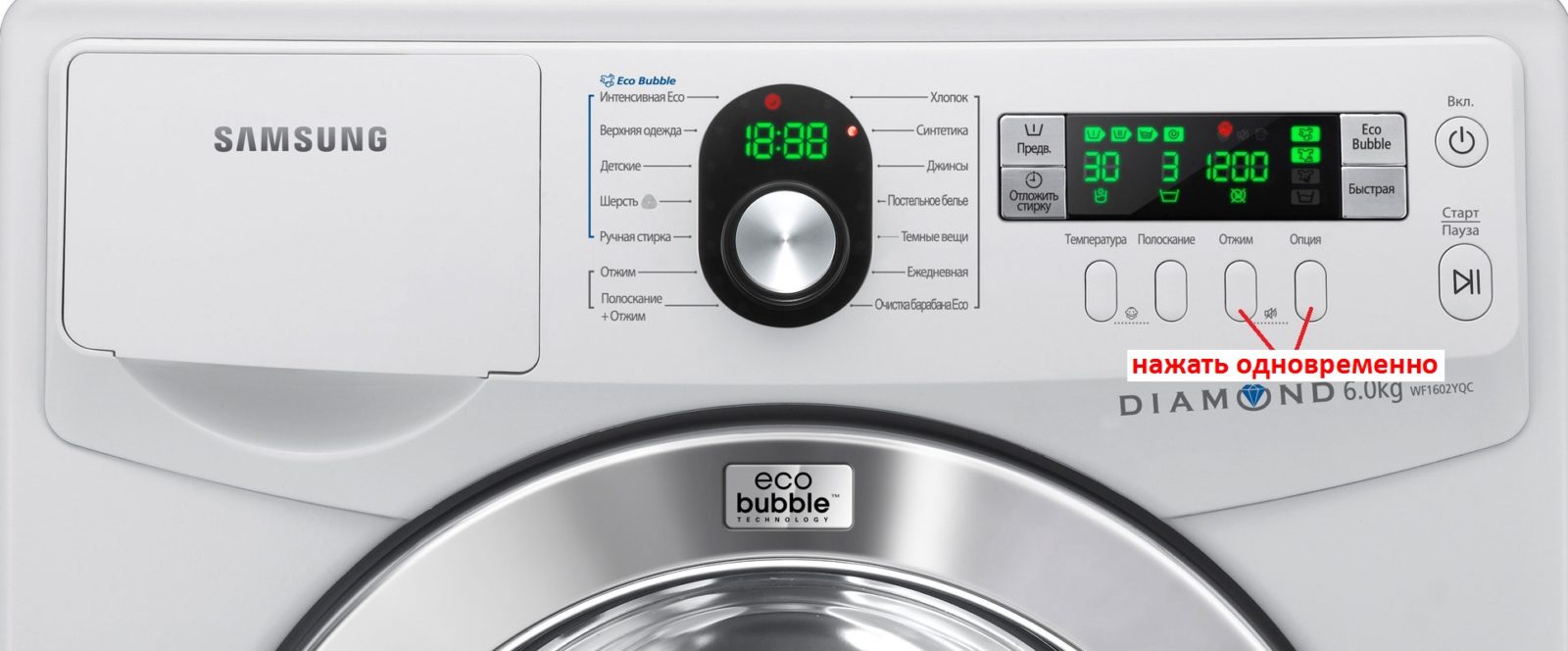
- Find the “Spin” and “Option” buttons (they are located next to each other on the right side of the panel).
- Press and hold the keys simultaneously.
- Hold until the crossed-out speaker icon appears on the display.
- Release the buttons.
Before starting any manipulations, we recommend reviewing the instructions or user manual, which will describe all available options and how to turn them off. Sometimes holding the buttons for three seconds is enough, while other times it takes a little longer. Just keep an eye on the mute indicator. Once the corresponding icon appears, the function is deactivated and the washing machine will stop voicing its actions.
Important! The mute function is not a standard feature and may not be available on some Samsung washing machine models.
But even in cases where there's no way to turn off the music, don't resort to extreme measures. It's best to contact a service technician. A technician will carefully open the dashboard and tape over the speaker, muffling all sound. Breaking off or damaging the transmitter is not recommended. Remember that if you resell such a washing machine, the price will drop immediately, as some people absolutely need the sound during the cycle.
Interesting:

1 reader comment
Add a comment
Headings
Washing machine repair




For buyers




For users


Dishwasher




Thank you for your help