
Resetting an Electrolux washing machine
 If a short-term malfunction occurs, your washing machine may freeze. To restore full functionality, you can reset its settings. This can be done by resetting your Electrolux washing machine. This will fully restore it to working order.
How can I restart the machine?
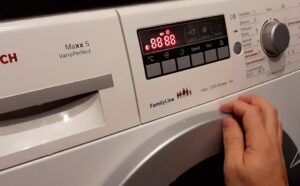
If your Electrolux washing machine freezes before completing a cycle, shows no signs of operation, and doesn't respond to button presses, you can restore it to working order by resetting the settings and restarting the machine. To do this and restore the machine to working order, hold down the Start button for ten seconds. This will cancel any previously scheduled processes. Then, re-enter the settings and restart the machine.
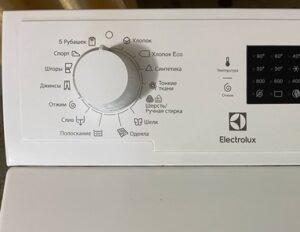
It's quite possible your washing machine was manufactured 10-15 years ago. In that case, you should set the program selector to the neutral position. As soon as the program stops, the green indicator light on the machine will flash and then go out.
 If this doesn't happen, the device is malfunctioning or has been accidentally interrupted. If resetting the program fails, you should perform a full reboot of the device. The procedure is as follows:
- we switch the programmer to the neutral position;
- press and hold the Start/Stop button for at least 5 seconds;
- disconnect the washing machine from the power supply by removing the plug from the socket;
- After waiting about 25 minutes, connect to the power supply again and initiate the program you have selected.
If the device does not respond to pressing buttons or turning the handle, you must immediately disconnect it from the power supply. A power failure while the machine is running a program can damage its control unit. If the measures you have taken to restore the device's operation do not produce results, you should contact a service center.
It is necessary to remove water from the tank
 Sometimes you urgently need to access the washing machine drum and retrieve items of clothing. For example, you might need to do this if you've forgotten your smartphone, wallet, or bank card in your jeans pocket. In this case, there's no need to completely reset the washing machine's control unit. You'll simply need to pause the program, drain the water, and remove the item from the drum. The procedure is as follows:
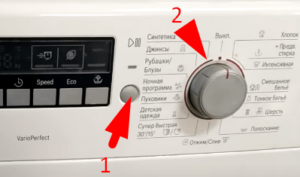
- stop the machine by holding down the Start/Stop button;
- we move the operating mode switch to the neutral position;
- select the “Drain without spin” mode;
- We wait until all the water has drained out until the door is opened.
If the unit stops working, you can drain the water using the waste filter compartment. This compartment is located at the bottom right of the front panel and is covered by a special door. Before draining the water, we recommend having a supply of rags and bowls.
Sudden power outage
 In the event of an unplanned power outage, disconnect the appliance from the power source as soon as possible. To do this, remove the plug from the outlet. This will protect your washing machine from sudden power surges.
Once power is restored, reconnect your appliance. If the reset fails, the machine will continue with the interrupted program. Some Electrolux models feature a special mode in which the appliance drains water after a power failure and remains in a neutral position. After this, you should reset the desired mode and restart the program.
A number of Electrolux models have a special emergency mode, in which, after a power failure, the device gets rid of water and remains in a neutral position.
When you encounter a temporary problem, you need to determine what's causing it. Problems fall into two categories:
- mechanical;
- software.
The first type of malfunction means you'll need a professional repairman. They'll thoroughly determine the cause of the problem, repair it, and advise you on how to avoid it in the future.
In the second case, the washing machine's control panel is locked, making pressing its buttons useless. To restore the machine's functionality, unplug it from the power source for approximately 30 minutes. Then reconnect it and turn on the operating mode of your choice.
Interesting:

Readers' comments
Headings
Washing machine repair




For buyers




For users


Dishwasher




Add a comment