
How to use an LG washing machine
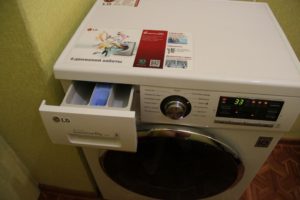 Many people ask, "What's so special about simply using a washing machine?" And, indeed, you load the laundry, add detergent, select a cycle, and start the machine. While that's true, even washing machines like LG have their own nuances when starting a wash cycle. Furthermore, if you don't have the manual handy and need detailed information about the washing cycles, problems can also arise. Therefore, in this article, we've outlined all the details on how to use a washing machine of this brand.
Let's start the machine
Operating an LG washing machine is one of the easiest, as most models available on the Russian market are assembled in Russia. That's why all cars have Russian-language control panels. However, let us list the order of actions when starting the wash:
- We load the laundry into the machine drum according to the maximum load for this type of laundry;
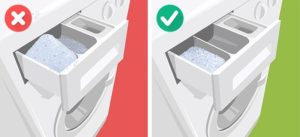
- pour powder into the tray and add conditioner if necessary;
- plug the machine into the power supply;
- press the On button on the panel;
- after the sound signal is heard, select the desired mode by turning the toggle switch clockwise;
- Press the Start button with the triangle. Before starting the wash, you can select the spin speed, wash temperature, and extra rinse.
Please note: If your washing machine is new and has never been washed, run it on a short cycle without any laundry to remove dust and dirt from the drum and check for proper operation.
Recommendations
As for washing machine recommendations, these are more like washing rules that should be followed to ensure the machine lasts longer and your clothes don't get damaged. These rules are:
- Before washing, laundry should be sorted by color and type of fabric;
- When washing newly purchased items, be sure to check whether they are machine washable by looking at the label and care tag;
- Don't forget to remove small items and important things from your pockets, such as keys, passport, money and credit cards. And if by accident you forgot to take out your card, then read this publication I washed my bank card – what should I do??
- Before washing, check that buttons and other small details and patches on clothing are securely fastened. It is recommended to wash such items in a special bag that will prevent foreign objects from getting into the washing machine drum;
- It is better to turn clothes with zippers, trousers, jackets and other large items inside out, this will improve the quality of washing;
- Use high-quality powders intended for automatic washing; you can also use chlorine-free bleaches and water softeners.
Important! Use the washing machine only if it is properly connected to the water supply and drain, and level. Otherwise, problems with washing and program freezes may occur.
Frequently used programs
 LG washing machines have 13 to 20 wash programs, depending on the specific model. This number of programs allows for washing a wide variety of clothes and linens. However, most users only use 3-4 programs from the entire set of modes on a regular basis; the rest are launched very rarely or not launched at all. Here are the most commonly used washing modes:
- Quick 30 – Washes lightly soiled laundry at 30-40°C for 30 minutes. For best results, use a 1.5-2.5 kg load.
- Cotton Quick – Washes cotton items with a maximum drum load of 5.5 kg, 7 kg, etc., depending on the model. This cycle allows you to select a wash temperature of 40 or 60 degrees Celsius, a spin speed, and an extra rinse. The process takes an hour and a half.
- Cotton – The cotton wash cycle is slightly different from the previous cycle. This cycle allows for a higher wash temperature of 90 degrees Celsius and a pre-wash function, so the cycle lasts approximately 2 hours.
- Baby clothes - this mode is popular among mothers. This mode is the longest - 2 hours 20 minutes.
- The delicate and wool wash cycles are similar and last about an hour. The difference is in the spin speed.
Modes such as Duvet, Sportswear, Bulky Items, Hand Wash, Synthetics, Bio-Wash are used less frequently, but they are also necessary.
Please note: LG washing machines have a separate Rinse + Spin mode, which is selected by turning the knob.
Additional functions such as easy ironing, half load, super rinse, and child lock are selected by pressing the corresponding buttons. In modern washing machines, this may be a touch panel.
Control Panel
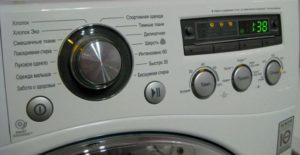
LG washing machine panels are very similar. They may differ in the presence or absence of a display, the size of that display, and the placement of additional buttons. Program selection is handled by a selector. Let's look at how to use the machine. LG, using the F1296ND4 model as an example, shows its control panel below.
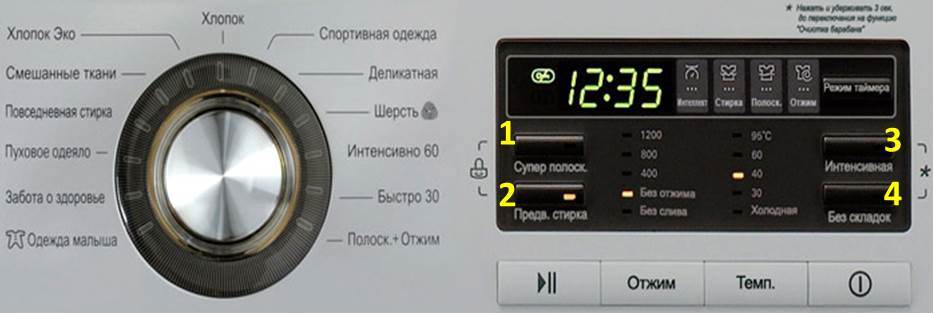
As you can see, the toggle switch located on the left side of the control panel allows you to select one of 13 programs. When you select a program, the indicator light next to it will light up, ensuring you'll never make a mistake. The right side of the control panel contains the buttons and digital display. The display provides all the necessary information: time remaining, spin speed, water temperature, and the current wash cycle (wash, rinse, and spin). The buttons at the bottom (from left to right) have the following meanings:
- button to start washing, pause the program;
- spin speed selection button, pressing it one by one sets one of the values: no drain, no spin, 400, 800 or 1200 rpm;
- temperature selection button, pressing it one by one sets one of the values: cold, 30, 40, 60 or 950WITH;
- washing machine power button.
The buttons marked with numbers in the photo are buttons for additional functions:
1 – super rinse;
2 – pre-wash;
3 – intensive wash;
4 – no creases (spin at reduced speed).
Pressing buttons 1 and 2 simultaneously activates the child lock on the control panel, preventing the buttons from working. The CL code appears on the display, which is why a lock is displayed next to these buttons. Pressing buttons 3 and 4 simultaneously activates the drum cleaning function. This function is an idle start mode that lasts for 1 hour 35 minutes with water heating up to 600WITH. It is not recommended to use any tools when running this function. Some machines have a function called Smart Diagnostics. For instructions on how to run it, see the article. Smart Diagnosis in LG Washing Machines.
So, using an LG washing machine is quite simple; all the necessary information is available on the control panel. With smart technology, washing is hassle-free!
Interesting:




3 reader comments
Add a comment
Headings
Washing machine repair




For buyers




For users


Dishwasher




How can I delay the start so that all the laundry is done by 7 a.m.? It's cheaper on electricity.
Why are all the temperature indicators flashing at the same time?
I don't understand: wash, rinse, spin, automatically? Or do I have to set it myself? Right away, or after washing?