
Indesit washing machine firmware
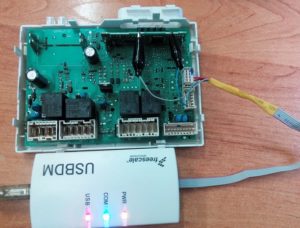 If you're looking to reflash your Indesit washing machine's control module yourself, you might encounter a lack of information. It can be difficult to figure out where to find the software for a specific model, what parameters are used to select the firmware, and how to determine if it's compatible with your machine. Let's look at how to reflash your Indesit washing machine yourself and what to consider during the process.
First, let's identify the machine.
Every Indesit washing machine has a barcode. It's located behind the drum door. The barcode contains basic information about the machine, which should be reviewed before attempting any repairs to the control module. The label indicates:
- Indesit washing machine model;
- serial number of the device;
- product code.
When selecting firmware for your automatic washing machine, you should rely on the washing machine's specifications, as indicated on the factory barcode.
Let's clarify what each specific parameter means.
- The model number is written using letters and numbers. This designation identifies the product series. For example, washing machine manufacturer Indesit uses the following designations: WISL 124 CIS or AQSL 118 EU. At first glance, this may seem like a simple set of symbols. In fact, the model number encodes important information about the machine, such as the maximum spin speed, load type, and more.
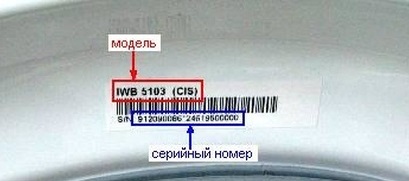
- The serial number is the washing machine's serial number assigned by the manufacturer during production. This unique identifier is assigned to the washing machine at the factory.
- Product code. This is the equipment model, interpreted as an 11-digit number.
If you decide to reflash your Indesit washing machine's module at home, carefully copy the barcode information onto a separate sheet of paper. It's important not to make any mistakes or mix up any numbers or letters. You'll need this information to find the right software.
We are looking for firmware
How is the machine stitched?
It's possible to flash an Indesit automatic washing machine at home, but you'll need to understand the process thoroughly. It's important to be prepared for the repair. The user should have the following items at their disposal:
- programmer;
- computer;
- software.
Some washing machines cannot be reprogrammed with a control unit, requiring only authorized software. Fortunately for Indesit owners, the control unit modules are easily reinstalled.
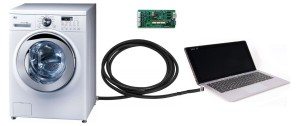
A programmer is required to connect the washing machine's main control unit to a computer. To update the firmware of an Indesit washing machine, you can use a common device from a Chinese manufacturer, the USBDM.
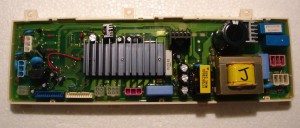
To reinstall the software, you need to remove the control board from the washing machine. To do this, follow these steps:
- de-energize the washing equipment;
- disconnect the equipment from communications;
- remove the detergent dispenser;
- Unscrew the bolts located behind the powder receptacle;
- unscrew the screws located on the opposite edge of the control panel;
- Using a slotted screwdriver, carefully release the panel latches;
- take a photo of the location of the connectors on the unit, then unfasten them;
- Remove the control module by releasing the latches that secure it to the panel.
That's it, the board is in your hands. Now let's talk about the flashing process itself. One end of the programmer is connected to the laptop's port, the other to the control board. Next, you need to download the device drivers.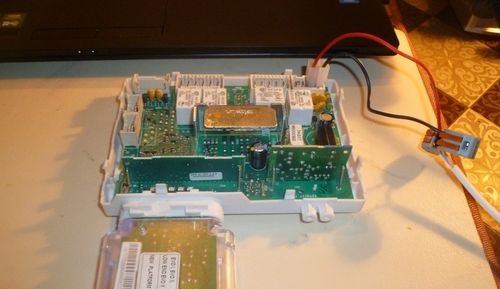
It's a good idea to check whether the laptop has recognized the devices connected to it. To do this, use the Start menu and go to the tab that displays devices recognized by the computer. The "USBDM" tab should display the programmer's name. You can confirm that the electronic board is also connected by clicking the "Target" tab. The "Device Selection" subsection will display the control board's number.
Next, you need to download the software found earlier and the appropriate driver to the programmer. To reprogram the Indesit washing machine, you need to:
- go to the “Target” tab;
- download the software (by clicking “Load Hex Files”);
- Once the download is complete, launch the installed program. To do this, click "Program Flash."
Wait until the running process stops. If no errors are returned when reinstalling the control module, the firmware has been updated correctly. You can reinstall the board, reassemble the machine, and test its operation.
Technical problems
Sometimes the programmer simply can't find the control module. It's more likely that the problem lies with the board. You'll need to test all its components with a multimeter. If a defect is detected, the control unit will need to be repaired. This is a technically complex job, so it's best to entrust it to a service center. Repairing such an important component yourself is not recommended.
Another outcome is also possible. If all devices are recognized and connected to each other, but various errors appear during the reinstallation process, this means that the wrong software has been selected. Although rare, it does happen that the factory mixes up the barcode and applies a label to a completely different model. In this case, reprogramming the washing machine will be much more difficult, but it's still worth trying to repair the module.
Interesting:
1 reader comment
Add a comment
Headings
Washing machine repair




For buyers




For users


Dishwasher




Good material for beginner craftsmen!