
Not all modes work in the Indesit washing machine.
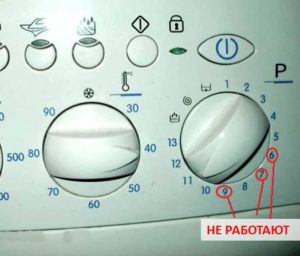 If not all modes on your Indesit washing machine are working, the control board has clearly failed. The situation may seem non-critical, as the machine continues to heat up, rinse, fill, and drain, and only a couple of buttons won't turn on. But in reality, the machine's "brain" is damaged, its firmware has failed, and it needs repair. This article will explain in detail whether this can be fixed at home and what steps should be taken.
We define the car
Flashing the software for an electronic unit is a challenging and complex task. To accomplish this, you need not only a thorough understanding of electrical installations and computer technology, but also a thorough knowledge of the washing machine's electronics. It's also crucial to proceed with extreme caution and be aware of all the risks.
When searching for a suitable program for flashing the Indesit board, you need to focus on the model, serial number, and product code of the model.
The first step is to examine your current washing machine model. Each Indesit comes with a factory identification barcode. It's located behind the door and contains key technical information. The following specifications are always included.
- Model. This combination of letters and numbers contains information about the capacity, load type, maximum spin speed, primary power, and other technical details. For example, the designations "WISL 124 CIS" and "AQSL 118 EU" are common.
- Serial number. A unique number assigned to the washing machine at the factory. This identifier consists of numbers and letters that encode the year of manufacture, the manufacturer's address, and other information.
- Product code. An additional identifier consisting of 11 digits.
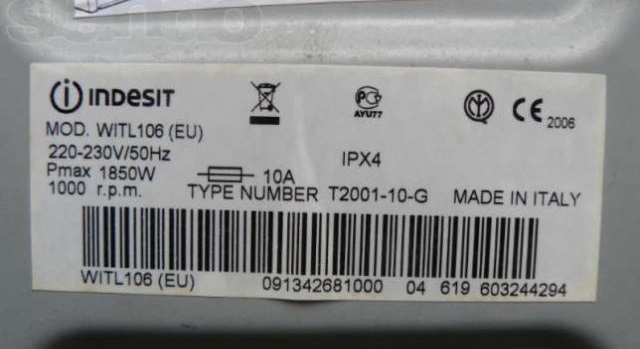
It is recommended that all data indicated on the marking be copied onto a piece of paper or photographed. It is important to check each sign carefully, otherwise the slightest error will lead to confusion and unnecessary expenses. Once the machine's background is known, we begin searching for a suitable program.
Search for a program
- Find the search icon and enter your washing machine model in the blank line. Enter the combination without spaces or hyphens—only the characters "/" and "." (if present in the marking) are allowed.
- Click on the "Find" button.
- We study the list of found programs suitable for flashing this model.
- Check the product codes. Often, a single model has multiple firmware versions, so to find the right one, narrow your search. For example, if the system displays a message that one firmware version applies to serial number 40829, and another version applies to serial number 40425 and higher, you should select the appropriate range (higher values will be 30815480000, lower values will be 30815480201).

How to reinstall firmware?
Indesit owners are lucky. Many manufacturers deliberately complicate the firmware update process, making it impossible to reinstall the board at home.Indesit washing machines don't have this kind of "protection," so updating the software is relatively easy. You just need to carefully prepare for the manipulations.
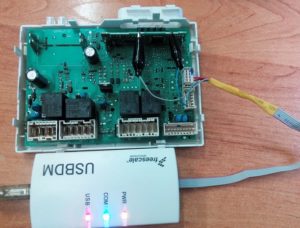
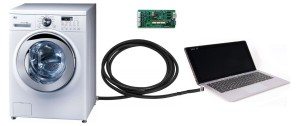
First, we need three essential components: a computer or laptop, the software itself, and a programmer. The latter is needed to connect the washing machine's control board to the computer unit. There's no need to look for an expensive adapter—a standard Chinese device from USBDM will do.
For a one-time firmware update, a cheap Chinese programmer for $1.50–$3 is enough.
Now you need to remove the faulty board from the machine. Here's how to remove the module.
- We disconnect the equipment from communications, electricity and water supply.
- Pulling it towards you, we unhook the powder receptacle.
- In the space cleared from the dispensary, we unscrew two screws.
- We release two more bolts located at the other edge of the dashboard.
- Using a flat-head screwdriver, pry the panel away from the body.
- We photograph the location of the wiring and components to avoid mistakes during reassembly.
- We unfasten the latches holding the block and carefully remove the control module.
Holding the board in our hands, we begin the firmware update. We connect one end of the programmer to the corresponding port on the computer, and the other to the washing machine's control board. Now we attempt to load the device drivers.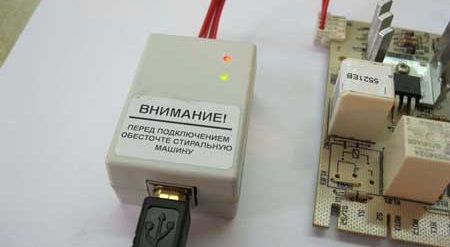
Be sure to check whether the computer has detected the connected devices. Open the Start menu and navigate to the appropriate folder. If the "USBDM" tab displays a combination with the adapter's name, then everything is OK. Next, look in the "Target" section and find "Device Selection." The serial number of the electronic unit should appear here.
If all connections are configured, we begin the download. The reprogramming process looks like this.
- Open the folder with the software and the appropriate driver.
- Open "Target".
- Load the software into the “Target” by clicking on the “Load Hex Files” button.
- We are waiting for the download to complete.
- Launch the downloaded utility by clicking on the “Program Flash” button.
On average, reprogramming the control module takes 15-60 minutes.
It is strongly recommended not to forcefully complete the download. It is better to be nearby during the installation and monitor the process. If no unusual errors or warnings are displayed, the firmware update was successful. You can replace the board, reassemble the machine, and run a quick mode, such as a rinse cycle.
Possible failures
Failures are rare, but they do occur. Most often, the user encounters the programmer "not recognizing" the connected board. Most likely, the cause is a faulty module. To confirm this, you'll need to test all the terminals on the unit with a multimeter. If defects or damage are detected, appropriate repairs must be carried out. Such repairs are not recommended at home, as they are very difficult and risky. It's best to leave this task to a service center.
If an error occurs during the firmware installation, you should immediately stop installing the utility.
The second possible problem when attempting to reflash the board is encountering system errors during the process. This indicates that the selected firmware is not compatible with the module. There are two possibilities: either the user entered incorrect data during the search, or the factory mistyped the barcode. In either case, you'll have to start the search from scratch.
Interesting:

Readers' comments
Headings
Washing machine repair




For buyers




For users


Dishwasher




Add a comment