
Candy washing machine washing modes
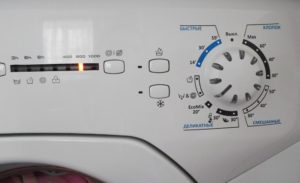 Knowing the meaning behind the schematic icons on your washing machine can make washing easier and faster, without having to manually adjust the water temperature or spin cycle. Each mode has its own symbol, and even standard programs are displayed differently across different brands and manufacturers. And when the instructions are lost, many questions arise.
Almost all Candy washing machine modes and programs are easily identified by their self-explanatory symbols, but there are also special buttons not found on other machines. To avoid damaged items or unwashed stains, it's important to carefully review the manufacturer's suggested modes, their symbols, parameters, start, and reset.
How are washing programs designated?
A detailed explanation of all the functions available on the Candy washing machine's control panel can be easily found in the manufacturer's instructions or downloaded from the manufacturer's official website. However, there's no need to search for documents or download additional files to your computer, as the most common programs for this brand's machines are described in detail below. The following images are commonly found:
- Two drops with a plus sign on the left. This icon indicates the "Aqua Plus" or double rinse function, which is recommended for washing baby clothes to thoroughly remove detergent and prevent allergies. It adds 30 to 40 minutes to the main wash time.
- A shirt with black stains. The intensive wash program is designed to remove stubborn stains. This mode sets the machine to maximum drum rotation, a high temperature of 90 degrees, and a wash time of 170 minutes.
- Dial with triangle on the right. It is called delayed start and allows you to program the start of washing at any time within 24 hours. To start, you need to load the laundry into the drum, add powder and set the start time.

- The basin and shower head are on the right. This function is activated for a single rinse and extends the wash time from half an hour to 40 minutes, depending on the fabric type.
- A basin marked with the letter "P" indicates a pre-wash program, which cleans work clothes or heavily soiled garments before the main wash cycle. After the pre-wash cycle is complete, the machine automatically switches to a standard wash cycle, which lasts at least 170 minutes.
- Three Balls. A special cycle for washing clothes, blankets, and throws made of natural wool, lasting approximately 55 minutes.
- A basin marked "32." The universal "Quick Wash" program takes no more than 32 minutes.
- A cloud with a downward-pointing arrow indicates washing durable fabrics, such as linen, cotton, and hemp, which require a temperature of 90 degrees Celsius and a spin and soak time of 70 to 170 minutes.
In addition to the standard features listed above, which are common to all Candy machines, some brands offer several special options and programs. Let's take a closer look at these features using the brand's most popular models.
Badges on different cars
Some modern Candy models boast unique mode markings, which are rare but provide convenient tools for fast and high-quality washing. To avoid searching through manuals, we've provided a detailed list for the most popular washing machines.
Candy Aquamatic 2D1140-07. Despite its compact size, the Candy Aquamatic 2D1140-07 offers 16 wash programs and additional options. Most of these are standard for all Candy machines, but there are also some special icons.
- Snowflake. This cycle is designed for delicate synthetic fabrics that shouldn't be exposed to any heat. This cycle is completely safe, takes about 50 minutes, and is used as an alternative to hand washing.
- "Sport" label. The name speaks for itself – this cycle is recommended for washing sportswear and shoes. The washing time varies depending on the degree of soiling and takes approximately 70 minutes.
- The numbers "44" with an apostrophe. Another express wash option, with a full cycle lasting 44 minutes.
- The number "32" with an apostrophe. A quick wash cycle for a load of up to 2 kg of dry laundry, lasting exactly 32 minutes.

Candy CS4 1071DB1/2. The updated Candy CS4 1071DB1/2 model also has its own special features. This washing machine offers the following modes.
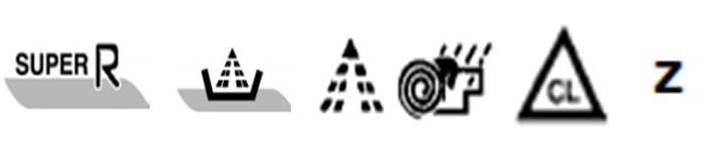
- The "SUPER R" icon. This icon is called "Super Wash" and allows you to speed up any previously selected cycle by 50 minutes. It is recommended to use this button only for cotton and synthetic fabrics.
- A basin with an overhead jet. Provides super-rinsing and thorough cleaning of laundry from detergent residue. This extends the wash cycle to 40 minutes.
- A downward-facing stream of water. This indicates a single rinse, which extends the wash cycle by 30-40 minutes.
- A spiral, spray, and dripping image. Complements the selected mode with conditioning, fragrance, and fabric softening.
- A triangle with the inscription "CL" in the center. Helps combat organic stains more effectively.
- Letter "Z". Excludes draining from the selected mode, which is necessary for washing items that cannot be spun. This option increases the cycle duration by 4 minutes.
Candy Aqua 104D2-07. The Candy Aqua 104D2-07 model has only one unique icon on the control panel: the "M&W" icon, which stands for "Mix and Wash System." This program allows you to wash different types of fabric simultaneously, simplifying laundry and saving energy.
Selecting and running a program
Automatic modes greatly simplify the washing process. Beyond the standard procedure of sorting items and pre-treating stains, there's little to do.
- Turn on the machine.
- Load the laundry into the drum.
- Pour or add the required amount of detergent into the tray.
- Select the appropriate mode using the selector or by pressing the button.
- Press the start button.
There is no need to adjust the temperature, spin strength, or washing duration: the main parameters are already set by the manufacturer within the mode.
Stopping and resetting the program
If, after starting the program, you discover that the program mode is incorrect, you can change the wash parameters. To cancel the program, set the selector to the "OFF" position. Then, select a new mode and press "Start."
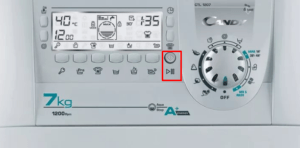
If necessary, you can pause the cycle by pressing the "Pause" button, waiting for the door to unlock, and removing or adding laundry. To resume the cycle, close the drum again and restart the wash.
Knowing your washing machine's hidden features ensures fast and high-quality washing, and deciphering the available modes will be key to getting to know your new machine. Candy owners will find it easiest to navigate the icons and symbols with the descriptions and explanations provided above.
Interesting:



Readers' comments
Headings
Washing machine repair




For buyers




For users


Dishwasher




Add a comment