
Washing modes of the Zanussi vertical washing machine
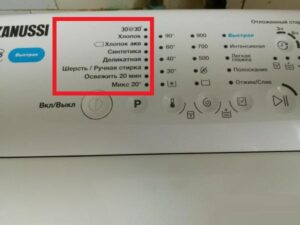 Washing machines are becoming increasingly complex with more and more functions, making it increasingly difficult to understand their functions without a manual. While the modes of a Zanussi top-loading washing machine are marked with special icons on the control panel, even with this guidance, it can be difficult to understand which function does what. The user manual can be helpful, and if you don't have one handy, our article today is the place to start.
Typical algorithms and their description
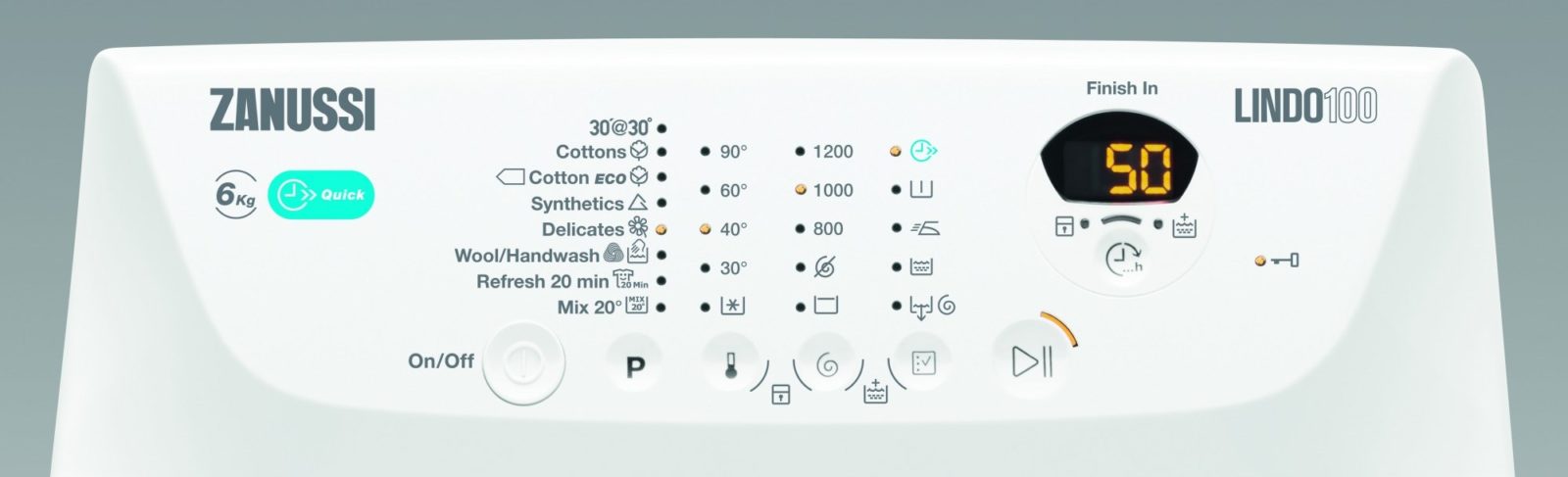
The washing modes on Zanussi's "home helpers" are almost indistinguishable from those on other washing machines, so you shouldn't have any trouble using them. They are all marked with different icons, which we'll help you navigate.
- The cotton box symbol. This is the "Cotton" cycle, suitable for cotton and colored items. The cycle lasts approximately 120-175 minutes at temperatures ranging from 60 to 95 degrees Celsius. This program is capable of cleaning even the dirtiest items, such as work clothes, towels, and bedding.
- Test tube symbol. The "Synthetics" function is designed for washing synthetic garments at a low temperature of 30-40°C for 85-95 minutes. Once the spin cycle is complete, the anti-crease option is activated, making this program ideal for office shirts, tablecloths, towels, and underwear.
- Tree symbol. Economy mode, which can be added to one of the main cycles to save energy. If you activate this function at 90 degrees, the machine will reduce the temperature to 67.
The manufacturer does not recommend using the economy mode with quick wash.
- Flower symbol. Indicates a delicate wash cycle, designed for delicate fabrics such as lace, as well as items labeled "hand wash." The cycle duration is 65-75 minutes.
- The symbol for trousers or jeans. This is the "Jeans" cycle, essential for proper care of this delicate fabric. It prevents fading and discoloration and takes approximately 130-140 minutes.
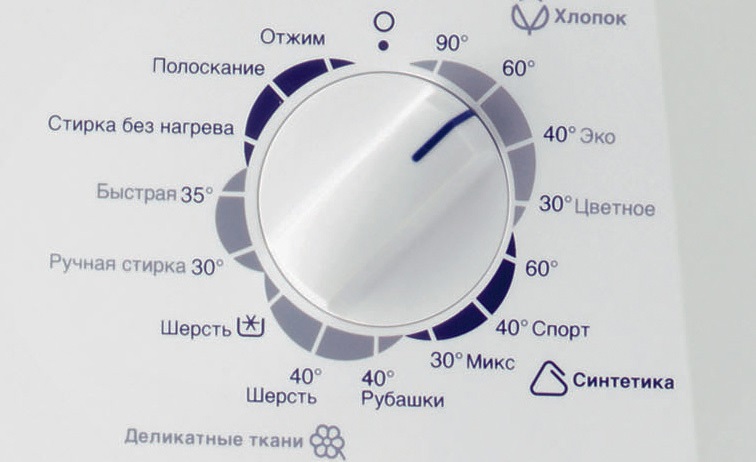
- A skein of thread symbol. The "Wool" program is designed for woolen items. This feature will prevent your clothes from shrinking or becoming misshapen during the cycle. The cycle takes only 50-60 minutes, partly because after the main wash, either a minimal spin cycle or no spin cycle at all is performed.
- Bug symbol. The "Children's" cycle, which washes clothes in plenty of water to completely remove any household chemical residue from baby's clothes, lasts only 30-40 minutes at a temperature of 30-40 degrees Celsius.
This mode is also suitable for allergy sufferers who have a reaction to detergents.
- The symbol of the medical cross. "Hygienic" wash, which helps remove dust mites and other sources of allergens. It is carried out at a very high temperature of 90 degrees Celsius for approximately two hours. It includes three intermediate rinses that help completely remove detergent.
- Blanket symbol. This cycle is for blankets and other items with different fillings. It takes approximately 65-75 minutes and runs at a temperature of 30 to 40 degrees Celsius.
- Sneaker symbol. This shoe washing program lasts for two hours at 40 degrees Celsius. It consists of a main wash cycle, three rinse stages, and a spin cycle at 1000 rpm.
- A moon symbol with two stars. A night cycle, characterized by minimal power consumption and incredibly quiet operation. It takes two hours, after which the water remains in the tank to minimize noise during the drain and spin cycle. In this case, you must manually initiate the drain and spin cycle.
- A basin symbol with the Roman numeral 1. Pre-wash, which takes between 40 and 115 minutes depending on the fabric. Suitable for heavily soiled garments, where ingrained stains need to be softened before proceeding to the main cleaning stage.
- T-shirt with a stain symbol. This function should be activated to remove stubborn stains and detergent residue. Be sure to add a special stain-removing detergent to the special compartment of the detergent dispenser. The "Stain Removal" mode operates at a temperature of 40 degrees Celsius.
- A basin of water with two rows of pixels symbolizes the extra rinse cycle, which is used to completely remove detergent after the main wash. It takes between 50 minutes and an hour.
- Spiral symbol. The spin function is useful when you're not satisfied with the spin cycle and want to spin your clothes again. It only lasts 10-20 minutes.
- A basin symbol with a downward-pointing arrow. This option is used to force the water to drain, for example, after an overnight wash. It takes up to 10 minutes.
This concludes the basic washing modes in Zanussi machines. Most of the icons on the control panel are easy to recognize even without instructions, as the manufacturer has specifically made them intuitive.
Useful additions
In addition to the basic modes, it's worth highlighting additional functions, some of which are particularly useful for high-quality washing. Zanussi appliances offer a number of useful features.
- Leak protection. Allows you to monitor the water level and initiate a flush if the liquid exceeds the permissible level.
- Restart. This is necessary to restart the machine if the power goes out while it's running.
- Block. Disables the washing machine's control panel during the wash cycle to prevent children from accidentally resetting the cycle.
- Anti-hair remover. Helps the user remove hair from items.
- Possibility of economical use of household chemicals.
- Control the imbalance to ensure that clothes are kept wrinkle-free while working.
Unfortunately, housewives don't always know everything about their "home helpers," which can lead to them missing out on a number of interesting opportunities. Be sure to read your machine's instructions carefully to avoid missing anything useful or important.
Selecting a washing algorithm
The choice of program is described in detail in the instructions for the household appliance. You can either activate a cycle with preset settings such as temperature, running time and spin speed, or customise the parameters to suit your needs.
The washing mode is always selected using the programmer. Temperature is usually selected by turning the second dial, and spin is selected with a separate button. Afterwards, all that remains is to start the wash with the "Start" button. The wash duration will be the sum of the time taken by all selected processes.
Interesting:

Readers' comments
Headings
Washing machine repair




For buyers




For users


Dishwasher




Add a comment