
Error ED on a Samsung washing machine
 The "ED" error code is appearing less and less frequently on Samsung washing machines. This is because this code was used on older models produced before 2008. Now, the same faults on Samsung washing machines are indicated by the codes "De," "De1," "De2," or "Dc," "Dc1," or "Dc2." We'll explore how to decipher the "ED" code and similar codes, as well as how to troubleshoot the faults that cause it.
What was the reason?
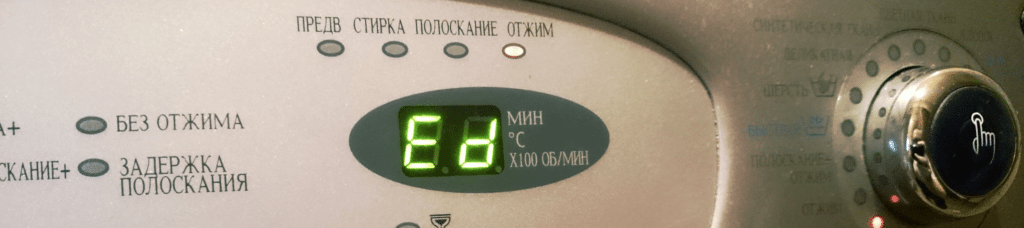
Error code ED, as well as errors DE, DE1, DE2, or DC, DC1, and DC2 on newer Samsung washing machines, can occur even if the washing machine does not have a display. In this case, the self-diagnostic system uses LED indicators on the control panel to alert the user. When transmitting an ED error code, a washing machine without a display lights up all temperature indicators simultaneously, and the indicators for all wash modes begin to flash rapidly.
Please note that with all this, the drum speed indicators do not flash or light up.
How to decipher Ed code? If we put aside the subtleties, this error can be deciphered as: “the washing machine door does not close or is not locked” Samsung". However, as will become clear from the following discussion, this explanation is too limited and does not identify all possible faults. We will have to determine this range.
- The hatch door does not close tightly and, as a result, does not lock.
- The door closes only after a loud slam or as a result of strong pressure.
- The hatch closes, but does not lock due to problems with the mechanical part of the UBL.
- The electronic part of the UBL has failed.
- The semiconductor component of the control module, which is responsible for communication with the door lock, has failed.
Problems with the hatch door
The Ed code, as well as similar codes such as De, De1, De2, or Dc, Dc1, Dc2, in Samsung washing machines often occur due to a foreign object getting stuck in the door. Most often, this is a piece of laundry or a small object lodged in the gap between the seal and the edge of the drum. To resolve this issue, simply carefully inspect the area around the seal and remove anything that might be preventing the door from closing.
The cuff itself can also interfere with closing the sunroof. Perhaps this part was recently replaced or the cuff tore, and part of it gets caught in the gap between the front wall of the Samsung car and the sunroof. Problems with the new seal can occur in two cases: if a non-original seal is installed, or if the seal is simply installed incorrectly. In this case, a repeat repair is required. If everything was done correctly, but the seal still prevents the sunroof from closing properly, you need to sand the edges of the part; most likely, there's a remaining protrusion or other defect. Smoothing it out will fix the ED error.
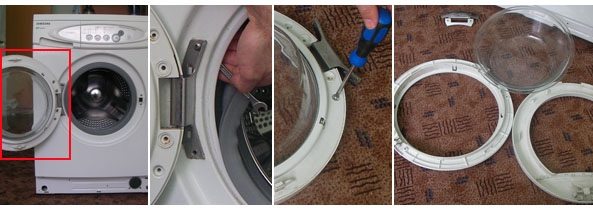
Sometimes the door of a Samsung washing machine will initially close intermittently, but pressing it with your foot or hand helps. Then the door won't close at all, and the display will consistently show an Ed error, or errors such as De, De1, De2, or Dc, Dc1, or Dc2. What's the cause? Carefully inspect the locking mechanism hook, which is located directly on the door cover. It should be spring-loaded and move with some effort. If the hook has shifted or the spring has popped out, you need to disassemble the hatch door and fix the problem.
The UBL is out of order
According to statistics, in approximately 30% of cases, the hatch locking device is the cause of the Ed, De, De1, De2 or Dc, Dc1, Dc2 errors. What could happen to it?
- The electrical component may be faulty. In this case, the door lock won't ring and will definitely need to be replaced.
- The mechanical part may break. While you can try to repair it, it's better to avoid unnecessary work and simply replace the door lock.
- The electrical wiring leading to the door locking system has burned or come off.
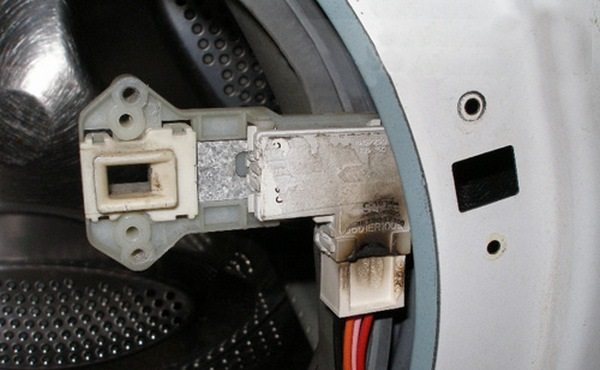
By the way! During home-improvement repairs, incompetent repairmen often tear or rip the wires leading to the door lock when removing the front panel of a Samsung washing machine.
What should we do? First, we need to make sure the locking mechanism on the washer door is working properly. Next, we'll do the following.
- To the right of the hatch we find a small hole and two screws that hold the door lock, unscrew them.
- Using one hand, bend the sunroof cuff inward as far as possible, then pull the door lock out through the gap. Be careful not to tear the wires in the process.
- Disconnect the plug with wires from the UBL.
- We check the resistance of the hatch locking device using a multimeter.
If a fault is detected, don't be too hasty; replace the hatch locking system immediately to avoid similar problems in the future. It's also important to note that the new hatch locking system must be the original one, otherwise problems may arise.
The control module is faulty
So, you've thoroughly checked the sunroof and door lock, and everything seems fine, but the errors Ed, De, De1, De2 or Dc, Dc1, Dc2 still appear, and the machine won't wash. A wiring check also shows there are no breaks anywhere. In this case, the problem may lie in the control module. There are several possible causes: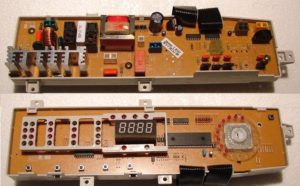
- the element responsible for the self-diagnostic system of the Samsung washing machine has failed, or the corresponding track has burnt out;
- the part responsible for communication with the UBL burned out, or the track burned out;
- One of the auxiliary parts failed.
In general, the best advice in this case is to contact an experienced technician who specializes in electronics. The chances of finding the cause on your own and having it professionally eliminated are very slim. At best, you'll waste a lot of time and energy; at worst, you'll end up spending money on a new control module and its programming. Avoid rash decisions.
In conclusion, it's worth noting that errors like Ed, De, De1, De2 or Dc, Dc1, and Dc2 on Samsung washing machines aren't as straightforward as they might seem at first glance. Sometimes, even experienced technicians have trouble identifying them. But if you follow a systematic approach, you'll likely be able to identify the problem, and the troubleshooting process will likely be straightforward. The key is to take your time and proceed carefully. Good luck!
Interesting:


Readers' comments
Headings
Washing machine repair




For buyers




For users


Dishwasher




Add a comment