
Resetting the error on a Siemens washing machine
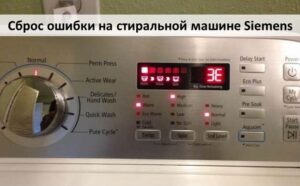 Some washing machines are ready to use immediately after repair. The system automatically detects that the problem has been resolved, the part is working properly, and no further warning is displayed. Siemens models operate differently—after repair, you'll need to manually reset the error, otherwise the machine won't start washing. The only remaining issue is how to reset the error on a Siemens washing machine. We offer step-by-step instructions and an overview of common malfunctions.
Getting rid of an unnecessary error
The self-diagnostic system on modern Siemens boards works properly—it immediately detects a malfunction and displays the corresponding error code on the display. However, after the problem is fixed, the user must notify the board that the repair is complete. In simple terms, the signal combination must be manually reset. The self-diagnostic system reset algorithm varies by Siemens model. However, the differences are minor. Typically, the following steps are sufficient: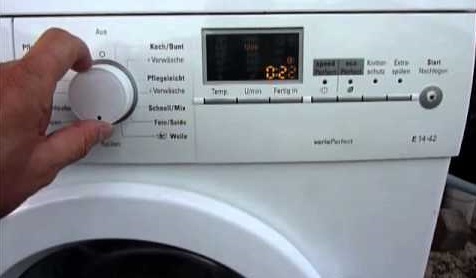
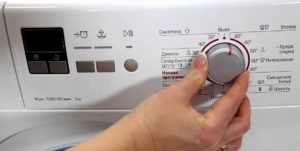
- turn the program selector to position “0”;
- move the programmer one more division to the left;
- press and hold the “Start” button for 2-3 seconds;
- scroll the selector to the starting position.
Sometimes you need to reset the error on Siemens several times – the system takes a long time to process the command.
If everything is done correctly, then after a while the error will be cleared and the machine will be ready for work. Sometimes the system does not accept the command for a long time – it is necessary to repeat the procedure 2-3 times. On some Siemens models, you need to press and hold the "Spin" button instead of "Start." It's best to check the manufacturer's instructions for the correct procedure.
Typical fault codes
The Siemens self-diagnostic system database includes dozens of different codes, allowing the user to determine the location and nature of the fault. However, most of these entered combinations remain hidden: the components and mechanisms associated with them rarely fail. Typically, a specific set of codes is displayed—these are typical faults for the brand.
- F01 indicates a leaky drum. The door may not be closed properly, or something may be stuck between it and the drum. Check the door; it's best to reload the drum.
- F02 indicates that the machine is not filling with water. This occurs if the central water supply is shut off or disconnected, the inlet hose is clogged, or the inlet filter mesh is clogged. Sometimes, a faulty pressure switch or a malfunctioning control board can cause filling problems.
- F03 Drainage system error – water has not been pumped out of the tank within 10 minutes. It is necessary to check all key drainage system components for blockages and damage: the debris filter, impeller, and pump. It is also recommended to test the pump; if the resistance is not 200 ohms, it needs to be replaced. The control board should be tested last.
A typical fault in Siemens washing machines is error code F03: problems draining water from the tank.
- F05 Engine malfunctions have been detected—it won't start, doesn't reach the required power, or, conversely, overrevves. The repair procedure depends on the cause of the malfunction. Sometimes, the only solution is to replace the engine.
- F06: The water does not heat up to the required temperature. The thermistor, temperature sensor, heating element itself, or the wiring connected to it are likely faulty.
- F14 Power Problems. This message appears if the network voltage is unstable and drops below 172V. It is necessary to restore the power supply by connecting a stabilizer to the network or by correcting the power supply.
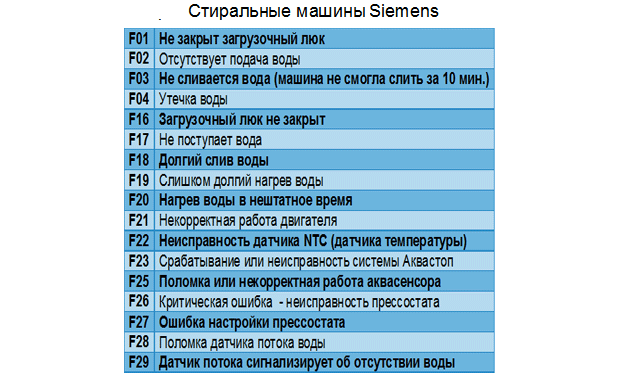
- F17 Fill time exceeded. There are three possible causes: the water supply tap is turned off, the inlet filter is clogged, or the water pressure has dropped below 1 bar. The water supply needs to be restored, after which the washing process will resume.
- F18 Drain timeout. Simply put, the drum didn't empty within the program's allotted time. The cycle resets after 1.5 minutes, after which the machine displays an error and freezes. This is caused by a faulty pump, pressure switch, or control board. Repairs involve cleaning the drainage system and replacing faulty components.
- F19 Heating timeout exceeded: The heating system has failed. Typically, the heating element isn't working at all, or high voltage is detected in the electrical system. Sometimes the problem is a missing thermostat: the set temperature exceeds the set value and threatens to overheat the machine. To correct the problem, check the heating element and the entire circuit, and replace components if necessary. With this error, the Siemens washer doesn't freeze; it continues washing in cold water.
- F23 The Aquastop system has been activated. There is a leak or a sensor failure.
- F57: Control board failure. Professional diagnostics, repair, or firmware update required.
The self-diagnostic system greatly simplifies the use and repair of Siemens devices. The main thing is to correctly decipher the code, completely repair the fault, and reset the error.
Interesting:

1 reader comment
Add a comment
Headings
Washing machine repair




For buyers




For users


Dishwasher




Hello.
My Siemens shows F21, please tell me what I should do?