
Electrolux washing machine service mode
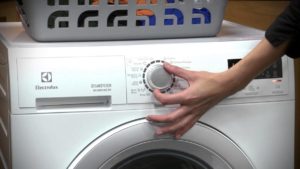 Modern washing machines can automatically detect system malfunctions. This greatly simplifies the user's life—just run the self-diagnostics function, and the system will narrow down the possible faults. Let's look at how to activate the service mode on an Electrolux washing machine to test it.
How to start a system test?
Entering service mode is quite simple. The main thing is to follow the algorithm precisely. To launch the test, follow these steps: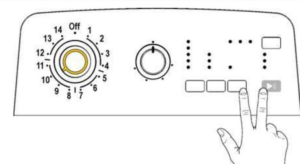
- turn off the washing machine;
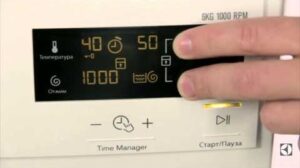
- Press and hold the Start/Pause and Option buttons on the dashboard;
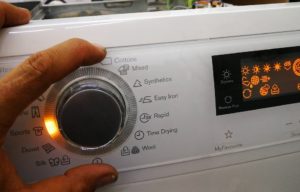
- While holding the keys, turn on the machine by turning the programmer knob to the right one position;
- Press and hold the buttons until the indicator on the dashboard starts flashing (you will have to hold the keys for about 2-3 seconds).
When the programmer is moved to the first position, the self-diagnostic system will begin testing the buttons and indicators on the control panel. Each time the selector is turned clockwise, diagnostics of specific components and elements of the washing machine will be initiated.
To exit test mode, you need to turn the washing machine off, on, and then off again.
Step-by-step diagnostics
After starting the test mode, you will have to check the operation of all the elements of the machine one by one. Diagnostics are performed step by step - you need to scroll the program selector clockwise and record the errors generated by the equipment. You can decipher the fault code using the instructions.
Let's figure out which components and elements of the washing machine are checked in each position of the programmer.
- Position 1. The user interface is being diagnosed. The control panel indicator flashes alternately.
- Position 2. When the selector is moved one click to the right, a check of the door locking device and the main cycle inlet valve begins. At this point, the machine door closes, and the tank fills with water to the required level. The diagnostic process takes 5 minutes.
- Third programmer position. The door lock and pre-wash valve are checked. The door is locked, and water is drawn into the system through the pre-wash compartment of the detergent drawer.
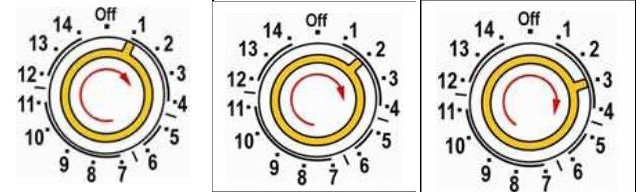
- Stage 4. The system checks how water is supplied to the tank through the fabric softener/rinse aid compartment. The machine is still locked, and there is water in the tank. This stage lasts 5 minutes.
- Stage 6. At this stage, the self-diagnostic system tests the heating element's operation. The door is locked, and the tank is filled to the required level. The heating element should bring the water to the set temperature (90°C). This process takes 10 minutes. If heating is not possible, the machine will display a corresponding error code.
- Position 7. In this position, the programmer starts the motor. The motor spins the drum clockwise for 55 minutes, then counterclockwise for the same amount of time. The speed is 250 RPM. The machine's drum is checked for leaks. This diagnostic stage takes a total of 2 hours.
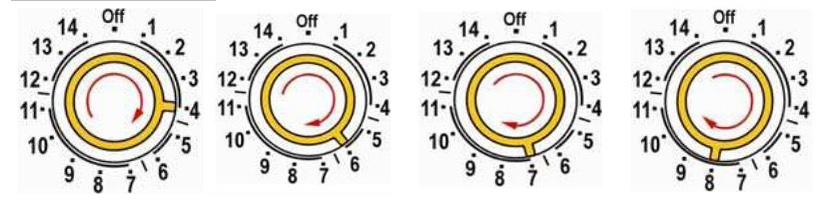
- Selector position eight. The pump is engaged. The engine accelerates to 650 rpm and reaches maximum spin speed. At this point, the drainage system is tested, as is the spin cycle efficiency. If a malfunction is detected, an error code is displayed.
- Position 9. This test stage is only relevant for Electrolux top-loading machines. The self-diagnostic system checks whether the drum is positioned correctly. The maximum test duration is 2 minutes.
Using the test mode, you can check the main components of the washing machine: the control panel, the water inlet and outlet system, the motor, etc.
The total inspection time will be approximately 2.5-3 hours. If the automatic transmission displays a fault code, you'll need to decode it and determine whether the repair can be done yourself or if it's best to call a technician.
Error history
The system allows you to view the last three errors detected by the intelligence. They are stored in the memory of the main electronic module. To do this:
- enter service mode;
- Turn the programmer to position 10. Be sure to turn the selector clockwise.
The display will show the last fault code detected by the system. To see previous errors, you need to press the button located to the left of the "Start/Pause" key.
If you are unable to enter diagnostic mode the first time, you should read the instructions again and follow the instructions exactly.
Interesting:
Readers' comments
Headings
Washing machine repair




For buyers




For users


Dishwasher




Add a comment