
Bosch washing machine service test
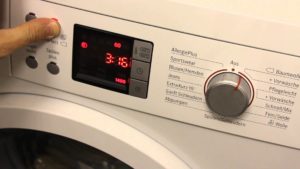 Self-diagnosis is a crucial feature that distinguishes modern electronic washing machines from older analog models. By running a service test on your Bosch washing machine, you can verify its performance. However, to run the self-diagnosis yourself, you need to read the instructions in this article. We hope you'll understand everything and be able to implement it on your "home assistant."
Why is this mode needed?
Why should a user run a self-diagnosis test on a Bosch washing machine, since it's not necessary for normal operation? In fact, a service test allows you to accomplish two tasks at once: first, to determine which washing programs and functions a specific washing machine has, and second, to identify which components and assemblies are malfunctioning. In some cases, it is the service test that helps to identify a serious malfunction., which is why experienced craftsmen often resort to it when they first get acquainted with a particular machine.
If you're just about to buy a Bosch washing machine and spot a demo model on display at a store, you can run a service test to find out what this "home assistant" is capable of and whether it's worth buying. Generally speaking, the test mode is a very useful feature that isn't needed every day, but it's worth running at least once a year, and we'll show you how.
Launching service on Bosch Maxx
You can start the Bosch Maxx washing machine's test mode using the program selector and buttons located on the control panel. Close the machine door tightly and begin.
- Turn on the Bosch Maxx washing machine and rotate the program selector in a circle until it is in the “Off” position.
- Wait for two seconds, then turn the selector dial to the 6 o'clock position to "Spin." Wait until the "Start/Pause" indicator button starts flashing.
- Press and hold the spin speed switch button.
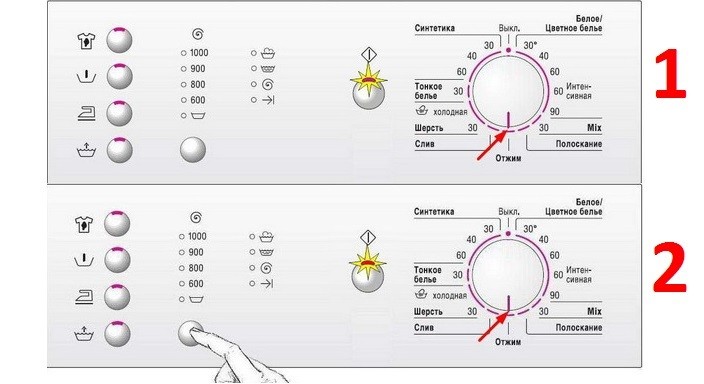
- Next, our task is to turn the selector handle to the “Drain” position (at 6 o’clock), while we do not release the spin speed button.
- Next, release the spin speed control button.
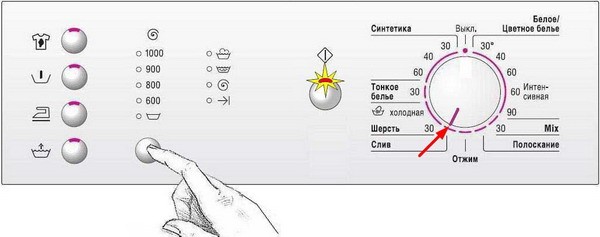
- Now, using the program selector, we can select any washing mode to test it for proper operation. Once we've selected a program, we press the "Start/Pause" button.
After testing the Bosch Maxx software for errors and malfunctions, we need to exit test mode. How can this be done?
- First, press the “Start/Pause” key button; it should start flashing.
- Turn the program switch to 6 o'clock and wait a few seconds.
- We switch the selector to the OFF position.
If something doesn't work at any stage, it's best to turn off the machine, then turn it on and start the service test installation again.
Launch on Bosch Logixx
Setting up the test mode on the Bosch Logixx is quite similar. First, close the door tightly, then turn on your "home assistant." Set the program selector to OFF, wait 2 seconds, then set the selector to the 6 o'clock spin position. As with the Bosch Maxx, the light above the "Start/Pause" button will flash.
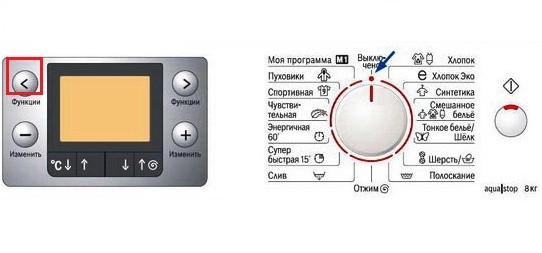
Now we need to pay attention to the machine's display. To the right and left of the display are buttons with right and left arrows. These are the function buttons. Press and hold the function button with the left arrow. Turn the programmer knob to the 7 o'clock position ("Drain"). Then, release the arrow button. If the last error code appears on the screen, then you have done everything correctly.
Next, use the left and right arrows to select the desired error code that corresponds to a specific component of the Bosch washing machine. Make your selection and press "Start/Pause." To understand what each code means, study Bosch washing machine error codes, then you can make an informed choice.
After testing the machine, you need to disable the self-diagnosis function. This is done in the same way as with Bosch Maxx washing machines.
Launch on Bosch Classixx
Now let's look at how to initiate self-diagnostics on Bosch Classixx washing machines. First, as usual, turn on the machine and set the program selector to OFF. Find the leftmost button on the machine's control panel and hold it down. Next, hold down the "Start/Pause" button and simultaneously turn the selector one step to the left. If everything was done correctly, the display will show the number 8888.
Set the program selector to the 12 o'clock position. Set the drum speed selector to maximum. Press the first and third additional function buttons. Turn the program selector one step to the right. Now press "Start/Pause." If you've done everything correctly, the machine will begin testing the spin speed by rotating the drum at different speeds.
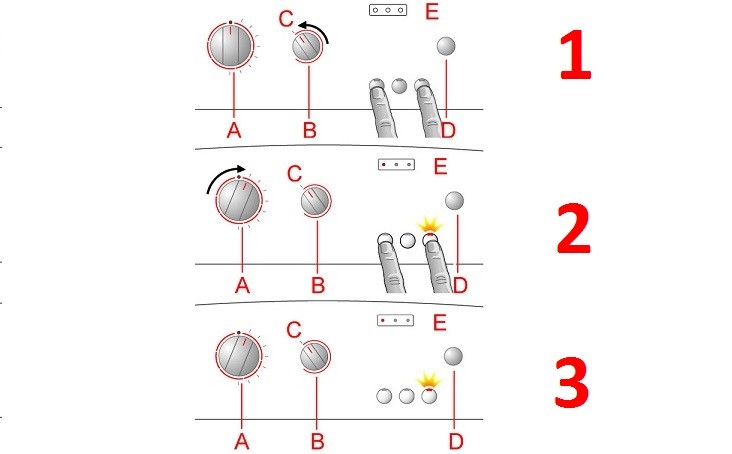
To check other machine components, turn the program selector knob clockwise one position at a time. The Bosch Classixx will check all its components one by one. To exit self-diagnosis mode, press "Start/Pause" and turn the program selector knob to OFF.
Interesting:



1 reader comment
Add a comment
Headings
Washing machine repair




For buyers




For users


Dishwasher




Are there instructions for troubleshooting error F23 for all BOSCH washing machines except the BOSCH Logixx7? Why? Where can I find this information?