
Siemens washing machine does not drain water
 If your Siemens washing machine stops with a full tank and doesn't finish a wash cycle, it means there's a drainage problem. This is practically normal—it happens often and can be quickly resolved at home. The key is to correctly identify the cause of the problem by conducting a comprehensive diagnosis of the drainage system. Let's take a step-by-step look at where to start and what you'll need.
What are the "symptoms" of the breakdown?
It's quite easy to suspect drainage problems in a Siemens washing machine. Such a breakdown is accompanied by a multitude of telling “symptoms” that clearly indicate a malfunction. As a rule, you can guess about a non-functioning drain by the following signs:
- the water drains very slowly (instead of 2-4 minutes, the drain takes 5 or more);
- the program periodically crashes – the specified settings are lost, the machine freezes;
- when switching to drain or rinse, the machine freezes and displays an error;
- the water doesn’t drain completely – things remain unusually wet;
- the drain works intermittently: sometimes the water drains, sometimes it remains in the tank;
- The spin cycle does not start.

Sometimes the draining process simply slows down, prolonging the cycle. If the machine doesn't drain at all, the program will stop before it finishes, leaving the drum full. The second situation is worse, as the washed items will be "locked in": the large amount of water prevents the safety system from opening the door.
Do not try to open a full water tank - it is unsafe!
Problems with drainage occur for the following reasons:
- the hose connecting the tank to the pump is clogged;
- the pump impeller is blocked by a foreign object or debris;
- the garbage filter is clogged, preventing water from entering the sewer;
- the pump is dirty or broken;
- there was an external blockage (in the general sewer system or siphon);
- The drainage hose is clogged due to a blockage or being pinched.
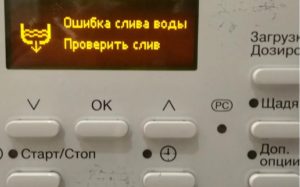
Sometimes the self-diagnostic system will prompt you to fix the drain. Modern Siemens washing machines can automatically check the operation of their components and, if any problems are detected, notify the user with an error code. All you have to do is write down the combination and look up the code in the manufacturer's instructions. If the display is clear, you'll need to proceed manually: sequentially checking all drainage components.
Main filter element
If the machine isn't draining, the first thing to check is the debris filter. It often becomes clogged with hair, lint, and other debris caught in the machine. To restore the drain, simply clean the nozzle - unscrew it and rinse it under the tap.It's not difficult to do this yourself, just follow the instructions:
- disconnect the machine from communications (remove the plug from the socket, turn off the water);
- find a false panel in the lower right corner of the case;
- pry up the panel with a flat-head screwdriver, press the latches and set it aside;
- tilt Siemens back;
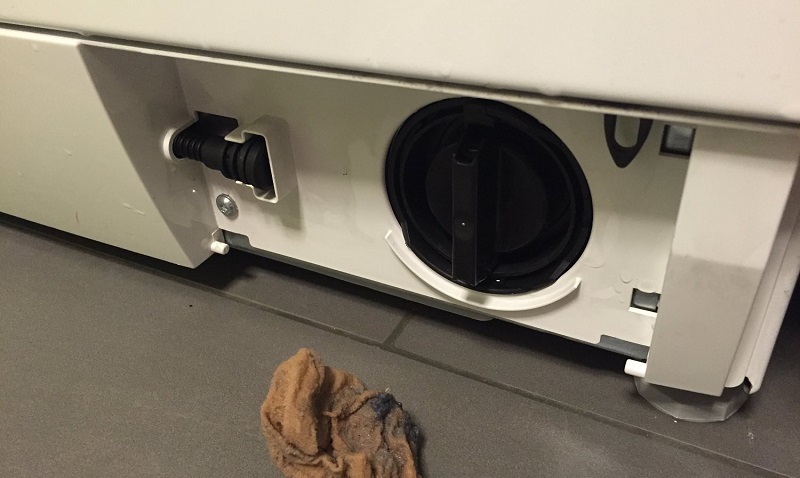
- place a container under the filter;
- use a floor rag as a safety net – water will spill out during the wringing process;
- grab the protruding part of the filter cover;
- slowly turn the filter clockwise;
- collect water;
- Unscrew the nozzle completely.
After unscrewing the filter, we begin cleaning. Sometimes, simply rinsing the nozzle under the tap with soap is sufficient. If the "coil" is covered with a thick layer of dirt and grime, clean the "dustbin" with a toothbrush or soak it in a warm lemon solution. Avoid using hot water, as boiling water will deform the plastic and rubber seal.
Immediately clean the filter seat of any dirt using a toothbrush or dish sponge. After cleaning, screw the nozzle tightly in place and snap the cover panel into place. Then connect the Siemens washing machine to the power supply and run a test cycle. Has the drain returned to normal? Then the problem is solved.
The pump is not working
If the debris filter was clean or cleaning it didn't solve the problem, then the diagnostics need to continue. This time, we move on to the drain pump. It's best not to stop after removing the debris filter; instead, perform a comprehensive cleaning of the drain.
First, assess the condition of the impeller. It's located on the pump and often becomes clogged with hair or solid debris. The blades, which are supposed to guide the waste, stop moving, and water stops pumping. This problem can be solved by inspecting and cleaning the impeller: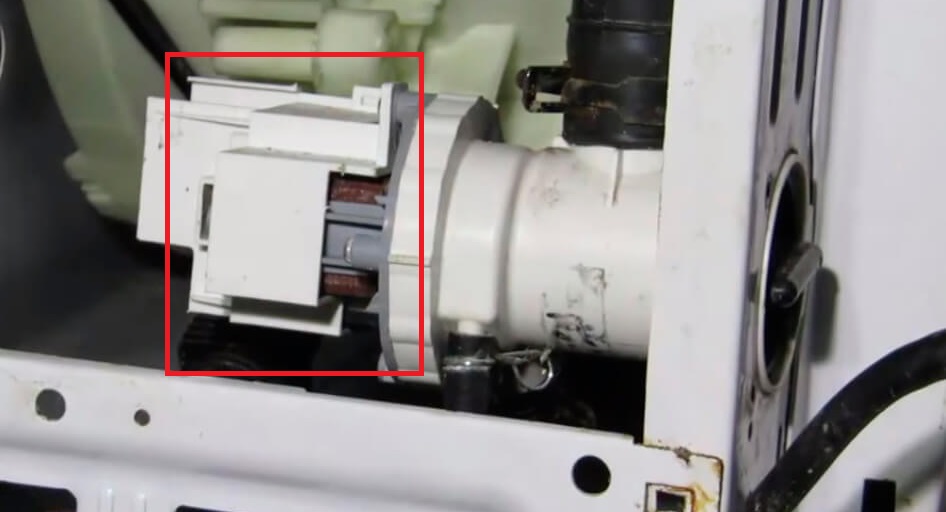
- We shine a flashlight through the hole free from the debris filter;
- we look out for the impeller - the blades on the pump;
- we evaluate the contamination of the part;
- we are trying to spin the impeller.
If the impellers are stuck due to a blockage, remove any debris. Then, replace the impeller and run a quick wash. Is the drainage correct? If not, remove the filter again and continue troubleshooting. The drain pump is likely faulty. A simple test can help: turn on the automatic spin cycle, shine a flashlight on the impeller, and observe its behavior. If the machine hums but the impellers don't move, the mechanism is damaged. Repairing the pump is too time-consuming and difficult; it's easier and cheaper to buy a new one.
An analogue is selected based on the serial number of the Siemens washing machine. The cost of the pump depends on the supplier and ranges from $10 to $30. You can install the pump yourself: remove the old unit, disconnect the wiring and hoses, and install a working replacement in its place. Then, start the wash cycle. If the drain still doesn't work, contact a service center.
Interesting:


2 reader comments
Add a comment
Headings
Washing machine repair




For buyers




For users


Dishwasher




I removed the pump, connected it to 220, and it works.
Everything is clear