
Samsung washing machine - spin and drain not working
 What should I do if my Samsung washing machine won't spin or drain? This question is often asked by customers when they contact our specialists for help. This problem is especially common with older Samsung washing machines, manufactured 7-10 years ago. What kind of malfunction could cause this symptom, how can I detect it, and then fix it myself? We'll discuss these issues in this article.
Possible causes of failure
We assume that this Samsung washing machine problem will be resolved by the user themselves. Therefore, we first need to identify a list of possible malfunctions that could cause the washing machine to stop draining and spinning. There are many possible causes, so the search will require considerable effort.
Before looking for the reasons why your washing machine is broken, try simply rebooting it; perhaps the problem will go away on its own.
- Blockages. A blockage in the drain hose, pipes, or pump will block the water flow, meaning the machine will freeze before the spin cycle even starts.
- Pump mechanics or electrical. The pump may have burned out, or its impeller may not be rotating for some reason. Under these conditions, the water drain from the washing machine stops working, the washing machine freezes and does not start the spin cycle.
- Pressure switch. A faulty level sensor can also cause the machine to freeze during the draining process, so it should be checked as well.
- Control module. In the worst case, this problem is caused by a faulty control module. Electronics can cause almost any kind of malfunction, and repairing the electronics of a washing machine is quite expensive.
Fault detection algorithm
To identify the malfunction that's stopped your washing machine and frustrated you, you must first rule out common user errors. What are they? First, the washing machine may freeze at various stages of the wash cycle if the drum is overloaded with laundry. Second, the machine may stop spinning if the user accidentally disables the spin cycle. Third, the machine may freeze before draining due to a brief electronic failure. This type of malfunction is usually resolved by turning the machine off and on again.
Having ruled out absurd reasons for the breakdown, you can begin to look for real faults, and you need to start with the simple, and then gradually move on to the complex.
- First, we inspect the machine for blockages: first, we check the debris filter, then the pipe
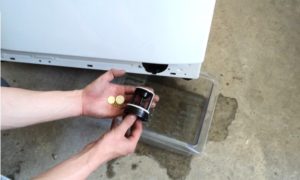 trash filter, a drain pipe running from the tank to the trash filter, then a pump and a hose.
 - If there are no blockages, we thoroughly check the pump for functionality, checking both the mechanical and electrical parts of the drain pump.
- If the pump is OK, the pressure switch is next in line. It needs to be removed and checked for functionality using a multimeter.
- Well, if the pressure switch is OK, all that's left to do is carefully inspect the washing machine's wiring for breaks, melting, and other issues, and then move on to checking the control module. But before you do that, read the following article. Is it worth repairing electronic modules yourself?, it will help to avoid many mistakes.
That's the entire troubleshooting algorithm. It seems simple, but don't be fooled. When you start disassembling and disassembling your Samsung washing machine, you'll realize it's far from simple. To save time and stress, it's best to call a professional, but if you have strong nerves and patience, start troubleshooting.
We find and remove the blockage
First, let's check the dust filter, but before you unscrew it, find a small flat container, trough, or frying pan and take several large rags. When you unscrew the filter, water will flow out of the hole, so to avoid flooding the floor, you need to place a container underneath it and lay rags underneath it.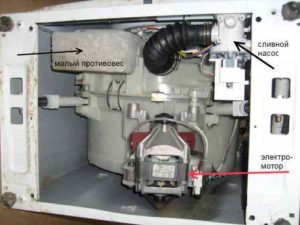
Unscrew this part and clean it of debris. Remove any dirt or foreign objects from the filter hole. Next, disconnect the washing machine from the water supply, sewer, and power lines, and move it to the center of the room, covering the floor with rags. Remove the detergent drawer. Lay the washing machine on its side to access the pipes through the bottom. Then, follow these steps:
- remove the clamps from the large drain pipe that comes from the washing machine tank;
- we pull off the pipe and wash it from dirt;
- We remove the wires from the pump, then unscrew it and disassemble it into two halves in order to see if it is clogged with dirt;
- We put the pump aside and remove the drain hose. It's unlikely that it's clogged, but it's still worth checking.
If any mud plugs or large accumulations of debris are detected, they should be removed, and then, after reassembling the machine and placing it back in place, the operation of the "home helper" should be checked. If no debris is detected, the pump can be left in place and checked immediately.
We check and repair the pump
At this stage of troubleshooting, we've ruled out clogs as a possible cause of the washing machine's malfunction, which means we need to move on to the next stage of diagnostics—checking the pump. We've already removed and even partially disassembled the drain pump, so we grab a multimeter, set it to test resistance, and touch the probes to the pump's electrical contacts.
If we see 0 or 1 instead of a three-digit number on the multimeter display, the pump has burned out and will have to be replaced. If the pump's electrical system is OK, we'll disassemble its mechanism completely.Let's check how tightly the impeller fits on the shaft and also check for hair or threads tangled around the impeller base. The drain pump's electrical system is fine, and the impeller rotates fairly freely, so this component isn't the issue.
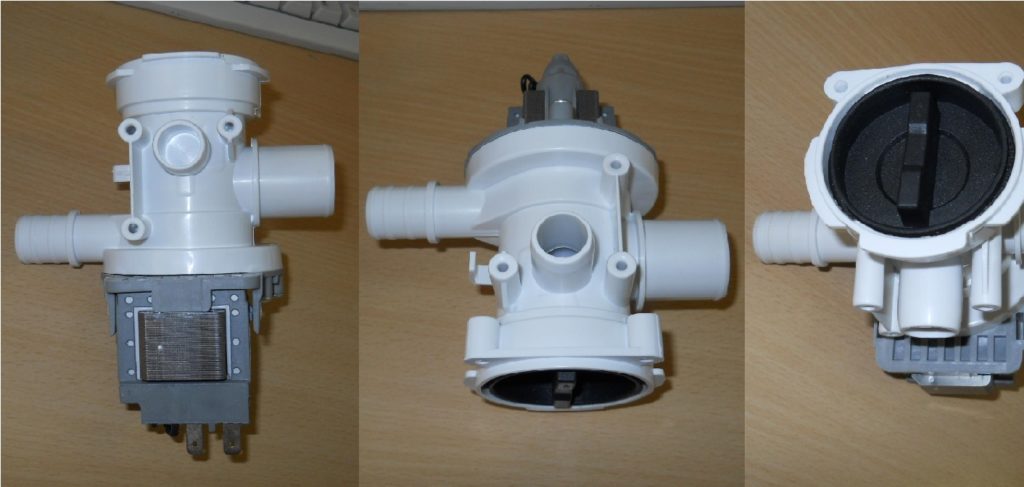
When checking the pump, immediately inspect the condition of the wires and terminals that connect to the drain pump. A wire can burn out or pop out, causing a number of problems.
Testing and replacing the pressure switch
My Samsung washing machine doesn't refuse to wash, but it doesn't drain or spin the clothes. It's possible the problem is with the pressure switch. The water level sensor (pressure switch) should be checked immediately after the pump, so without further delay, we remove the top cover of the washing machine. If you have difficulty removing the top cover, don't despair.
- go around the back of the washing machine;
- Find two screws in the upper corners of the back wall;
- unscrew these screws;
- Place your hands on the lid and pull it towards you, the lid will move back and come off.
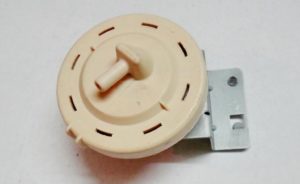
At the top, just under the lid of the washing machine, you will see a round plastic piece with an electrical sensor attached to it - this is the pressure switch, we will need to check it.
We will not describe the verification process, since we have already done this in the publication. Checking the washing machine pressure switchRead this article, and you'll find all the information you need. If the pressure switch is faulty, it should be replaced immediately; the part costs about $20.
Checking the control module
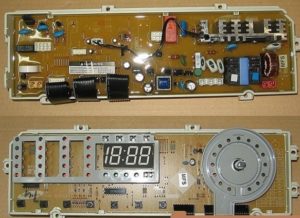 If the water level switch is working properly, you'll need to take a closer look at the electrical system of your Samsung washing machine. Feel and inspect all the wires leading to the control module, and mark any suspicious ones with a marker so you can test them later with a multimeter. If these tests don't reveal anything unusual, the problem is most likely with the control module.
We do not recommend removing, much less checking or replacing the electronic module yourself: Firstly, this requires specialized knowledge, and secondly, the risk of breaking an expensive part is too great. It's better to consult a reputable specialist.
In conclusion, if your Samsung washing machine isn't working properly and freezes during the draining and spinning phase, you should immediately begin investigating the cause. It's a good idea if the problem is due to simple user error, but what if it isn't? Ultimately, the problem exists and needs to be addressed, especially since we've outlined the solution in this article. Good luck!
Interesting:

7 reader comments
Add a comment
Headings
Washing machine repair




For buyers




For users


Dishwasher




Thank you! It helped!
Thank you
Thanks, it helped!
Thanks, it helped!
Thank you
2020 Samsung washing machine did not drain water.
Following your instructions, I disassembled the pump, cleaned the pipe and reassembled it.
Everything worked. Thank you very much.
I took the pump apart (just unscrewed three bolts, it's made of two parts) and found fluff and hair in the impeller. I removed it and that's it! It started draining! Thank you.