
Time Manager on an Electrolux washing machine
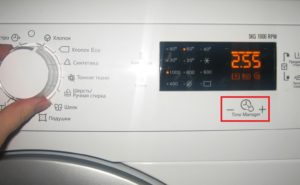 Many housewives are dissatisfied with their washing machines' unreasonably long wash cycles. For example, bedding can only be washed on a two-hour cycle. Three or four loads of laundry would take 6-8 hours—consuming significant amounts of electricity and water, and leaving the machine unattended for such a long time is unacceptable. To solve this problem, the Time Manager feature was developed for Electrolux washing machines.
Features and benefits of the function
With Time Manager, you can finally tailor your laundry to your personal schedule. This feature allows you to adjust the time allocated for individual cycles. You can adjust the program duration based on the degree of soiling of your clothes. The most modern Electrolux models offer up to eight time settings.
The Electrolux washing machine's user manual offers a variety of programs. These include universal programs suitable for synthetics and cotton fabrics, as well as programs designed for specific types of fabrics and garments, such as wool, silk, denim, jackets, blankets, and more. Each program is developed with the specific fabric characteristics in mind to ensure optimal washing results. Universal programs are used more often for the following reasons:
- they allow you to load the drum to the maximum;
- they have a choice of spin speed and temperature;
- You can wash both synthetic and cotton items.
 Their only drawback is their duration. Depending on the temperature setting, a cycle can take two hours or more. How many can afford to spend that much time? Furthermore, large families often run their washing machines more than once or twice a week. This forces them to adjust their schedules to account for the hours spent doing laundry.
Time Manager lets you use your washing machine the way you want. Why spin lightly soiled laundry for two hours? Intensive treatment or quick refresh—the choice is yours!
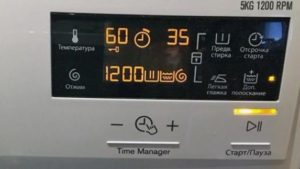
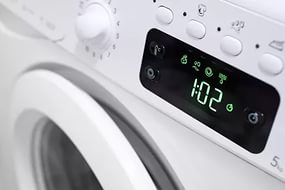
You can activate the function on the control panel using the button of the same name. The economy indicator (usually a circle with a circle around it) will show the number of wash time levels. If for some reason the default cycle time doesn't suit you, press the button and use the +/- buttons to select the desired level. The basic Time Manager offers the following alternatives.
- The first level is the normal degree of contamination, full load.
- The second is minor contamination of items at maximum load.
- The third one is when loading laundry onto ½ of the drum.
- The fourth one is for refreshing a small amount of clothing.
The number of cycle levels depends on the specific model. The latest Electrolux models offer up to 8 cycle time options. These are displayed on the LCD display, which shows the balance between the wash result and the selected cycle level.
How much time can you save?
Before using such a useful feature, it's a good idea to understand how to manage it. Let's calculate how much the program will shrink when choosing a specific level. For example, if Time Manager is divided into four segments, the first level (a full hour-long cycle) will complete the entire cycle. The second allows you to reduce the initial period by a quarter, and the third by almost half. The fourth level saves two-thirds of the time.
Important! If your model is designed for six or eight levels, corrections can be made with a smaller time step.
Thus, with the maximum reduction in the two-hour cycle, the wash can be completed in less than 60 minutes. However, using Time Manager isn't practical for all programs. If the cycle is already short, activating the feature isn't worth it. Those who are curious are welcome to experiment.
Interesting:



Readers' comments
Headings
Washing machine repair




For buyers




For users


Dishwasher




Add a comment