
Turning on the spin cycle on a Candy washing machine
 Manufacturers of all household appliances always strive to create an intuitive interface, making it easy to navigate even without a manual. This also applies to washing machines, which are technically complex but simple to operate. Activating the spin cycle on a Candy washing machine is no more difficult than on other "home helpers," but new users sometimes have trouble. We'll explain in detail how to properly spin clothes in this brand's appliances.
Spin activation diagram
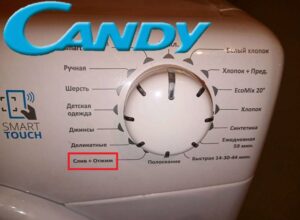
Most Candy models feature a prominent "Spin" button on the dashboard, typically represented by a spiral icon. However, this button isn't used to activate the spin cycle, but rather to adjust its intensity, measured in drum revolutions per minute. The start is carried out by setting the programmer to the “Drain + Spin” position, which activates a separate program without washing and rinsing.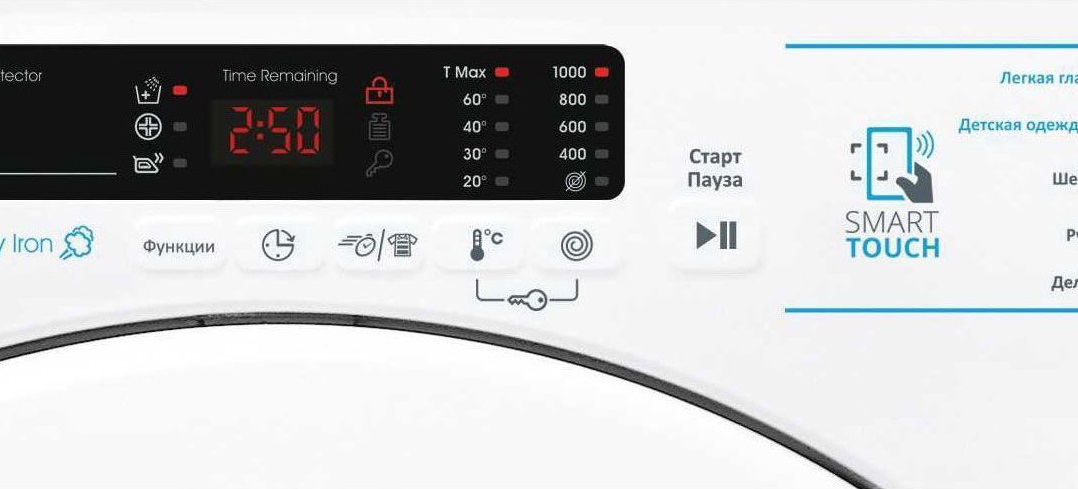
After selecting the mode, you need to select the optimal speed. Machines often spin at 400, 800, 1000, and 1200 rpm, but some models spin at 1400 rpm. Once adjusted, simply press the "Start/Pause" button to begin the program. Once the items are free of excess moisture, the washing machine will drain the waste liquid and then finish its cycle.
Don't confuse the modes on the dashboard, as there is a similar icon with a crossed-out spiral that is responsible for starting the drain without spinning.
English-language versions of Candy automatic washing machines can pose additional challenges for users, as they lack a display and all text isn't translated into Russian. In this case, to start the spin cycle, the user must first select the "Spin" position using the programmer. Next, adjust the program intensity using the "Spin Speed" button, selecting either medium speed (labeled "MED") or high speed (labeled "MAX"). Then, simply turn on the machine and wait for it to finish spinning.
Symbols of various Candy car models
This company's equipment often features unique function designations that are rarely found in devices from other manufacturers. They are most often found in more expensive devices, as they significantly improve and sometimes even speed up washing, but budget "home helpers" also have good functionality. We'll briefly describe the interesting modes in this brand's popular machines in case you don't have a user manual at hand.
Let's start with the widely popular Candy Aquamatic 2D1140-07 washing machine, which boasts compact dimensions and a full 16 modes. Most of its programs are standard, as found in any Candy machine, but there are also a few unusual modes with special icons.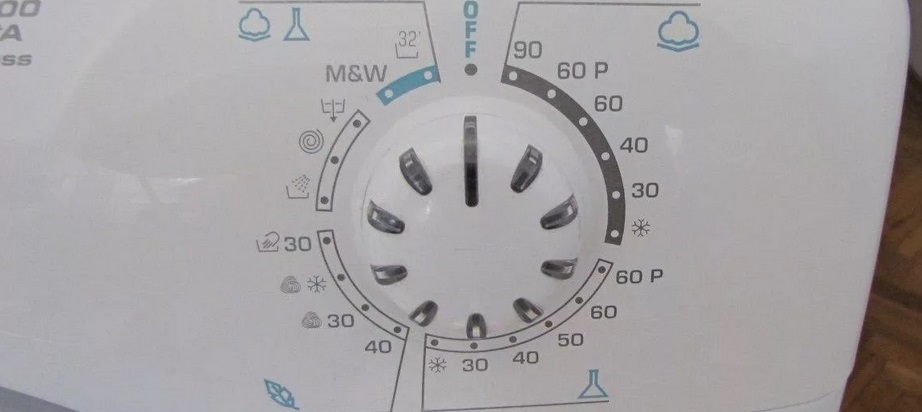
- Snowflake icon. Allows you to run a cold water wash, which can be useful for delicate synthetic fabrics that shouldn't be heated. The program lasts approximately 50 minutes, safely cleaning clothes, saving you the time and effort that would otherwise be spent hand washing.
- The "Sport" mode is aptly named, designed for cleaning sportswear and shoes. The duration depends on the degree of soiling of the garment, but averages 70 minutes.
- The "32" label indicates an extremely fast cycle, allowing you to refresh up to 2 kilograms of laundry in just 32 minutes.
- The "44" label is another fast program, which allows the washing machine to wash items in just 44 minutes.
Let's move on to another modern washing machine – the Candy CS4 1071DB1/2. In addition to classic cycles, it also offers the following interesting programs:
- The "SUPER R" label. The manufacturer modestly calls this mode "Super Wash" because the button with this designation accelerates any previously activated mode by 50 minutes.
Experts recommend accelerating the work cycle in this way only for processing clothes made of cotton and synthetics.
- A basin icon with a jet of water directed from above. This activates the Super Rinse function, which completely removes household chemicals used during the main wash cycle. Activating this function extends the washing machine's cycle time by an additional 40 minutes.
- The downward-facing water jet icon indicates a single rinse cycle has been activated, which will extend the program duration by approximately 30-40 minutes.
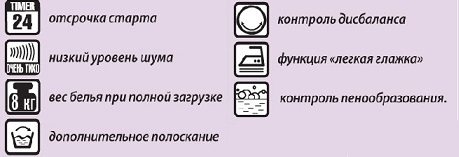
- Spiral, spray, and falling water droplet icons. Improves your current wash cycle with conditioning, fragrance, and fabric softening.
- A triangle icon with the word "CL" written on it. This feature will improve the washing machine's ability to remove organic stains.
- The letter "Z." Activating this option will remove the drain function from the current program, which is useful for washing delicate items that cannot be spun. Enabling this function will increase the washing time by approximately 4 minutes.
Finally, if we're talking about another popular washing machine, the Candy Aqua 104D2-07, you'll find only one unusual symbol on its dashboard. It's the "M&W" symbol, which stands for "Mix and Wash System." This mode allows you to wash items of different fabrics in a single cycle, saving time and energy.
Starting and stopping modes and functions
An automatic washing machine makes life much easier for modern people. To start a wash, simply sort your laundry by fabric type, color, and soil level, then proceed directly to the washing machine. What do you need to do?
- Turn on the device.
- Place dirty clothes in the drum.
- Add washing powder or gel, as well as fabric softener, to the powder dispenser.
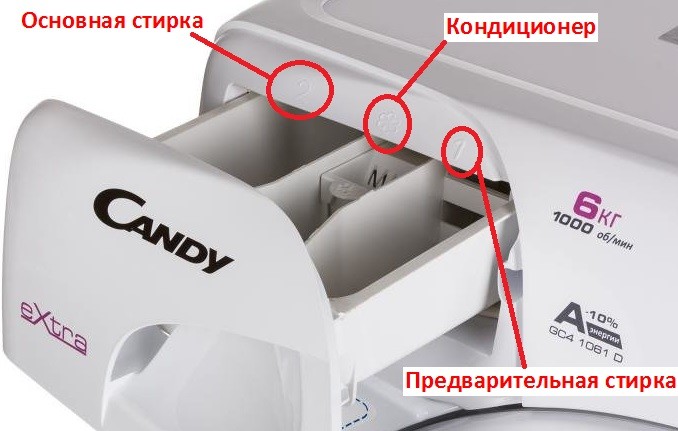
- Using the programmer, select the required program.
- Activate the wash using the corresponding button.
Typically, the user does not even need to adjust the temperature, spin speed, and cycle duration, as all of this is already configured for each work cycle.
However, if the wash cycle has already started but you discover the wrong program was selected, you can still change the settings. To do this, turn the programmer to the "OFF" position, then select the desired mode and restart the wash cycle using the "Start" button. If you just need to stop the current program, and not cancel it, then you should press the “Pause” button and wait until the hatch door lock is released. After this, you can take out the extra clothes or add the forgotten ones, close the door and continue the work of the “home assistant”.
Interesting:
Readers' comments
Headings
Washing machine repair




For buyers




For users


Dishwasher




Add a comment