
How to turn on the spin cycle on an LG washing machine?
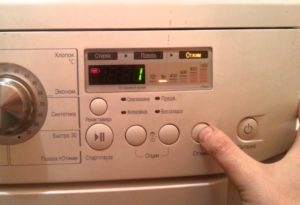 Modern washing machines have a user-friendly interface, so after reading the manual, the user can easily figure out how to activate the basic washing modes. An interesting situation arises with machines from a famous brand: the program selector knob on an LG washing machine doesn't allow you to separately activate the spin cycle. The program selector only allows you to select the "Rinse and Spin" option. So how do you activate the spin cycle?
Instructions for activating the spin cycle
Using only the spin cycle on LG washing machines is very simple. After turning on the washing machine, the user doesn't need to immediately turn the dial to select the appropriate program. In fact, the dial isn't needed at all. To activate the spin cycle, you must use only the button of the same name located on the control panel. The sequence of actions will be as follows:
- press the power button (which turns on the equipment);
- wait until the indicators on the control panel light up and the machine makes a characteristic sound signal;
- Press the "Spin" button several times to set the desired drum speed. The display will show the approximate time it will take to complete the process.
- Start the washing machine by pressing the "Start" button. Wait for the machine to spin the laundry and drain the water from the drum.
By following the instructions precisely, you can be sure that the washing machine will skip the rinse cycle and immediately begin the spin cycle. If you select the "Rinse and Spin" program, be prepared for the machine to first draw in water, rinse the items, and only then begin the spin cycle. This means an extra 10 minutes of machine operation and several dozen liters of wasted water.
Some LG washing machine models do not respond to the algorithm described above.
This is no reason to be upset; you can run the "Spin" function separately like this: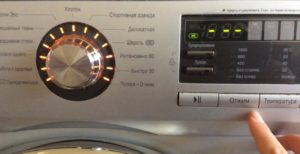
- turn on the washing machine and use the selector to select the “Rinse and spin” mode;
- Turn off the equipment by pressing the network key. The intelligence will remember the last command given to it;
- Turn the washing machine back on. It's important not to touch the programmer knob at this point;
- press the “Spin” button as many times as necessary to set the optimal speed;
- Run the program by pressing the "Start" button.
A little trick will help the user activate the spin cycle. If the described methods fail to activate the cycle, your "home assistant" may have software issues, or a couple of buttons on the control panel are not working. In this case, you should call a technician for diagnostics.
Disabling the spin
When washing certain types of fabric, spinning is not recommended. This limitation may be set by the manufacturer. Sometimes, you want to wash a batch of your favorite clothes carefully and gently.
On LG models, you can turn off the spin function in almost every factory wash program.
In fact, you can immediately select a mode that doesn't involve spinning. If this isn't an option, simply turn the dial to the desired program. Then, using the speed control button on the control panel, set "No Spin." The wash will proceed as normal, but after the rinse cycle is complete, the machine will simply drain the remaining water from the drum and notify you when the process is complete.
Interesting:


1 reader comment
Add a comment
Headings
Washing machine repair




For buyers




For users


Dishwasher




The washing machine turns off the spin cycle, but rinses while spinning. What should I do?