
How to drain water in an LG washing machine
 Sometimes your LG washing machine fills with water, but the cycle stops for some reason. Or maybe you just suddenly remembered you forgot to remove documents or your phone from the pockets of your pants. In this situation, you need to immediately drain the water from the drum and open the door. How do you quickly turn on the drain on your LG washing machine?
Activating the hardware drain
If your LG washer doesn't display an error code and responds to your commands, you can drain the water from the drum at any stage of the program, whether it's wash or rinse. What should you do?
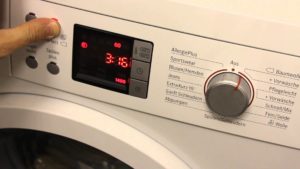
- First, you need to stop the program execution by clicking on the Stop/Start button.
- Next, you need to turn the program selector, setting it to the “Spin” position.
- Now comes the most paradoxical part. You need to press the "Spin" button so that the light on the control panel lights up next to the "No Spin" sign.
Important! If you press the "Spin" button multiple times, you'll select the spin speed, which is not what we want. We want the system to start the spin cycle and then immediately finish draining without spinning the drum.
- The timer says that forced draining of water without spinning will take 1 minute, but in reality, everything will depend on the amount of water in the LG washing machine tank.
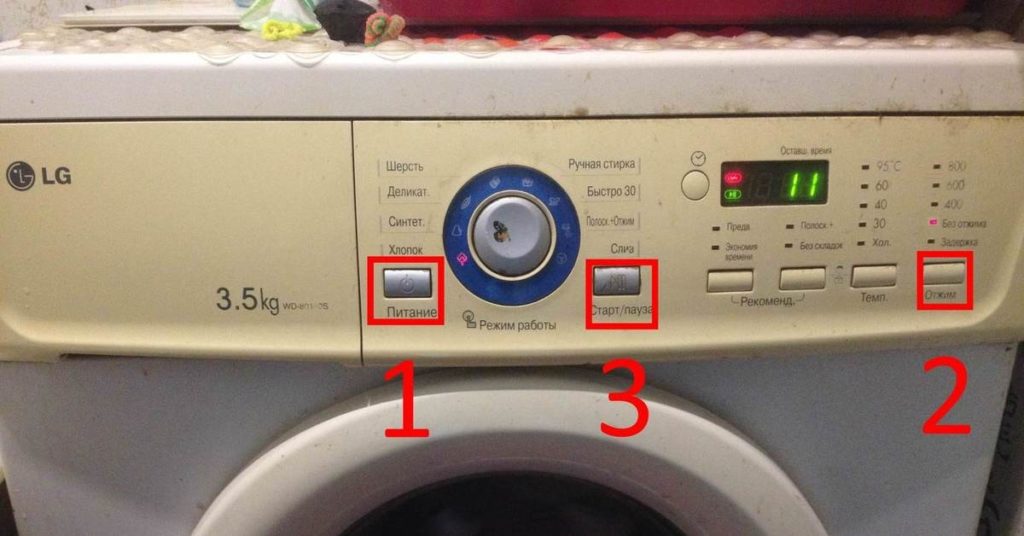
Once the drain is complete, the machine will stop, allowing you to open the door and remove any items that may have accidentally fallen into the drum. As you can see, it's all very simple.
An alternative option for water removal
The advantage of a mechanical drain is that you don't have to disassemble anything. Your LG washing machine will drain the water with just a few presses of a button, making it quick and easy. However, this feature is unavailable if the display shows error codeEven after a system reboot, the control panel may not be activated for user manipulation, and this is a problem.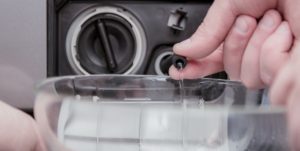
In this case, you'll have to drain the water from the drum manually, and now we'll tell you how to do this in the simplest and most painless way. The LG washing machine, like many other automatic washing machines, has a debris filter. You can unscrew this filter and water will flow through the resulting hole onto the floor. You can put some kind of container underneath, lay down some rags and thus reduce the risk of flooding to a minimum, but you can do it even simpler.
- Next to the LG washing machine's dust filter, there's a small black hose with a plug—this is the emergency drain hose. You can find it by opening the access hatch on the lower right side of the front panel.
- We take some deeper container, for example a basin, and place it next to the front wall of the machine body.
- We pull out the emergency drain hose and remove the plug. Water begins to flow from the machine directly into the basin.
- Keep an eye on the basin's filling level. If there's too much water, replace the plug at the end of the hose and empty the basin. Repeat the process until all the water has been removed from the tank.
There can be a lot of water in the LG washing machine's drum. You'll have to empty the basin several times before all the water is removed. Incidentally, not all the water will drain out of the machine through the drain hose. A significant amount will remain in the pipes and the volute, so to completely drain the machine, you'll need to unscrew the waste filter.
Interesting:


Readers' comments
Headings
Washing machine repair




For buyers




For users


Dishwasher




Add a comment