
Turning on the sound on a Haier tumble dryer
 Almost all modern tumble dryers have a mute/sound control. This is convenient, as the user can control this feature and manage it by pressing specific buttons. These buttons may vary depending on the model, and today we'll look at how to turn on the sound on a Haier tumble dryer.
Keyboard shortcut for sound control
Let's take the Haier HD90-A2979 and Haier HD90-A2979S dryers as examples. First, you need to determine the location of the buttons that control the sound. In most cases, they are located either on the control panel or integrated into the digital display. Once you've figured this out, refer to the manual and determine the next step. To activate the sound function after turning on the dryer, follow these steps: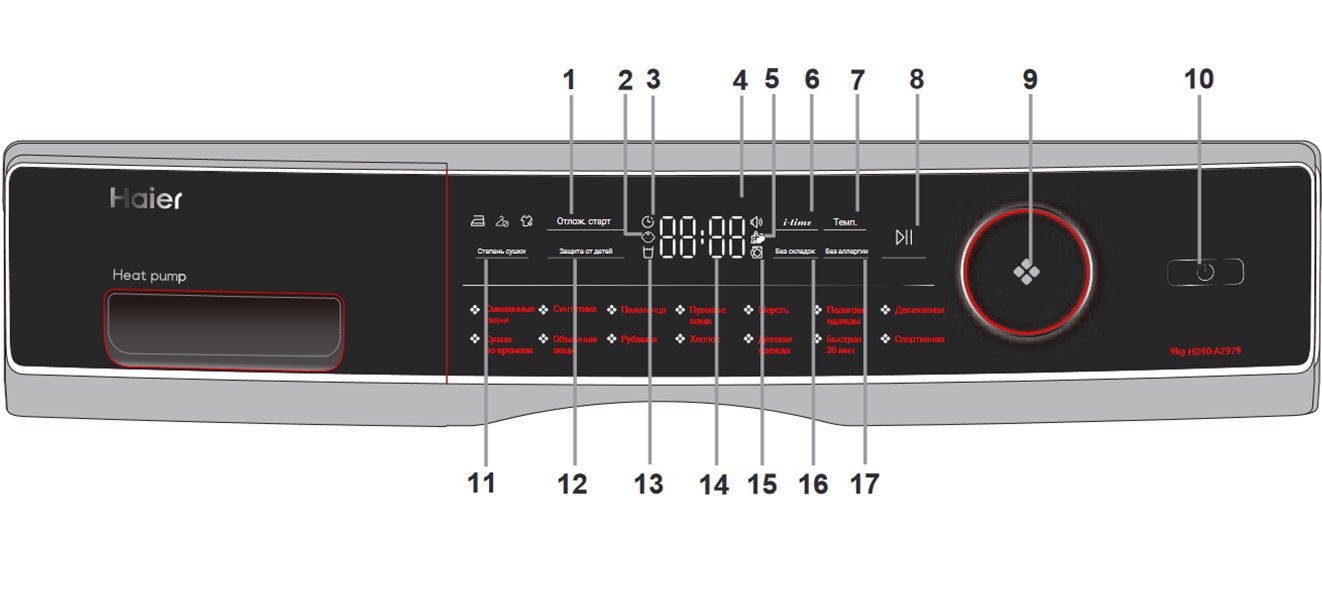
- find and press the “No Allergies” and “Temperature” buttons;
- hold them for 3 seconds;
- wait until the sound signal icon disappears.
The ability to adjust the sound is a very convenient feature that helps users customize their dryer's alerts to suit their preferences!
The same rules apply to Haier HD90-A2959 and Haier HD90-A2959S models. The only difference is that the key combination is slightly different. You'll need to press and hold the "Temperature" and "Dryness" buttons for a few seconds.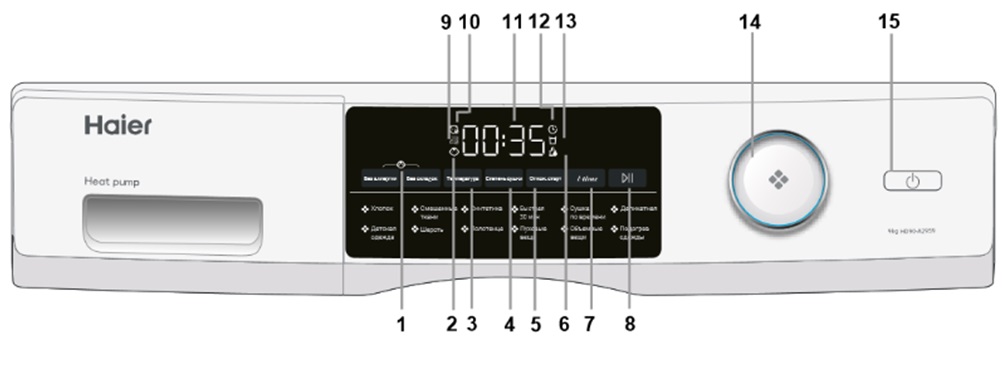
Whenever you need to disable a feature, always refer to the user manual. It will help you clarify all the necessary information. Furthermore, the instructions will prevent you from pressing the wrong buttons, which could subsequently reset the default settings.
Useful features and indicators of the Haier dryer
In addition to the mute function, the Haier dryer has many other useful features and indicators. Today, we'll share the most important ones with you. These features include:
- delayed start;
- child protection indicator;
- clean filter and empty tank indicator;
- temperature and drying selection buttons;
- door unlock indicator;
- wrinkle-free and allergy-free mode.
If you need a delayed start, press the appropriate button to set a time between 1 and 12 hours. Allow your appliance to complete its previous cycle, and then it will begin the delayed start. It is important to note here that it is better to set such a function after you have completed all the settings, otherwise, when you turn the knob or press the button, the option will automatically turn off.
To activate the Child Lock function, press and hold the appropriate button for about three seconds after starting the machine. The indicator light will then light. Deactivating the function is done in the same way. When the cycle is complete or the power supply is interrupted, the child lock function will deactivate automatically.
As we all know, filters need to be cleaned regularly. For this reason, dryers are equipped with a useful feature called a "Clean Filter Indicator." When clothes are line-dried, small particles tend to be blown away by the wind, but when using a dryer, lint accumulates in the filter, making it crucial to clean it. After each drying cycle, the indicator will flash, reminding you to clean it. To remove all accumulated particles, you should: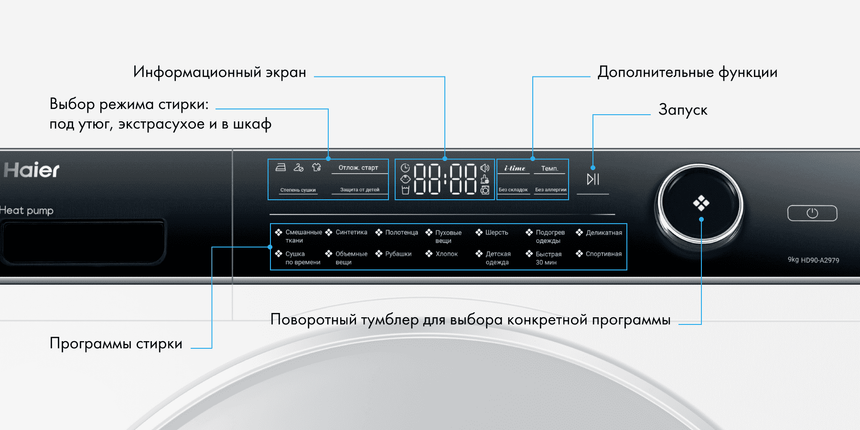
- remove the lint filter from the drum;
- open it;
- clean from various deposits and install back.
If the lint filter or condenser filter is extremely dirty, you'll need to clean it another way. To do this, rinse the filter under running water. Be sure to let it dry completely before using.
When talking about the water tank, it's important to drain it after each cycle. During operation, steam condenses into water, which then accumulates in the tank. To drain it, you'll need:
- remove the tank from the housing;
- empty it (under no circumstances use the drained water for drinking or cooking);
- put it back into the dryer.
As the name suggests, the temperature button is used to set the desired mode. To do this, press the corresponding button. The display shows a selection of options: L3 for high temperature, L2 for medium, L1 for low, and Cool for cold air.
The dryness level button is used to set the final moisture level of the laundry, and the unlock indicator is designed to notify users that the door is not closed. It is also worth mentioning that some drying programs may use the “No Crease” function, which is applied to them by default. When you select the "Allergy-Free" mode, the initial setting automatically switches to the highest temperature. After the program finishes, continue drying for 1.5 hours.
Hayer dryer programs
The Haier dryer also features a dedicated program selector. This allows you to select the program you need most. Once you've selected it, you'll see the corresponding indicator light up. The machine has 14 programs, including:
- mixed fabrics;
- synthetics;
- towels;
- downy items;
- wool;
- heating clothes;
- drying by time;
- delicate;
- bulky items;
- shirts;
- sportswear;
- children's;
- fast 30 minutes;
- cotton.
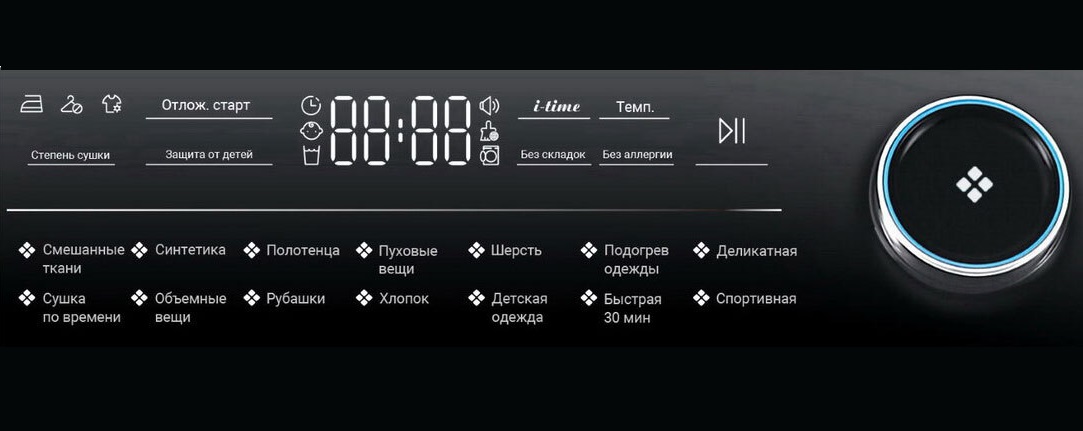
By selecting the "Mixed Fabrics" program, you enable extra drying. This option is suitable for heavy fabrics that require additional drying. The maximum load for this mode is 6 kg.
The "Synthetics" option also includes extra drying. As the name suggests, this program is designed for synthetic items. The maximum load in this setting is 4.5 kg.
The "Delicates" cycle is designed for underwear, while the "Bulky Items" cycle is for heavy cotton garments. The "Rapid 30 Minutes" cycle is for quick-drying items (1-2 synthetic or lightweight cotton items). The maximum load capacity for this cycle is 0.5 kg. The "Cotton" cycle is appropriate for cotton items.
An important reminder for users: Before placing your laundry in the dryer, spin it until it's as dry as possible. Avoid overloading the machine and remember to shake items before loading them. When selecting the desired program, make sure it's the correct one and don't let clothes dry longer than necessary. Also, remember to check the filters and keep them clean. Only then will you achieve the best results from your dryer.
Interesting:


Readers' comments
Headings
Washing machine repair




For buyers




For users


Dishwasher




Add a comment