
How long does it take to wash in an Electrolux washing machine?
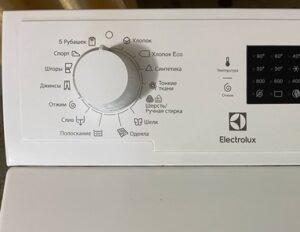
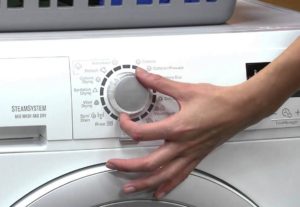 The control panel of an Electrolux automatic washing machine is littered with various icons. Some models have the name of each wash cycle, while others only have cryptic symbols. You can decipher these symbols using the instructions. If you've lost the manual or the washing machine was purchased second-hand, you can look up the symbols online. We'll explain the parameters of each program.
Duration of the main modes
Knowing the wash time of an Electrolux washing machine is crucial for many users. Sometimes you need to run a quick cycle, while other times you need to select a long cycle.
It is not recommended to select a washing algorithm at random. It's best to immediately find out what fabrics each option is intended for. Let's find out what modes Electrolux washing machines have, how long they last, and what kind of clothes they're suitable for.
- Cotton flower image. This program is for washing cotton items. The water temperature is 90°C, and the cycle lasts 145 minutes.
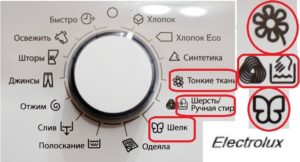
- Cotton symbol with the "ECO" label. Suitable for cleaning cotton fabrics. Wash temperature ranges from 40°C to 60°C, user-adjustable. The machine washes in 136 minutes.
- Triangle with a socket. "Synthetics." Can be used when loading synthetic and mixed fabrics into the drum. Water temperature adjustable from 20°C to 60°C. Cycle duration is one and a half hours.
- Daisy flower design. This cycle is for delicate fabrics. It helps gently remove stains from acrylic, lace, and viscose items. The water temperature is set to 40°C, and the cycle lasts for one hour.
- A skein of woolen thread or a basin with your hand dipped into it. The symbols indicate the "Wool" or "Hand Wash" programs. These can be used to care for items prone to shrinkage. The wash temperature is 40°C, and the wash time is approximately 55 minutes.
- Butterfly. Silk mode icon. The water in the tank is heated to 30°C, and the cycle lasts 40 minutes. Spinning is performed at minimum speed.
When choosing a washing algorithm, be sure to focus on the type of fabric and type of laundry.
If you load a wool sweater into the drum and set it to the "Cotton" cycle, the item will be irreparably damaged after prolonged exposure to hot water. That's why it's so important to understand which cycles are appropriate for which laundry.
Auxiliary algorithms
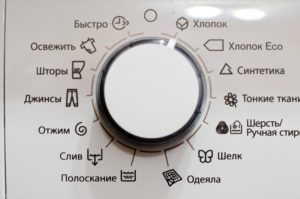 Next, let's look at how long a wash takes when selecting "auxiliary" modes. These modes are available on almost all Electrolux machines, and some homeowners even use them more often than the main ones. What options are we talking about?
- Image of a bedspread. This program is suitable for washing bulky bedding items such as blankets and pillows. The gentle cleaning prevents the filling from "compressing" into a ball. Water is heated to 30°C-60°C, and the cycle lasts 100 minutes.
- Trouser symbol. "Jeans" cycle. Suitable not only for trousers but also for other durable items in dark shades. You can manually adjust the temperature from low to 60°C. The cycle lasts approximately 100 minutes.
- Curtain pattern. A program designed for curtains. The program first performs a pre-wash, then the main wash. The entire process takes approximately an hour and a half, with the water heating up to 40°C.
- Image of a sneaker. This mode is for sportswear and shoes. The cycle lasts only 30 minutes, so it's also perfect for simply refreshing your clothes.
- Shirt Design. This cycle is ideal for washing shirts. It allows you to wash up to six shirts at a time. The wash time is 30 minutes, and the water temperature is 30°C.
By understanding the parameters of each auxiliary function, it is easy to select the one needed for a specific situation. Each mode differs not only in the duration and temperature of water heating, but also in the intensity of drum rotation, the number of rinse cycles, etc.
Additional algorithms
In addition to the icons described above located around the programmer, other "mysterious" symbols can be found on the control panel. These additional features help improve washing quality and ensure the main cycle is completed. These options aren't always used, but in most cases, they're essential.
- The basin icon with one vertical bar means "Prewash." This is added to the main cycle if the laundry is heavily soiled. It increases the wash time by approximately 20%.
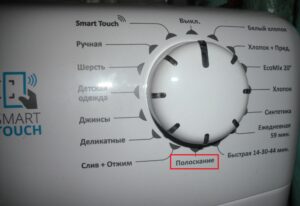
- A basin of rippling water. Rinse function indicator. An extra rinse can be added to the main wash cycle to thoroughly remove detergent residue from fabric fibers. Rinse time: up to 20 minutes.
- Spiral pattern. Spin option. You can adjust the speed, turn the function off, or restart it. Lasts up to 5 minutes.
- The symbol with "TIMER" written above it indicates a delayed start timer. You can load your laundry, add detergent, and use the button to set a convenient cycle start time (in 1, 3, 6 hours, etc.)
- A basin of still water stops the rinse. This option can sometimes be useful for the user.
- A basin with an arrow pointing downwards. Drain function. This option can help remove water from the tank if the liquid wasn't drained during the main cycle.
Enabling additional options increases the execution time of the main program.
In addition, modern Electrolux machines may feature other useful features. For example, the "Steam System" feature allows you to treat clothes with steam, and "Direct Spray" prevents wrinkles.
Interesting:
Readers' comments
Headings
Washing machine repair




For buyers




For users


Dishwasher




Add a comment