
How to change the pump in a Samsung washing machine
 If you've noticed your washing machine isn't draining, have you suspected the drain pump is faulty? You don't have to call a professional technician to fix this problem right away; you can do the repair yourself. We'll explain in detail how to replace the drain pump yourself, saving you hundreds of dollars. The procedure isn't particularly complicated and takes no more than an hour.
Is the pump really broken?
How can you tell if a Samsung washing machine malfunction is caused by a faulty pump? First, inspect the machine for other faults and check the functionality of other parts and components.
First, focus on the external signs of a malfunction. All modern machines alert the user to a malfunction by displaying an error code on the digital screen. By seeing this combination of numbers and letters and decoding it using the instructions for the machine, you'll understand whether a malfunctioning drainage system is the root cause of the problem.
Important! The main sign of a failing drain pump is a "freezing" of the wash cycle during the stage where wastewater is removed from the tank.
Start by checking the system. First, make sure the spin function is set in the program. If not, re-enable it. If nothing happens, check the drain hose; it shouldn't be positioned above the tank or have any kinks. If it's level, disconnect it from the utility lines and check for a blockage. Direct the free end of the hose into the bathtub and turn on the automatic flush mode. If the water starts to flow freely, then everything is fine with the machine, and the root cause of the breakdown is a clogged sewer pipe.
If a clog isn't the issue, proceed to the next step. Remove the protective panel (on some models, a small hatch allows access to the drainage system components) located at the bottom of the front panel. Prepare a container large enough to hold all the water from the machine, place it underneath, and unscrew the drain filter. Drain the liquid from the tank and remove any accumulated debris from the filter surface.
Using a flashlight, illuminate the hole where the part was located. Carefully examine the impeller, checking that it rotates freely. If the impeller is stuck or moves with great difficulty, it's time to check the pump.
Preparatory activities
To replace the drain pump, you need to unplug the machine and disconnect the drain and inlet hoses from the water supply and sewer lines. After completing these simple steps, the user will naturally ask themselves, "Where is the pump located? Which side of the machine should I access?"
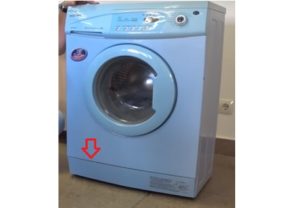 On the vast majority of Samsung washing machines, the drainage system components are located at the bottom, covered by a special panel or a separate hatch. To detach the panel from the body and gain easy access to the necessary components, it's best to use a flat-head screwdriver. Carefully pry the bottom of the machine with the tool and remove the cover.
Once you remove the cover, you will see the area where the drain filter is located. It is a plastic structure that protects the pump impeller from foreign objects getting into it. It is necessary to remove the debris filter and clean it.
Important! When unscrewing the filter, water remaining in the hoses may begin to leak, so place a rag near the washing machine before doing this.
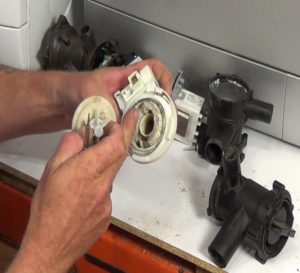
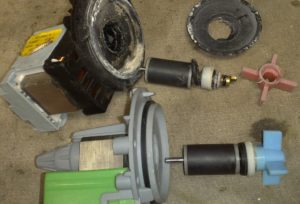
In the opening, you'll see the drain pump impeller. Spin it with your finger or a long, thin stick; it should rotate freely. If the impeller is difficult to move, it may be clogged with hair, thread, or other debris. It needs to be cleaned, but this can only be done by removing the pump from the housing.
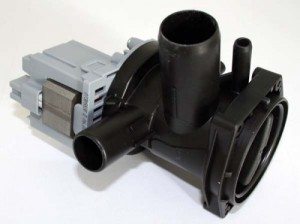
The next step is to lay the washing machine on its side. This must be done carefully to avoid scratching the machine's body. Be sure to place a pad under the side of the machine; this could be a rolled-up rug or any other object that will allow the machine to be lowered smoothly. Turn the machine over and look underneath the base to see the drain pump, the volute, and its motor.
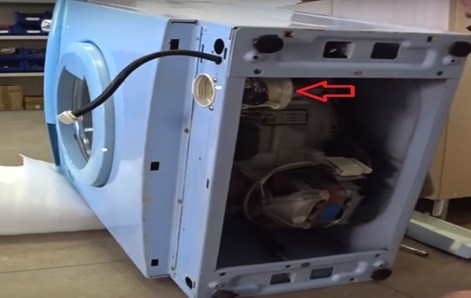
It's a good idea to check the pump with a multimeter. Connect its probes to the terminals leading to the pump, then set the device to an alternating voltage of up to 700 volts. Plug the washing machine into the outlet, select the drain program, and after a while, check the voltage reading on the multimeter. If the indicator value is 220 volts, and the pump does not drain, we proceed to replace the part. If there is no voltage, but the drain program is working, then the problem lies in the control module.
So, to replace the old pump with a new one, you just need to follow a simple sequence of steps that will allow you to change the pump in a Samsung washing machine.
We remove the old one and install the new one.
Once you've reached the desired element, it's worth carefully reviewing the recommendations for further action. The step-by-step user guide is as follows:
- Disconnect the 2 power wires that are connected to the pump by disconnecting both terminals;
- Using a screwdriver, unscrew the three Phillips bolts that secure the pump to the snail one by one;
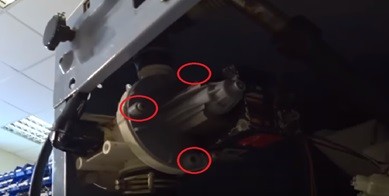
- Taking hold of the drain pump and slightly “breaking” it towards the bottom, disconnect the part;
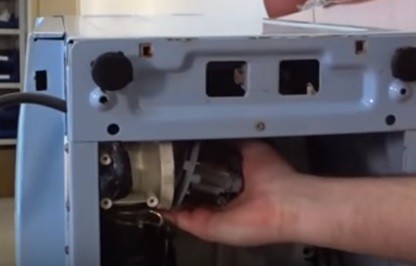
- prepare a new pump;
- Afterwards, you should connect the serviceable pump to its original place in the same position;
- secure the pump using the bolts that were unscrewed at the very beginning of the work;
- connect the previously removed terminals to the new part;
- put the drain filter back in place;
- return the SMA to its original position;
- Install the protective panel back.
In fact, replacing a drain pump doesn't take much time. You can do the job yourself, without the help of a certified repairman. All you need to do is carefully read the step-by-step instructions for this type of work.
Interesting:

1 reader comment
Add a comment
Headings
Washing machine repair




For buyers




For users


Dishwasher




Thank you! Useful and practical. Everything came in handy.