
Symbols on a Samsung washing machine
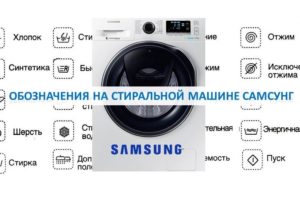 Modern Samsung washing machines feature a user-friendly digital display that displays all the information the user needs. While previously the control panel's indicators were used to notify the housewife about the washing process's progress, the remaining time, and other parameters, now, by looking at the graphic display, users can see all this information gathered in one place—on a small screen.
To confidently use your "household helper," you need to understand the symbols on your Samsung washing machine's control panel and digital display. We'll try to provide the clearest possible explanation of the symbols on your washing machine.
Symbols on the graphic display
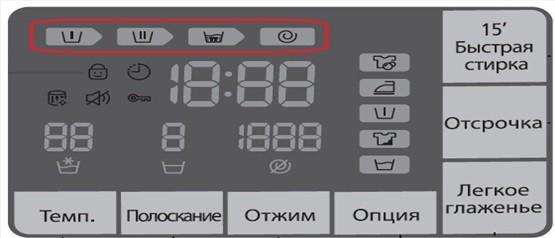
First, let's decipher the icons located at the very top of the digital display; they represent the steps in the laundry process. These symbols are the ones most frequently encountered by homeowners, so it's important to understand what each one means first.
- A basin with the Roman numeral I inside. This symbol indicates the prewash cycle and will illuminate at the beginning of the wash cycle only if this option has been selected. If the "Prewash" button has not been pressed, the symbol will not light.
- A basin with the Roman numeral II displayed inside, indicating the main wash process. It lights up either immediately after starting the selected program, or only after the pre-wash has finished, if it was provided. The icon will always light up, regardless of the selected program; the main wash cycle is provided in absolutely all modes programmed by the washing machine's intelligence.
- The basin half-filled with water and laundry is nothing more than a rinse cycle indicator. At the end of the main wash cycle, the machine will inevitably proceed to the final rinse. During this phase, fabric softener will be dispensed into the drum, if it was added to the detergent dispenser.
- The spiral icon indicates the "Spin" mode, which is the final stage of the washing process, is active. The icon will light up after the final rinse is complete in any washing program, unless the user has selected the "No Spin" option.
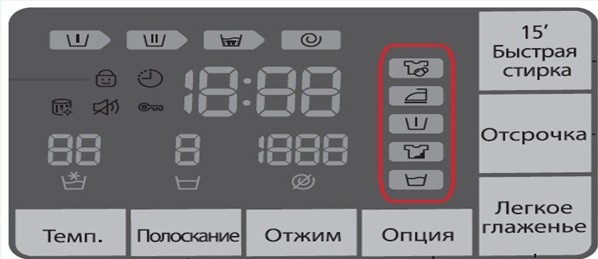
The next category of symbols that's essential to understand is the wash options. These allow you to set the necessary additions to the standard programmed cycle.
- The T-shirt design with two bubbles represents the "EcoBubble" feature. Bubble washing involves activating a special bubble generator. It infuses the water and detergent with air bubbles, resulting in accelerated detergent dissolution and significantly improved washing results.
- The iron icon indicates the "Easy Iron" feature. Selecting this feature will reduce wrinkles in your clothes during the spin cycle.
- The basin with the Roman numeral I inside it, as we already know, symbolizes the pre-wash function. To enable an additional wash cycle before the main one, you need to load the detergent powder into the appropriate section of the detergent drawer and enable this mode before starting the program.
- A T-shirt with a stain indicates an intensive wash cycle. This option can be used when loading items with stubborn, old, or ingrained stains. It increases the wash time for each cycle.
- The symbol of a basin filled with clean water indicates the "Soak" function. This is used to achieve greater stain removal effectiveness.
The next group of symbols that need to be analyzed are the designations of various additional functions of the washing machine.
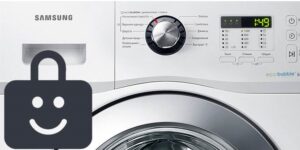
The child lock symbol indicates the child lock function. When this feature is selected, the buttons will not respond to touch, preventing accidental changes to the selected wash cycle.
To enable or disable child protection, press and hold the "Temp" and "Rinse" buttons simultaneously for 3 seconds.
The clock symbolizes a delayed wash cycle. This feature allows you to program your washing machine to start washing at a specified time. The delay can be set to 3, 4, 5, 6, 7, 8, or 9 hours.
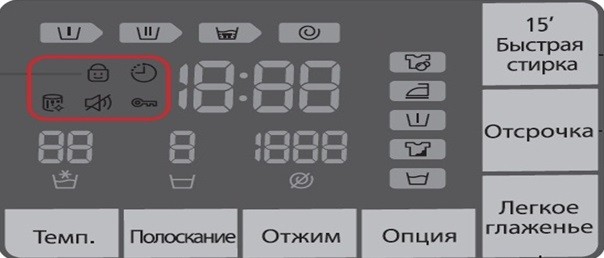
The drum with a flash is responsible for the washing machine's self-cleaning function. If the drum surface becomes heavily clogged during the wash cycle, the Eco Clean symbol on the digital display and the corresponding indicator on the mode selector will light up. Self-cleaning of the drum is necessary to prevent the appearance of mold and accumulation of dirt on its surface. Typically, the indicator lights up once a month, and if the Eco Cleansing function is not activated by the user, the machine will signal the need to turn it on after the next two washes.
The crossed-out speaker indicates an option to mute the washing cycle sound. To enable or disable this feature, hold down the "Rinse" and "Spin" buttons for 3 seconds. The key symbol is the washer door lock indicator. If it lights up, the door lock is engaged and securely closed.
The symbols located in the center of the digital graphic display are responsible for displaying the washing time, water heating temperature, number of rinses and drum rotation speed during spinning.
- The washing time is displayed directly in the center of the screen, and it decreases continuously as the machine operates. If a malfunction occurs and the machine is unable to continue the process, an error code, consisting of a combination of letters and numbers, will appear in this area.
- The selected water temperature is displayed above the basin, where a star appears above the water level. You can adjust it by pressing the "Temp" button. The lower symbol glows to indicate that the wash is being performed in cold water, without heating.
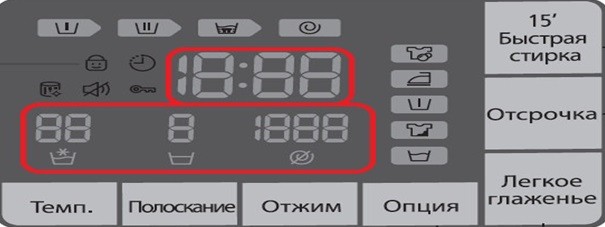
- The number of rinses will be displayed over a basin half filled with water; it is possible to set up to 5 additional cycles.
- The field located above the crossed-out spiral will indicate the drum rotation speed during spinning.
If the crossed-out spiral symbol lights up, it means the “No spin” option is selected.
The digital display, although small, contains all the information about the washing process and its stages, displays the remaining cleaning time, and lets you know whether any additional features are enabled. Once you understand the basic symbols on the display, you can easily control the washing machine's intelligence.
Symbols on the control panel
It's also worth mentioning the symbols for some of the buttons located on the control panel of Samsung washing machines. What can we see there?
First, there's the power button, which turns the machine on and off. It's designated by a standard symbol: a partial circle with a vertical line above it. Second, there's the well-known "Start/Pause" button, which, after selecting the desired washing program with the selector knob, starts the process and, if necessary, pauses it by activating the pause function. It is indicated by a triangle icon with two vertical lines drawn next to it.
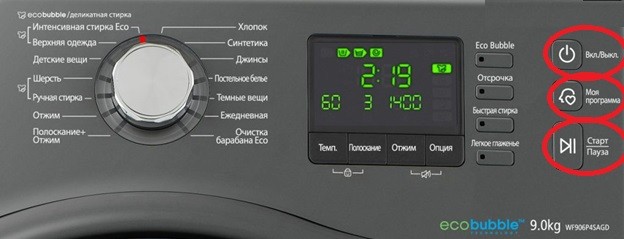
Some modern Samsung automatic machines feature a button with a profile image of a human face with a heart at the bottom. It's called "My Program." It allows you to save your favorite mode, along with additional settings, into the machine's memory.
The button with a clock and hands is used to delay the start of the wash cycle. It allows you to program the machine's intelligent system to start the wash cycle at a convenient time.
In addition to the keys described above, the washing machine's control panel also contains buttons for "Temperature," "Spin," "Rinse," and "Easy Iron," but the user shouldn't have any trouble understanding their purpose, as they are all labeled in plain English, without the use of any incomprehensible symbols or images.
Interesting:
11 reader comments
Add a comment
Headings
Washing machine repair




For buyers




For users


Dishwasher




What does the letter H mean in the washing mode?
Hello, Nikolai! "H" is an abbreviation for "Hour." The inscriptions 1H, 2H, 3H, and so on indicate the number of these hours.
What does 5Ud mean?
What does T-shirt + mean?
Hello, should the symbols stay lit during the wash cycle? What does it mean when they flash constantly during the wash cycle?
What does the rectangle icon with a circle inside and a line above mean?
What does Uc mean?
What does le mean?
What does a basin of water with a “+” on top mean?
What does door and lock mean?
What does the IE sign mean?